Building the Bridge: Reverse Proxies for Cloud-to-Local AI Development
Quick answer
Copilot API Bridge: Secure Reverse Proxies for Local AI Dev: webhook testing answer
For local webhook testing, run your app locally, expose it with a public HTTPS tunnel, and paste the stable callback URL into the provider dashboard.
How do I test webhooks on localhost?
Start your local server, open a public HTTPS tunnel to that port, configure the provider webhook URL, and inspect events in your local logs.
Why does a stable webhook URL matter?
Stable URLs prevent provider dashboards from needing manual callback updates every time you restart a tunnel.
The modern developer workspace exists in a state of architectural tension. On one side sits the cloud: massive LLM clusters, cloud-hosted coding assistants like GitHub Copilot, and managed agentic platforms operating inside remote datacenters. On the other side sits the local environment: proprietary codebases, ephemeral test databases on localhost, internal microservices, and specialized local developer tooling.
For cloud-based AI systems to deliver true context-aware automation — debugging a local PostgreSQL query failure, inspecting an uncommitted git diff, executing a specialized project script — they must securely reach into the developer’s local machine. Conversely, developers frequently need to route cloud AI subscriptions into local command-line interfaces (CLIs) and custom developer agents without exposing enterprise secrets or running afoul of API rate limits.
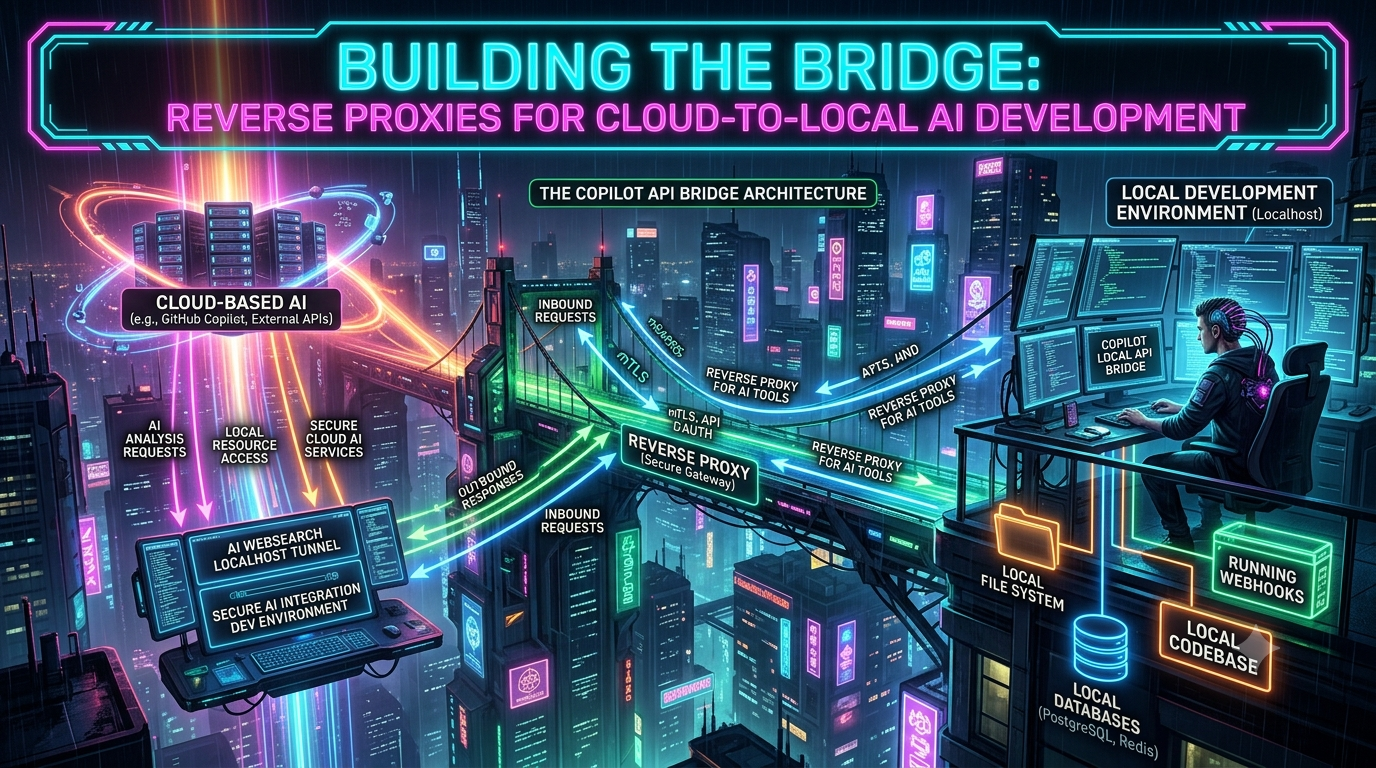
This architectural requirement has given rise to the Copilot local API bridge and dedicated reverse proxies for AI tools. Sitting between cloud-based AI engines and local developer environments, these proxies act as intelligent traffic control planes, handling protocol translation, token authorization, header sanitization, and secure tunneling through outbound-only connections.
This guide walks through the architecture of cloud-to-local AI bridges, real-world implementation patterns, and a step-by-step build of a secure AI integration dev environment.
1. Architectural Overview: The Cloud-to-Local AI Bridge
At its core, an AI bridge architecture solves a fundamental networking problem: establishing bi-directional, context-rich communication between cloud-based AI services and private local environments without opening inbound ports on a corporate firewall.
+-----------------------------------------------------------------------------------+
|                                  CLOUD BOUNDARY                                   |
|                                                                                     |
|   +-----------------------+                    +------------------------------+    |
|   | Cloud AI Agent / SaaS |                    | GitHub Copilot Platform API   |   |
|   | (Claude, Copilot UI)  |                    | (proprietary GitHub backend)  |   |
|   +-----------+-----------+                    +--------------+---------------+    |
+---------------+-----------------------------------------------+-------------------+
                | (Inbound MCP Traffic via Tunnel)               | (Upstream Inference Calls)
                v                                                 v
+---------------+-----------------------------------------------+-------------------+
|               |              LOCAL DEV MACHINE                 |                   |
|               |                                                 |                   |
|   +-----------v-----------+                     +--------------v---------------+   |
|   | Secure Outbound Tunnel|                     | Copilot Local API Bridge     |   |
|   | (Cloudflare/Pinggy)   |                     | (Reverse Proxy on 127.0.0.1) |   |
|   +-----------+-----------+                     +--------------+---------------+   |
|               |                                                 |                   |
|               v                                                 v                   |
|   +-----------+-----------+                     +--------------+---------------+   |
|   | Local MCP Server      |                     | Local Developer CLI / Agent  |   |
|   | (DB, File Index, RAG) |                     | (Claude Code, custom agents) |   |
|   +------------------------+                    +-------------------------------+   |
|                                                                                     |
+-----------------------------------------------------------------------------------+
The bridge operates across two distinct directionalities:
- Cloud-to-Local Remote Context Execution. A cloud-hosted AI model needs to trigger a local tool or inspect a local database. The request travels over an encrypted outbound tunnel to an internal Model Context Protocol (MCP) server listening on the loopback interface (
127.0.0.1). - Local-to-Cloud Provider Emulation. A local developer tool or CLI agent needs to speak to an LLM provider. The local proxy listens on a loopback port, intercepts OpenAI- or Anthropic-formatted API calls, translates them into upstream-compatible requests, and handles authentication transparently.
In both patterns, the reverse proxy serves as the security perimeter. It ensures raw local file systems are never directly exposed to the internet, while stripping incompatible client headers, normalizing streaming events, and enforcing strict bearer-token authorization.
2. Key Bridge Patterns and Wire-Shape Translation
When integrating disparate AI tooling, wire-shape mismatches are common. Different clients speak different protocols, expect different JSON schema constructs, and pass custom headers. The reverse proxy bridges these protocol gaps.
The Copilot API Bridge Pattern
A small but active ecosystem of reverse-engineered proxies — messense/copilot-api-proxy, ericc-ch/copilot-api and its many forks (betaHi/copilot-api, craz-yq/copilot-api, and others) — act as local middleware between CLI agents (Claude Code, Codex CLI, custom orchestration scripts) and a GitHub Copilot subscription. None of these projects are supported by GitHub; they’re reverse-engineered, explicitly labeled as liable to break, and GitHub’s own Copilot terms and acceptable-use policy warn that excessive automated or scripted use can trigger abuse detection and temporary suspension. That caveat is worth repeating to readers before they wire one into a CI pipeline.
Instead of paying separately for duplicate API keys across multiple LLM vendors, a developer runs a local bridge — messense/copilot-api-proxy defaults to port 9876. The bridge advertises vendor-neutral endpoints:
| Route | Behavior |
|---|---|
POST /v1/chat/completions |
OpenAI Chat Completions format |
POST /v1/responses |
OpenAI Responses API (required for the gpt-5 family and Codex-style models, which reject /chat/completions) |
POST /v1/messages |
Anthropic Messages format; native Claude models are forwarded directly to Copilot’s own /v1/messages endpoint, preserving Anthropic-style tool_use/tool_result flow rather than round-tripping through an OpenAI-shaped translation |
POST /v1/messages/count_tokens |
Anthropic-compatible token counting |
GET /v1/models |
Lists models available on the caller’s Copilot plan |
When a request hits the bridge, the proxy:
- Validates and refreshes the underlying GitHub Copilot OAuth token in the background, storing it at
~/.local/share/copilot-api-proxy/github_tokenwith0600file /0700directory permissions. - Injects the headers GitHub’s backend actually requires:
Copilot-Integration-Id,X-Initiator(set touseroragentbased on whether the conversation already contains assistant/tool turns),Openai-Intent, and aCopilot-Vision-Requestflag for image inputs. Community proxies converged on this exact header set after reverse-engineering the official VS Code Copilot Chat client traffic; a request missingCopilot-Integration-Idis rejected outright with a Bad Request. - Handles model-name aliasing for Anthropic-shaped requests —
messense/copilot-api-proxymaps the genericopus/sonnet/haikutiers Claude Code expects to concrete upstream Copilot model IDs viaBIG_MODEL/MIDDLE_MODEL/SMALL_MODELenvironment variables, and capsmax_tokensbetween aMIN_TOKENS_LIMITandMAX_TOKENS_LIMIT(4096 by default) before forwarding upstream.
One correction worth flagging: reasoning-effort handling on these bridges is not a uniform “clamp everything unsupported down to high.” GPT-5-family reasoning models now commonly accept an explicit xhigh tier as a first-class value (several proxy forks pass it straight through via a COPILOT_REASONING_EFFORT environment variable, and Microsoft’s own Copilot documentation lists xhigh as supported on later gpt-5.1/gpt-5.2-class models), so a bridge that silently downgrades xhigh to high on a model that actually accepts it would be discarding a legitimate, user-requested setting rather than protecting against a real API rejection. Build this kind of adapter defensively — pass reasoning tiers through when the upstream model advertises support, and only clamp on a confirmed rejection.
The MCP Tunnel Pattern
Anthropic’s Model Context Protocol (MCP) uses a standardized JSON-RPC 2.0 schema for exposing tools, resources, and prompts to AI agents. Local MCP servers traditionally communicate via stdio; cloud-hosted AI agents need a network-reachable transport instead.
It’s worth being precise about which transport that is, because the protocol changed under everyone’s feet in 2025. The original remote transport, “HTTP+SSE,” used two separate endpoints — one for POST messages, one for a long-lived SSE stream — and was replaced starting with the 2025-03-26 MCP spec revision by Streamable HTTP: a single endpoint (conventionally /mcp) that accepts POST for every JSON-RPC message, with the server free to answer either a plain JSON response or an SSE stream scoped to that one request. The old HTTP+SSE transport is now formally deprecated under MCP’s feature-lifecycle policy — new servers shouldn’t implement it, though clients are still expected to fall back to it for older servers that haven’t migrated. FastMCP (the most common Python server framework for this) reflects the same migration: mcp.run(transport="http", ...) and mcp.run(transport="streamable-http", ...) are both current and equivalent, while transport="sse" is explicitly documented as “legacy — use HTTP instead for new projects.” A further draft revision dated 2026-07-28 goes even further, removing the GET-based standalone SSE stream and protocol-level session IDs entirely in favor of one JSON-RPC request per POST — worth watching if you’re building a server meant to stay compliant for a while, though as a draft it hasn’t superseded the shipped 2025-11-25 revision as the deployed baseline.
To connect cloud models to local tools, an outbound tunnel maps a public HTTPS endpoint to that local Streamable HTTP MCP server. The reverse proxy terminates TLS at the edge, checks incoming HMAC signatures or bearer tokens, and routes valid JSON-RPC requests to local tools like code syntax checkers, database query engines, or custom RAG pipelines.
3. Core Use Cases for Cloud-to-Local AI Bridges
Use Case 1: Exposing Local DBs & Code Search to Cloud Agents
Suppose an engineer is using a cloud-based AI workspace to debug a complex SQL query. The database isn’t hosted in the cloud; it runs in a Docker container on the engineer’s workstation.
By running a local MCP server that interfaces with pg-promise or SQLAlchemy and piping it through an outbound tunnel, the cloud agent can invoke tools like list_tables, describe_schema, or explain_query directly against localhost:5432. The code and data stay on the developer’s workstation; only explicit tool-execution results leave the local environment.
Use Case 2: Unified Model Routing via a Copilot Subscription
Developers often prefer specialized agentic workflows on the command line — Claude Code, Codex CLI, OpenCode — while holding an active GitHub Copilot seat.
Using a local Copilot API bridge, the developer configures their CLI tools to point to http://localhost:9876. The bridge performs native passthrough for Claude models on Copilot’s own /v1/messages endpoint, translates requests for GPT/Codex models into OpenAI’s Responses format, and enforces the token ceilings described above before forwarding. (One caveat some proxy READMEs now call out explicitly: routing an unusually large context window through Copilot — for example requesting a Claude variant’s extended [1m] context tier — risks tripping GitHub’s own abuse detection, so several forks recommend sticking to the standard context size for Copilot-routed traffic even when the underlying model supports more.)
Use Case 3: Local WebSearch & Enterprise RAG Tunnels
Cloud-hosted LLM platforms frequently restrict or bill heavily for built-in web search tools, and built-in cloud search can’t crawl internal corporate wikis, local documentation builds, or private staging servers.
An AI websearch localhost tunnel resolves this by exposing a local search indexer or headless browser instance to the cloud AI. When the cloud model requires external context, it issues a tool call down the tunnel to a local search engine (a local SearXNG container, a local vector database), the search executes on internal networks, and clean markdown context is returned to the cloud model.
4. Step-by-Step Implementation: Building a Secure Bridge
This build has three pieces: a Python-based FastMCP server exposing local file search and database tools, a local API proxy enforcing bearer-token authentication and loopback isolation, and an outbound secure tunnel granting cloud AI models access without opening inbound firewall ports.
Step 1: Create the Local Tool Server (FastMCP)
Install FastMCP:
pip install fastmcp
Create local_bridge_server.py:
import os
import glob
from fastmcp import FastMCP

# Initialize the MCP Server
mcp = FastMCP("LocalDevBridge")

@mcp.tool()
def search_local_files(directory: str, extension: str) -> list[str]:
    """Search for files matching a specific extension within a local directory safely."""
    # Enforce basic directory traversal protection
    abs_base = os.path.abspath(directory)
    if not os.path.exists(abs_base):
        return [f"Error: Directory {directory} does not exist."]

    pattern = os.path.join(abs_base, f"**/*.{extension.lstrip('.')}")
    matches = glob.glob(pattern, recursive=True)
    # Return relative paths to prevent exposing absolute system structures unnecessarily
    return [os.path.relpath(m, start=abs_base) for m in matches[:50]]

@mcp.tool()
def read_local_file_head(filepath: str, max_lines: int = 100) -> str:
    """Read the top N lines of a specified local file."""
    if not os.path.exists(filepath):
        return f"Error: File {filepath} not found."

    try:
        lines = []
        with open(filepath, 'r', encoding='utf-8') as f:
            for _ in range(max_lines):
                line = f.readline()
                if not line:
                    break
                lines.append(line)
        return "".join(lines)
    except Exception as e:
        return f"Error reading file: {str(e)}"

if __name__ == "__main__":
    # Bind to 127.0.0.1 for strict local loopback isolation.
    # transport="http" serves the modern Streamable HTTP transport
    # (FastMCP treats "http" and "streamable-http" as equivalent).
    print("Starting Local MCP Bridge Server on http://127.0.0.1:8000/mcp")
    mcp.run(transport="http", host="127.0.0.1", port=8000)
Run the server:
python local_bridge_server.py
Step 2: Build the Reverse Proxy & Token Gate
To ensure only authorized cloud tools can reach our local MCP server, wrap it in a lightweight reverse proxy using Node.js and http-proxy. This layer enforces strict bearer-token verification and strips suspicious headers.
mkdir ai-bridge-proxy && cd ai-bridge-proxy
npm init -y
npm install http-proxy dotenv
Create .env:
BRIDGE_TOKEN=super-secret-local-dev-key-2026
Create proxy.js:
require('dotenv').config();
const http = require('http');
const httpProxy = require('http-proxy');

// Secret token required for all inbound bridge requests
const BRIDGE_BEARER_TOKEN = process.env.BRIDGE_TOKEN || "super-secret-local-dev-key-2026";
const TARGET_MCP_SERVER = "http://127.0.0.1:8000";
const PROXY_PORT = 9000;

const proxy = httpProxy.createProxyServer({});

// Handle proxy errors gracefully without crashing the service
proxy.on('error', (err, req, res) => {
    console.error('[Proxy Error]:', err.message);
    if (!res.headersSent) {
        res.writeHead(502, { 'Content-Type': 'application/json' });
        res.end(JSON.stringify({ error: 'Bad Gateway: Local tool server unreachable.' }));
    }
});

const server = http.createServer((req, res) => {
    console.log(`[${new Date().toISOString()}] ${req.method} ${req.url}`);

    // Enforce Bearer Token Authentication
    const authHeader = req.headers['authorization'];
    if (!authHeader || authHeader !== `Bearer ${BRIDGE_BEARER_TOKEN}`) {
        console.warn('[Unauthorized Access Attempt]: Invalid or missing Bearer token');
        res.writeHead(401, { 'Content-Type': 'application/json' });
        return res.end(JSON.stringify({ error: '401 Unauthorized: Invalid Bridge Token' }));
    }

    // Sanitize headers before forwarding downstream
    delete req.headers['x-forwarded-host'];
    req.headers['x-ai-bridge-version'] = '1.0.0';

    // Route request to internal MCP server
    proxy.web(req, res, { target: TARGET_MCP_SERVER });
});

server.listen(PROXY_PORT, '127.0.0.1', () => {
    console.log(`[Bridge Proxy] Running on http://127.0.0.1:${PROXY_PORT}`);
    console.log(`[Security] Authenticating with Bearer Token gating active.`);
});
Start the proxy:
node proxy.js
http-proxy (node-http-proxy) is a mature, widely used library for exactly this kind of pass-through gateway; if you’d rather avoid an extra dependency, Node’s built-in fetch/http modules or undici’s ProxyAgent can do the same job for a single upstream target.
Step 3: Establish a Secure Zero-Trust Outbound Tunnel
Now that the local proxy handles token validation on port 9000, expose that port to cloud AI platforms securely.
Opening router ports (port forwarding) is dangerous because it exposes raw IP addresses to public scans. Instead, use an outbound-only tunnel that initiates an encrypted connection from inside your private network to an edge provider.
Option A: Cloudflare Tunnel (cloudflared)
Cloudflare’s dashboard now defaults new tunnels to a token-based, dashboard-managed setup (under Networking → Tunnels in the current Zero Trust / Cloudflare One dashboard — that section moved there from Access → Tunnels in a March 2026 navigation update). For scripted or version-controlled infrastructure, the CLI-managed, certificate-based flow shown below remains fully supported as the “locally-managed” alternative:
brew install cloudflared
cloudflared tunnel login
cloudflared tunnel create local-ai-bridge
Route traffic to your proxy in ~/.cloudflared/config.yml:
tunnel: <TUNNEL_UUID>
credentials-file: /Users/dev/.cloudflared/<TUNNEL_UUID>.json

ingress:
  - hostname: ai-bridge.yourdomain.dev
    service: http://127.0.0.1:9000
  - service: http_status:404
Route DNS and run the tunnel:
cloudflared tunnel route dns local-ai-bridge ai-bridge.yourdomain.dev
cloudflared tunnel run local-ai-bridge
One gotcha worth flagging up front: Cloudflare’s zero-config quick tunnels (cloudflared tunnel --url http://localhost:9000, no login required) cap out at 200 concurrent requests and don’t support Server-Sent Events — which will silently break the SSE-fallback path of an MCP server that still needs to talk to older clients. Use a named, logged-in tunnel like the one above for anything beyond a five-minute demo.
Option B: SSH-Based Tunneling (Pinggy / Zrok)
For rapid prototyping or ephemeral developer sessions, SSH-based tunnels like Pinggy provide instant HTTPS endpoints without installing daemons:
ssh -p 443 -R0:localhost:9000 free.pinggy.io
The terminal displays a public HTTPS URL in the form https://rnskg-21-24-129-38.run.pinggy-free.link (free tier; Pro accounts can bind a persistent domain to their access token instead). Free-tier Pinggy tunnels are capped at 60 minutes per session and show a one-time browser screening page on first load — worth knowing if this is wired into an automated pipeline rather than a human clicking through it.
Step 4: Connecting the Cloud AI Platform to Your Local Bridge
With the tunnel active, register the local tool endpoint within your cloud AI platform. To attach the bridge’s tools to a Claude Code session:
claude mcp add --transport http local_dev_bridge https://ai-bridge.yourdomain.dev/mcp \
  --header "Authorization: Bearer super-secret-local-dev-key-2026"
Verify the tools are recognized:
claude mcp list
Now, prompting Claude Code with “search my local repository for all configuration files and summarize the database settings” issues a tool call that travels over the Cloudflare tunnel, passes the Node.js proxy’s token check, executes locally inside Python FastMCP, and returns file context safely to the agent.
5. Security Architecture for AI Integrations
Exposing local system capabilities to external LLM execution loops introduces novel attack vectors. Software engineers building a secure AI integration dev environment should apply defense-in-depth across three layers:
+-----------------------------------------------------------------------------------+
|                            THREE-LAYER DEFENSE MATRIX                             |
+-----------------------------------------------------------------------------------+
|  1. NETWORK LAYER       | Loopback-only binding (127.0.0.1), Outbound Tunnels,    |
|                         | Strict IP Allowlisting, Zero Inbound Firewall Rules      |
+-------------------------+---------------------------------------------------------+
|  2. APPLICATION LAYER   | Mandatory Bearer Token Gating, Origin Header Validation, |
|                         | Schema Sanitize, Header Stripping, Rate Limiting          |
+-------------------------+---------------------------------------------------------+
|  3. EXECUTION LAYER     | Read-only Filesystem Scoping, Strict Path Validation,    |
|                         | Command Execution Sandboxing, Audit Logging              |
+-----------------------------------------------------------------------------------+
1. Threat Mitigation: Indirect Prompt Injection. If an AI agent searches local files or internal web pages, an attacker could plant malicious instructions inside a local comment or log file. Mitigation: don’t grant local bridge tools arbitrary shell execution rights; use strict schema input validation (Pydantic or Zod); restrict file tools to explicit directory subtrees; never expose a raw eval() or unrestricted bash tool over a public bridge endpoint.
2. DNS Rebinding. The current MCP Streamable HTTP transport specification explicitly requires servers to validate the Origin header on every incoming connection and reject invalid ones with 403 Forbidden, and recommends binding local servers to 127.0.0.1 rather than 0.0.0.0 — precisely to stop a malicious website the developer has open in a browser tab from silently talking to a local MCP server. This is a protocol-level requirement now, not just a general best practice, and it’s worth checking that whatever MCP server framework you use actually implements it (FastMCP does).
3. Token Leakage & Session Isolation. Local reverse proxies that interface with GitHub Copilot store credentials locally — ~/.local/share/copilot-api-proxy/github_token in the case of messense/copilot-api-proxy. Mitigation: lock token file permissions to 0600 (owner read/write only) and directory permissions to 0700; never write raw Copilot OAuth tokens to client-facing CLI configuration files; force client applications to authenticate against the proxy using a separate ephemeral bridge token instead.
4. Infinite Runaway Loop Safeguards. Agentic loops can get stuck in repetitive tool-calling cycles, generating thousands of requests in seconds — enough to exhaust API quotas or trigger GitHub’s Copilot abuse-detection flags, which explicitly call out “rapid or bulk requests, such as via automated tools” as grounds for a warning or temporary suspension. Mitigation: implement client-side and proxy-side concurrency limits, and treat any Copilot-backed bridge as something to run at human-interactive request rates, not CI-scale batch throughput.
Here’s an updated comparison of common reverse-proxy tools used in local AI development:
| Tool / Pattern | Best Use Case | Auth Capability | Protocol Support | Deployment Complexity |
|---|---|---|---|---|
| Tailscale / WireGuard | Private mesh networking between developer devices | OAuth / SAML SSO | Any TCP/UDP traffic | Low (install client) |
Cloudflare Tunnel (cloudflared) |
Public HTTPS endpoints for web-based cloud AI agents | Cloudflare Access + tunnel token | HTTP / SSE / WebSockets | Medium (DNS required for named tunnels; quick tunnels need none) |
copilot-api-proxy and forks |
Converting a Copilot subscription into OpenAI/Anthropic-compatible APIs | GitHub OAuth device flow + optional local bearer token | REST / Streaming SSE | Low (single binary/CLI) |
| Custom FastMCP + Proxy Gate | Exposing specialized local databases, search, or scripts | Custom bearer token / HMAC | JSON-RPC over Streamable HTTP | Medium (script setup) |
6. Advanced Configuration: Local RAG with an AI Websearch Localhost Tunnel
To demonstrate the full power of a hybrid cloud-to-local setup, consider a local web search and document retrieval bridge. This allows cloud models to search internal developer documentation without uploading those documents to cloud storage.
A local background worker indexes local .md, .pdf, and internal wiki pages into a lightweight vector store (LanceDB or ChromaDB) running on localhost, and a FastMCP server exposes a query_internal_docs tool that a tunneled endpoint makes reachable to cloud assistants:
# snippet of local search tool endpoint
from fastmcp import FastMCP
import lancedb

mcp = FastMCP("LocalSearchBridge")
db = lancedb.connect("~/.local_doc_index")
table = db.open_table("dev_docs")

@mcp.tool()
def query_internal_docs(query: str, limit: int = 3) -> list[dict]:
    """Search internal engineering documentation and architecture decision records (ADRs)."""
    # Execute semantic search locally
    results = table.search(query).limit(limit).to_list()

    formatted_results = []
    for r in results:
        formatted_results.append({
            "title": r["title"],
            "category": r["category"],
            "content": r["text"][:500]  # Truncate snippet length
        })
    return formatted_results

if __name__ == "__main__":
    mcp.run(transport="http", host="127.0.0.1", port=8001)
By decoupling the search index from the LLM, the cloud model acts strictly as a reasoning engine: it requests context dynamically through the tunnel, receives structured JSON search results, and streams the answer back to the developer — keeping sensitive internal architecture specifications on local hardware.
7. A Second Meaning: Anthropic’s Own “MCP Tunnels”
Anything called an “MCP tunnel” in 2026 could mean one of two genuinely different things, and it’s worth being explicit about which one a given piece of tooling is.
Everything covered above is the community pattern: a third party (Cloudflare, Pinggy, a custom reverse proxy) carrying traffic into a developer’s machine so a cloud agent can reach a locally-hosted MCP server. Anthropic has since shipped a same-named, first-party feature that runs in the opposite direction. MCP tunnels on the Claude Platform — currently in research preview and available to organizations on the Claude Enterprise plan by request — let a Claude Managed Agent or the Messages API reach an MCP server that lives inside an organization’s private network, without that organization opening any inbound firewall port or exposing the server to the public internet. The mechanism is architecturally similar to the pattern in this guide: a small cloudflared connector dials out from inside the private network to Cloudflare’s edge, and a proxy component (mcp-proxy, published by Anthropic) terminates an inner layer of TLS with a certificate only the customer holds, so Cloudflare itself never sees unencrypted request or response payloads. It ships alongside a related feature, self-hosted sandboxes (public beta), which lets Managed Agents execute tool calls on customer-controlled infrastructure — self-hosted or through managed providers including Cloudflare, Daytona, Modal, and Vercel.
The practical distinction: the bridges built earlier in this guide let your local machine offer tools to a cloud agent you’re chatting with interactively. Anthropic’s MCP tunnels let an enterprise’s private-network MCP servers become available to Managed Agents and the Messages API at the account level, under Anthropic’s own reliability and support terms (explicitly none, while it remains a research preview, and it depends on Cloudflare’s uptime as a third-party transport provider). If your organization is trying to give agents durable access to internal systems rather than wiring up a personal dev-machine bridge, that first-party feature — reachable by requesting research-preview access — is worth evaluating before building a bespoke equivalent.
8. Operational Checklist for Bridge Deployment
Before deploying a cloud-to-local AI bridge across a development team, run through this operational readiness checklist:
- [ ] Loopback Binding Verification — confirm every underlying MCP server and proxy service binds explicitly to
127.0.0.1rather than0.0.0.0, preventing unauthorized exposure on local physical Wi-Fi networks. - [ ] Origin Header Validation — confirm the MCP server rejects requests with a missing or invalid
Originheader (403 Forbidden), per the Streamable HTTP transport spec’s DNS-rebinding protection. - [ ] Bearer Token Enforcement — ensure every incoming request through the reverse proxy is gated by a high-entropy secret token, generated and stored separately from any upstream OAuth token.
- [ ] Outbound Tunnel Hardening — run the tunnel daemon under an unprivileged user account, and prefer a named/authenticated tunnel over a zero-config quick tunnel for anything beyond a short-lived demo.
- [ ] Request-Rate Ceilings — cap concurrent and per-minute request volume at the proxy layer, especially for Copilot-backed bridges, to stay well clear of GitHub’s abuse-detection thresholds.
- [ ] Telemetry & Audit Logging — log all tool invocations, request timestamps, and IP origins to a local file for auditability.
Moving Forward with Cloud-to-Local AI Architectures
The boundary between cloud-hosted intelligence and local development environments is fading. Rather than forcing a binary choice between pure local execution and total cloud dependency, the hybrid bridge architecture delivers the best of both worlds.
By deploying an intelligent reverse proxy for AI tools, developers can harness the reasoning power of cloud LLM infrastructure while retaining ownership over local files, private databases, and subscription entitlements. Whether the goal is a Copilot local API bridge for command-line workflows or an AI websearch localhost tunnel for secure document retrieval, a well-gated, token-authenticated bridge keeps the development environment fast, context-rich, and secure — and it’s worth knowing, now, whether the “MCP tunnel” a given tool advertises is the community pattern this guide builds, or Anthropic’s own enterprise-network feature wearing the same name.
Changelog
Corrections and additions made to the original draft, verified against the Model Context Protocol’s official specification site (modelcontextprotocol.io), FastMCP’s own documentation (gofastmcp.com), messense/copilot-api-proxy’s GitHub README, related Copilot-proxy forks (ericc-ch/copilot-api, betaHi/copilot-api, craz-yq/copilot-api), Cloudflare’s cloudflared documentation, Anthropic’s Claude Platform documentation for MCP tunnels, and Claude Code’s official MCP client documentation:
- Removed metadata scaffolding. Stripped the plain frontmatter/title-and-byline block from the top of the draft, consistent with house style for this series.
- Biggest correction — transport terminology. The draft described the MCP remote transport as “HTTP/SSE (Server-Sent Events)” throughout. That transport was replaced by Streamable HTTP starting with the 2025-03-26 MCP spec revision and is now formally deprecated (new servers “should not” implement it). Rewrote the MCP Tunnel Pattern section to describe the current single-endpoint POST-based Streamable HTTP transport, and added the still-in-draft 2026-07-28 revision (removal of the GET stream and protocol-level session IDs) as a forward-looking note rather than settled fact, since it hasn’t superseded the shipped 2025-11-25 revision.
- Corrected the reasoning-effort claim. The draft asserted that Copilot bridges clamp unsupported
xhigh/maxreasoning-effort values down tohigh. Verified againstbetaHi/copilot-api’s README and Microsoft’s own Copilot/Codex reasoning-effort documentation:xhighis now a natively accepted tier on several current reasoning models (passed through, not downgraded), so a bridge that silently clamps it would be discarding a legitimate setting. Reframed the guidance as “pass through when supported, clamp only on confirmed rejection.” - Verified and sharpened the Copilot bridge details against
messense/copilot-api-proxy’s actual README rather than leaving them generic: confirmed default port9876, the exact token storage path (~/.local/share/copilot-api-proxy/github_token) and its0600/0700permissions, the real required headers (Copilot-Integration-Id,X-Initiator,Openai-Intent,Copilot-Vision-Request), and theBIG_MODEL/MIDDLE_MODEL/SMALL_MODEL/MAX_TOKENS_LIMITenvironment variables used for Anthropic-route model aliasing and token ceilings. Added a note that this is one of several active community forks, none supported by GitHub, and that GitHub’s Copilot terms explicitly warn about automated/bulk-use abuse detection. - Added an accurate endpoint table (
/v1/chat/completions,/v1/responses,/v1/messages,/v1/messages/count_tokens,/v1/models) sourced from the proxy’s own documented API surface, in place of the draft’s unsourced bullet list. - Cloudflare Tunnel section: corrected the setup flow to note the dashboard’s current default is token-based, dashboard-managed tunnel creation (moved to Networking → Tunnels in a March 2026 navigation update), keeping the CLI/config.yml flow the draft showed as the still-fully-supported “locally-managed” alternative. Added a missing caveat: Cloudflare’s zero-config quick tunnels cap at 200 concurrent requests and don’t support SSE, which would silently break an MCP server’s legacy-transport fallback path if used for anything beyond a short demo.
- Pinggy section: replaced the placeholder tunnel-URL example with the real free-tier URL format and added the free-tier’s 60-minute session cap and one-time browser screening page, both absent from the draft.
- FastMCP code: added a note that
transport="http"andtransport="streamable-http"are equivalent and both current in FastMCP, whiletransport="sse"is documented as legacy — the draft’s original code was technically correct but silent on this distinction. - Fixed a functional gap in the Node.js proxy example: the draft’s
package.jsoninstalleddotenvbut the proxy script never loaded it. Added therequire('dotenv').config()call and a corresponding.envfile so the documented dependency is actually used. - Added a new security item: the Streamable HTTP spec mandates
Originheader validation (reject with403on an invalid or missing header) specifically to prevent DNS-rebinding attacks against local MCP servers, and recommends binding to127.0.0.1. This wasn’t in the draft’s three-layer defense matrix or operational checklist; added to both. - New section added: disambiguated “MCP tunnel” as a community reverse-proxy pattern (the subject of this whole piece) versus Anthropic’s own same-named, first-party “MCP tunnels” research-preview feature on the Claude Platform — architecturally similar (Cloudflare-backed outbound connector, customer-held TLS certificate) but running in the opposite direction and scoped to Claude Enterprise organizations connecting Managed Agents to private-network MCP servers. Noted its companion self-hosted sandboxes feature (public beta) and its Cloudflare/Daytona/Modal/Vercel execution-provider options.
- Softened the Use Case 2 “1M token context / automatic compaction” claim, which wasn’t documented as a feature of the named Copilot bridge tooling. Replaced with the proxy’s actual, sourced token-ceiling mechanism (
MAX_TOKENS_LIMIT) and a note about GitHub’s own abuse-detection risk when routing unusually large-context requests through a Copilot-backed bridge. - Minor: noted
http-proxy(node-http-proxy) is a mature, still-current choice for this pattern, withundici’sProxyAgentor Node’s built-infetchmentioned as lighter-weight alternatives for a single-upstream use case.
Related InstaTunnel pages
Continue from this article into the most relevant product guides and workflows.
Related Topics
Keep building with InstaTunnel
Read the docs for implementation details or compare plans before you ship.