Dangling Webhooks: What Happens When a Released Tunnel Subdomain Is Still Registered in Stripe, GitHub or Shopify
Dropped a tunnel subdomain but left it in Stripe, GitHub or Shopify? Learn how dangling webhooks leak payloads, plus an audit checklist and secret rotation.
Quick answer
Dangling Webhooks: Risks of Released Tunnel Subdomains: webhook testing answer
For local webhook testing, run your app locally, expose it with a public HTTPS tunnel, and paste the stable callback URL into the provider dashboard.
How do I test webhooks on localhost?
Start your local server, open a public HTTPS tunnel to that port, configure the provider webhook URL, and inspect events in your local logs.
Why does a stable webhook URL matter?
Stable URLs prevent provider dashboards from needing manual callback updates every time you restart a tunnel.
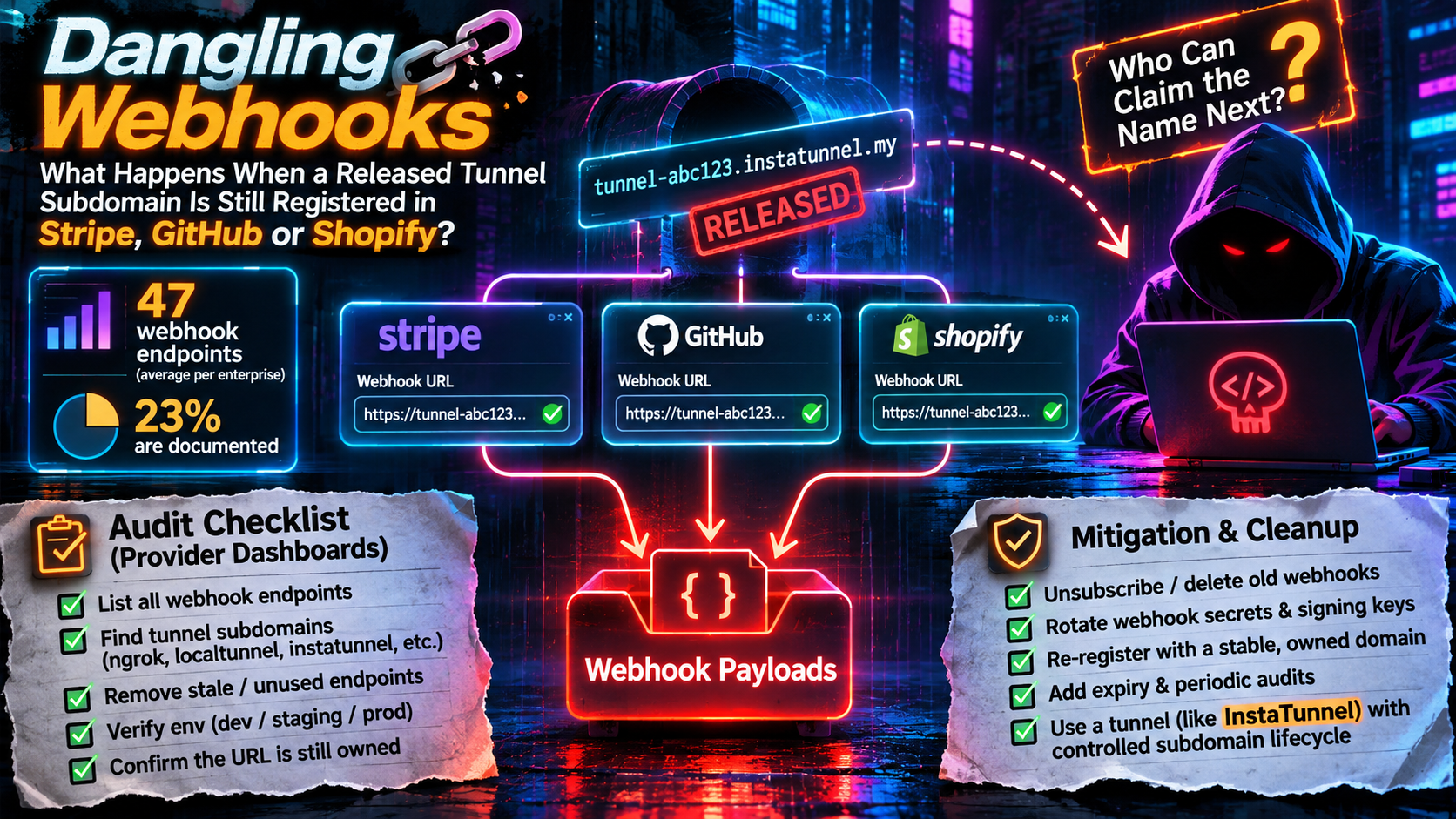
You stop the tunnel, close the laptop and move on. Stripe, GitHub and Shopify don’t know that. They keep the URL you gave them and keep trying to deliver events to it until someone removes the registration or the provider gives up.
That leftover registration is a dangling webhook: a provider-side subscription that points at a hostname you no longer control. If the name you used was a tunnel subdomain, the question is simple and uncomfortable. Who can claim that name next, and what will your old registrations send them?
This guide answers that for the three providers developers wire up most often. It then gives you a provider-by-provider audit checklist and a safe order for unsubscribing and rotating secrets.
What a dangling webhook is
A webhook registration lives in the provider’s dashboard or API, not in your code. Deleting your project or letting a tunnel session expire changes nothing there. Unlike a stale DNS record, the sender initiates: the provider pushes events to the URL without anyone visiting it. In many teams nobody owns the inventory, because registrations get created by whoever was debugging that week.
Security vendors already treat this as a takeover risk. Obsidian Security’s webhook guide warns that endpoints pointing at deprecated URLs create takeover opportunities when infrastructure is migrated or decommissioned. A released tunnel subdomain is the same problem on a much shorter timescale.
Why this is worth an audit now
Three data points frame the problem. None measures dangling webhooks directly, so read them as context, not proof.
Webhook sprawl is poorly documented. Obsidian Security reports that the average enterprise runs 47 active webhook endpoints, while security teams can document only 23% of them in their integration inventories. That is a vendor-reported benchmark, not an audited census.
Third parties are involved in nearly half of breaches. Verizon’s 2026 Data Breach Investigations Report (published May 2026) puts third-party involvement at 48% of breaches. That is up from 30% in the 2025 edition and 15% in 2024. “Third party” is a broad bucket. Verizon splits it into three archetypes: a vulnerability in a vendor’s software used as the way in, a vendor that hosts your data being compromised, and a vendor connected into your environment. Webhook misconfigurations are only a small slice of it.
Cleanup of leaked credentials is slow. The 2025 edition found that the median time to remediate leaked secrets discovered in GitHub repositories was 94 days. Slow cleanup of credentials and integrations is the common thread.
Who can claim the name next?
This depends on how your tunnel provider names things, and it is where most of the risk is decided.
- Random names (
k8m9n2.example.dev) are hard to target, but a registration pointing at one is still dangling, and the provider may recycle the name. - Chosen names (
stripe-webhook,oauth-dev,acme-qa) are much easier to guess. If the service lets any account request a name that isn’t currently in use, whoever asks first after you leave gets it. - Reserved names (held for an account even while no tunnel is running) close the gap, but only for as long as the reservation exists.
Guessability matters more than people expect. Names that appear in documentation examples are the ones most likely to be copied, reused and left behind.
What InstaTunnel documents today
Here is what InstaTunnel’s public docs, pricing page and terms say as of November 14, 2026, and what they leave out.
Documented:
- Custom subdomains are included on the free plan, but you must sign in to choose one. Anonymous tunnels get a random six-character name and last 24 hours. The CLI sets a name with
--subdomain(or-s), for exampleinstatunnel 3000 -s myapp. - Names are first-come-first-served for signed-in users, and the docs list the free plan as having no reservation. A taken name returns a “subdomain already taken” error.
- First-party and security-sensitive names such as
api,loginandsupportare reserved and can’t be claimed. - Free-plan sessions last 24 hours, so a tunnel can end without you doing anything.
- Authenticated connections must belong to the tunnel’s owner, and since CLI 1.1.24 a second client can no longer silently replace the active one. While your tunnel is live, someone else can’t hijack it.
instatunnel --listshows your tunnels, andinstatunnel --kill <subdomain>stops one.- The Business plan lists “custom subdomain reservations” as a feature. The Pro plan’s feature list doesn’t.
- The docs’ own examples use names like
stripe-webhook,oauth-dev,acme-qa,myappandmyapp-dev. The troubleshooting guide also recommends a fixed subdomain so provider dashboards keep a stable URL. Both make these names likely to end up registered with providers.
Not documented:
- How long a free-plan name stays unclaimable after your tunnel stops or your session expires. The docs say only that free names aren’t reserved.
- Whether ownership checks on connections outlive the session, and whether a previous user gets any priority on a name.
- What happens to names when an account is terminated. The terms say active tunnels close on termination but say nothing about names.
Until those points are written down, the safe assumption for any name you aren’t explicitly reserving is that it can be claimed by someone else once you stop using it. Plan your cleanup around that, with any tunnel provider. The audit below works regardless of how a given service answers.
What a squatter would actually receive
Assume someone now controls the hostname. Each provider hands them something different.
| Stripe | GitHub | Shopify | |
|---|---|---|---|
| Event content | Snapshot events carry a full copy of the affected resource. Thin events carry less, and you fetch the rest through the API | Repo, branch and commit data, author names and emails; private repos included | Order and customer data, which can include names, emails and addresses |
| Signature | Stripe-Signature, includes a timestamp |
X-Hub-Signature-256, no timestamp |
X-Shopify-Hmac-SHA256, no timestamp |
| Provider-side cleanup if endpoint fails | Retries up to 3 days in live mode, 3 times over a few hours in a sandbox | No documented auto-removal | Retries up to 8 times over 4 hours; shop-specific subscriptions are removed, app-specific ones are not |
Across all three, a squatter gets:
- Everything in the request. Body, headers and the full URL path and query string. GitHub’s own guidance says not to put API keys or other credentials in the payload URL. If you ever embedded a token or basic-auth credentials in a webhook URL, they went to the new owner.
- A view of your activity. Repo names, customer emails and order volumes are useful for phishing and reconnaissance without a single forged event.
- A working TLS connection. Providers verify the destination’s certificate, but the hostname is still served by the tunnel provider’s edge with a valid certificate, so verification passes. Certificate checks don’t tell the provider the name changed hands.
- A reason to answer
200. Providers treat a non-2xx response or a timeout as failure; Shopify counts any response outside the 200 range, including redirects. A squatter who returns 200 makes deliveries look healthy, which suppresses the retry-and-remove behaviour that would otherwise clean up the registration. That is an inference from how failure is defined, and it means the registration can survive indefinitely.
What a squatter can’t do on their own is forge a signed event for your real endpoint. They don’t have your signing secret, and the payloads they receive don’t contain it. That protection only holds if your production handler enforces signatures. GitHub, for instance, sends no signature header at all unless you configured a secret on the webhook. Signature verification does nothing for the confidentiality of what was sent to the wrong place.
One replay caveat: Stripe’s official libraries reject events older than five minutes by default, but GitHub and Shopify signatures carry no timestamp. Deduplicate on the delivery ID as well: X-GitHub-Delivery for GitHub and X-Shopify-Webhook-Id for Shopify.
Don’t count on provider-side cleanup
Stripe’s documentation covers a three-day automatic retry window in live mode and three retries over a few hours in a sandbox. Third-party guides (Svix, Hookdeck) report that Stripe disables an endpoint after three days of continuous failures. Stripe’s own pages I checked don’t state that rule, so treat it as reported behaviour, not a guarantee.
GitHub lets you deactivate (reversible) or delete (permanent) repository and organization webhooks. Each GitHub App has one webhook that you can deactivate but not delete. I found no documentation of GitHub removing a failing webhook automatically.
Shopify needs the closest reading. Deliveries are retried up to eight times over four hours, and persistent failure deletes subscriptions created through the Admin API (shop-specific). Shopify’s own comparison table says failing app-specific subscriptions, the ones in shopify.app.toml, are not deleted. A stale URL there lingers until you edit it and run shopify app deploy.
Cleanup only runs when the endpoint fails, and a squatter can stop that.
The provider dashboard audit checklist
Run this before you release a tunnel name, and again as a quarterly sweep. Check test and live environments separately, because people forget one of them.
Stripe
- Open the Webhooks tab in Workbench and list every endpoint, in live mode and in every sandbox or test environment, plus any Connect or multi-account setup you manage.
- Or use the API:
curl -G https://api.stripe.com/v1/webhook_endpoints -u "$STRIPE_SECRET_KEY:" -d limit=100. Run it once per environment with that environment’s key. Entries includeurl,statusandenabled_events. - Flag any URL on a tunnel domain or a host you don’t recognise, including
status: disabledones, which are still registered. - Check who holds restricted keys with the
webhook_writepermission. Stripe notes that such a key can create destinations receiving payloads for any event type, even without permission to read the underlying objects.
GitHub
- Repository webhooks: Settings, then Webhooks, for every repo you maintain. Via CLI:
gh api --paginate repos/OWNER/REPO/hooks --jq '.[] | {id, active, url: .config.url}'. - Organization webhooks (owners only):
gh api orgs/ORG/hooks. - Each GitHub App you own has one webhook URL; check the app’s settings.
- Recent Deliveries: repeated failures usually mean the destination is gone.
Shopify
- App-specific subscriptions: open
shopify.app.tomland check everyuriunder[[webhooks.subscriptions]]. - Shop-specific subscriptions: query
webhookSubscriptions(first: 50) { edges { node { id topic uri } } }through the GraphQL Admin API, for each shop and dev store your app is installed on. This query covers only API-created subscriptions, not TOML-managed ones, so you need both checks. - Check the delivery logs and metrics in the Dev Dashboard for failing or removed subscriptions. The delivery logs cover only the past seven days.
Everything else
- Repeat for Slack, Twilio, Meta/WhatsApp, PayPal, Zapier-style tools, CI systems and any OAuth app that stores a redirect URI. Callback URLs for login flows are a related risk, which we covered in The OAuth Tunnel Trap.
Unsubscribe first, then rotate
Order matters, because the goal is to stop data leaving before you worry about what the new owner already has.
- Disable, don’t delete yet. Deactivate the GitHub webhook (
gh api -X PATCH repos/OWNER/REPO/hooks/HOOK_ID -F active=false) or disable the Stripe endpoint in Workbench. This is reversible if the URL turns out to matter. - Confirm silence. Watch the provider’s delivery log for a day. If something was relying on the endpoint, you’ll find out now rather than during an incident.
- Delete. Use
curl -X DELETE https://api.stripe.com/v1/webhook_endpoints/we_XXXX -u "$STRIPE_SECRET_KEY:",gh api -X DELETE repos/OWNER/REPO/hooks/HOOK_ID, or thewebhookSubscriptionDeletemutation for shop-specific Shopify subscriptions. For TOML-managed Shopify subscriptions, remove the entry and runshopify app deploy. GitHub deletion can’t be undone. - Rotate anything the old URL could have exposed. Treat these as compromised only if they were shared with the old endpoint:
- Secrets embedded in the URL, query string or custom headers.
- A signing secret you reused anywhere else, such as a production handler. Stripe creates a distinct secret per endpoint, but GitHub’s secret is one you chose, so check that you didn’t paste the same value into several places. Shopify signs with your app’s client secret, which is shared across the whole app. If that one was reused, rotating it is a bigger job, and Shopify says the new digest can take up to an hour to take effect.
- API keys or tokens your dev handler used to call back into the provider.
- Pick the right rotation window. In Workbench, rolling a Stripe signing secret lets you expire the old one immediately or keep it valid for up to 7 days. The delay suits planned rotation. After a suspected exposure, expire it immediately, since the grace period keeps the old value valid.
- Re-verify with a test event to the real endpoint, then record the date in your inventory.
For GitHub secrets, generate a long random value (for example openssl rand -hex 32) and keep it in a secret manager.
Prevent the next dangling webhook
Cleanup is the fix, but a few habits make the problem smaller:
- Release names deliberately. Make “remove provider registrations” part of tearing down a dev environment. With InstaTunnel, run
--killon the subdomain and delete its registrations in the same sitting. - Don’t reuse documentation example names. If a guide uses
stripe-webhookoroauth-dev, pick something specific to you. - Reserve names you depend on instead of hoping nobody asks for them. On InstaTunnel that means the Business plan, which is the only one that lists reservations. On the free plan, remember that sessions end after 24 hours.
- Let tooling manage dev URLs where it can. Shopify’s docs note that the CLI’s tunnel URL changes on every
shopify app devrun, and suggest a relativeuri(for example/webhooks) so you don’t re-register each time. - Trim what a stray endpoint can receive. Shopify’s
include_fieldsandfilteroptions limit the payload and which deliveries fire, and Stripe lets you subscribe to only the event types you need. - Give every dev registration an owner and an expiry. Stripe’s
descriptionandmetadatafields are built for this. - Keep separate secrets per environment, so one stale URL never becomes a production problem.
- Put registrations in code, so forgotten ones get noticed in pull requests.
One tempting fix doesn’t work: password protection on your tunnel protects you only while you hold the name. It requires a Pro or Business plan, and a provider can’t complete a browser password form anyway. A squatter on the same hostname simply won’t enable it.
FAQ
What is a dangling webhook?
A webhook subscription at a provider such as Stripe, GitHub or Shopify that still points at a URL you no longer control, typically a released tunnel subdomain.
Can someone take over my old tunnel subdomain?
It depends on the tunnel service. If it lets any account request a specific name and doesn’t hold released names, then yes. InstaTunnel’s docs describe free-plan names as first-come-first-served with no reservation, and list reservations only under the Business plan. Check your provider’s documentation, and don’t assume a name is safe unless it is explicitly reserved.
Can an attacker forge Stripe or GitHub events using a dangling webhook?
Not against a production endpoint that verifies signatures. They don’t receive your signing secret. What they can do is read the payloads, headers and URL sent to them, and keep the registration alive by returning 200.
Do I need to rotate secrets after deleting a webhook?
Rotate anything exposed to the old URL, such as tokens in the query string or a signing secret you reused elsewhere.
The bottom line
A tunnel subdomain is cheap and temporary. A registration pointing at it keeps working until someone removes it. Audit every provider when you release a name, and sweep quarterly.
Sources
- What is Webhook Security: Securing SaaS Integrations in 2026 (Obsidian Security)
- Top takeaways from the 2026 Verizon DBIR (SpyCloud)
- Supply Chain Breaches Surge 60% To Hit Half Of All Incidents (Expert Insights)
- Verizon 2025 DBIR: third-party involvement doubled (ASIS Security Management)
- Manage webhook endpoints (Stripe Docs)
- Set up events (Stripe Docs)
- Stripe webhooks review (Svix)
- Guide to Stripe Webhooks: Features and Best Practices (Hookdeck)
- Best practices for using webhooks (GitHub Docs)
- Disabling webhooks (GitHub Docs)
- Validating webhook deliveries (GitHub Docs)
- Troubleshoot webhooks (Shopify)
- Manage webhook subscriptions (Shopify)
- Verify webhook deliveries (Shopify)
- InstaTunnel custom subdomains docs, CLI flags, troubleshooting, pricing and terms, checked November 14, 2026
Related InstaTunnel pages
Continue from this article into the most relevant product guides and workflows.
Related Topics
Keep building with InstaTunnel
Read the docs for implementation details or compare plans before you ship.