Exposing the Pod: Localhost Tunnels for Kubernetes Developers
Quick answer
Exposing the Pod: Kubernetes Localhost Tunnels (Inlets vs ng: webhook testing answer
For local webhook testing, run your app locally, expose it with a public HTTPS tunnel, and paste the stable callback URL into the provider dashboard.
How do I test webhooks on localhost?
Start your local server, open a public HTTPS tunnel to that port, configure the provider webhook URL, and inspect events in your local logs.
Why does a stable webhook URL matter?
Stable URLs prevent provider dashboards from needing manual callback updates every time you restart a tunnel.
Cloud-native development has fundamentally changed what “localhost” means. A decade ago, a developer might spin up a simple Node.js server on localhost:3000 and use a standard reverse proxy to share it with the world. Today, cloud-native developers don’t just run standalone web servers — they run entire local Kubernetes clusters using tools like Minikube, K3s, or kind, orchestrating microservices, deploying operators, configuring service meshes, and managing StatefulSets directly on their laptops.
A critical bottleneck remains: how do you expose specific Pods or internal services running inside these local clusters to the public internet? Whether you’re testing webhooks from Stripe or GitHub, collaborating with remote teammates, demoing a client frontend, or syncing local code changes with a remote staging environment, you need a Kubernetes ingress tunnel.
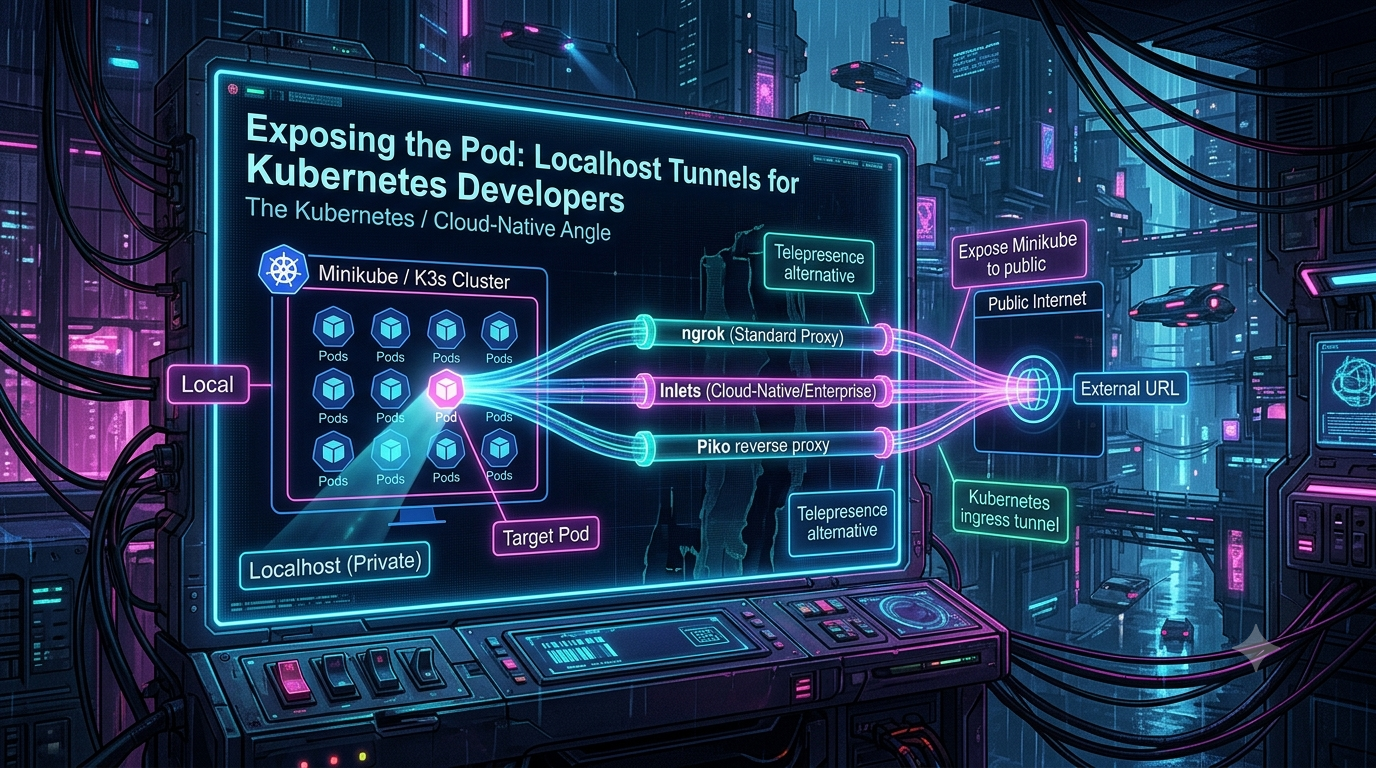
For Platform Engineers and SREs, standard reverse proxies often fall short of enterprise requirements — they get blocked by corporate networks, run into usage limits, or lack native integration with container orchestration primitives. This guide walks through the architectural challenges of tunneling into local clusters, compares Inlets and ngrok, examines the Piko reverse proxy, and evaluates lightweight Telepresence alternatives for Kubernetes-focused teams.
The Architectural Challenge of the Kubernetes Ingress Tunnel
When you run a standard web application, it binds directly to a port on your host OS’s network interface, and exposing it is a simple matter of mapping a public endpoint to that local port.
Kubernetes introduces multiple layers of network abstraction:
- Pod IP — every Pod gets its own internal IP address, hidden from the host network.
- ClusterIP Services — stable internal IPs that load balance across ephemeral Pod IPs.
- Ingress Controllers — components like NGINX or Traefik that route HTTP/S traffic based on hostnames and paths.
- Network Address Translation (NAT) — local clusters run inside VMs or containers (Minikube’s Docker or Hyper-V drivers, for example), creating an additional NAT boundary between the host OS and the cluster network.
To route external webhooks or public traffic into a local cluster, an ingress tunnel must pierce these NAT boundaries, bypass local firewalls, and correctly interface with Kubernetes network primitives. A poorly designed tunnel might route traffic to the host but fail to resolve cluster DNS (.cluster.local) or struggle to map external TLS certificates to internal services.
How to Expose Minikube to Public Traffic
Knowing how to expose a Minikube service to public internet traffic is a foundational skill. By default, Minikube runs inside a container or VM, so its internal network is isolated from the host.
1. Start Minikube and Deploy a Service
minikube start
kubectl create deployment hello-world --image=registry.k8s.io/e2e-test-images/agnhost:2.53 -- /agnhost netexec --http-port=8080
kubectl expose deployment hello-world --type=LoadBalancer --port=8080
Note on the image reference: older tutorials use
k8s.gcr.io/echoserver:1.4for this kind of demo.k8s.gcr.iohas been frozen since April 2023 and now only redirects toregistry.k8s.io— some restricted environments and non-standard clients don’t handle that redirect. The official Kubernetes “Hello Minikube” tutorial now usesregistry.k8s.io/e2e-test-images/agnhost, which is the current recommended test image.
2. Establish the Local LoadBalancer
Minikube runs locally, so it can’t provision a cloud LoadBalancer the way AWS or GCP would. Minikube’s built-in tunneling feature bridges the cluster’s LoadBalancer IP to your host machine:
minikube tunnel
This command needs to keep running in a separate terminal window — it allocates a local IP address to your LoadBalancer services.
3. Attach the Reverse Tunnel
Once the service is reachable on your local host network, you can attach an ingress tunnel to the allocated local IP and port. Platform Engineers increasingly prefer Kubernetes-native tools that automate this routing rather than manually mapping IPs — which is where Inlets, ngrok, and Piko come in.
Inlets vs ngrok: Two Different Philosophies for the Cloud-Native Edge
ngrok: The Legacy Champion, Now with a Kubernetes Operator
ngrok operates as a SaaS reverse proxy: a local agent connects to ngrok’s cloud network, and traffic is routed back through an encrypted connection.
Kubernetes integration. ngrok’s open-source Kubernetes Operator consumes standard Kubernetes Ingress and Gateway API resources and translates them into ngrok endpoints, so it works the same way whether you’re on EKS, GKE, k3s on a laptop, or Minikube. One differentiator the ngrok team highlights is that the Operator works behind NAT without requiring a public IP attached to a load balancer or edge router — most Ingress Controllers can’t do that.
Current pricing (2026). ngrok’s plans are Free, Hobbyist, Pay-as-you-go, and Enterprise. Free and Hobbyist plans are capped at 3 concurrently online endpoints; Pay-as-you-go removes that cap and bills by endpoint-hour. The Free plan includes a one-time usage credit and roughly 20,000 HTTP requests/month; Hobbyist ($10/month, or $8/month billed annually) raises that to around 100,000 requests/month with a larger bandwidth allowance. Enterprise pricing is negotiated individually.
Corporate firewall friction. This is real, and it’s ngrok’s own stated tradeoff, not just competitor FUD: because tunneling tools make it trivial to punch a hole through NAT, ngrok is a recurring target for phishing and malware campaigns that abuse it to create backdoors into private networks. ngrok’s own FAQ acknowledges that its agent is sometimes flagged by antivirus software and blocked by corporate proxies as a result, and the company runs an active abuse-monitoring and account-banning process to deal with it. In practice, this means the *.ngrok.io domain and the ngrok binary itself can get blocked by security tooling on corporate laptops — independent of anything the individual developer is doing.
Inlets: The Bring-Your-Own-Cloud Tunnel
Inlets was created by Alex Ellis — the founder of OpenFaaS and a CNCF Ambassador — and takes a fundamentally different architectural approach: Bring-Your-Own-Cloud (BYOC). You run the Inlets server on a cloud VM you control (DigitalOcean, Hetzner, AWS EC2, and others are supported), and your local cluster connects out to it.
- No SaaS rate limits. Because you control the data plane, throughput is bounded by your own VM’s bandwidth, not by a shared service tier. Inlets’ own project comparison describes ngrok, by contrast, as limiting connections per minute and periodically restarting agent sessions — worth noting as Inlets’ framing of a competitor, but consistent with the rate-limit tradeoffs SaaS tunnel services generally make.
- Native LoadBalancer integration. The
inlets-operatorwatches for KubernetesLoadBalancerservices, then provisions a cloud VM running an inlets-pro tunnel server, deploys a matching tunnel client Pod in-cluster, and updates the Service’s external IP — giving Minikube or K3s the sametype: LoadBalancerexperience you’d get on a managed cloud, but self-hosted. - TCP/UDP support. Where ngrok is HTTP-first, Inlets is protocol-agnostic at the TCP layer, so it can expose databases, SSH, or gRPC services without workarounds.
The verdict: ngrok’s SaaS convenience is hard to beat for a solo developer who just needs a webhook URL in thirty seconds. For a platform team building rate-limit-free internal tooling with full data-plane control, Inlets’ BYOC model is the better fit — at the cost of owning and paying for the VM yourself.
The Piko Reverse Proxy: Open-Source, Production-Grade Tunneling
If you want an open-source, Kubernetes-native alternative to ngrok built for production traffic rather than laptop demos, Piko — created by Andy Dunstall — is worth a close look.
Piko is written in Go and MIT-licensed. As of writing it’s sitting at roughly 2,200 GitHub stars and 87 forks, with the latest release (v0.10.0, shipped May 8, 2026) still pre-1.0, so treat the CRD and config surface as subject to change. Unlike single-binary laptop tools, Piko is explicitly designed to run as a horizontally scalable, fault-tolerant cluster of nodes behind a standard HTTP(S) load balancer.
How it works. Piko never opens a connection directly to your upstream. Instead, your services (via the Piko agent, or the Go SDK) open outbound-only WebSocket connections to the Piko server and register the endpoint they’re listening on. Piko then proxies incoming HTTP(S) or TCP traffic down that outbound connection. Because the connection is outbound-only, it looks like ordinary egress traffic to any firewall in between.
Key features for SREs:
- Gossip-based anti-entropy. Piko server nodes propagate “which node has a live connection for endpoint X” state via gossip, typically converging in under a second — so it doesn’t matter which node in the cluster a public request lands on.
- Header-based routing. Requests can target an endpoint via the
Hostheader (for wildcard-DNS setups) or thex-piko-endpointheader, avoiding the need for wildcard DNS in simpler deployments. - Security has matured steadily. Mutual TLS support shipped in
v0.6.4(December 2024). JWKS-based key verification and multi-tenant upstream authentication both landed inv0.8.0. JWT auth supports HMAC, RSA, and ECDSA signing, with optional per-token endpoint scoping.
Piko explicitly lists “bring your own cloud,” “expose services in a customer network,” and “connect to user devices” as its intended use cases — it’s aimed less at “share my laptop for five minutes” and more at teams that need a durable, self-hosted reverse tunnel fabric.
Beyond Simple Tunnels: Local-to-Cluster Alternatives to Telepresence
Exposing a local service to the internet is only half the story. Often developers want the reverse: their local machine participating directly in a remote, cloud-hosted cluster.
Telepresence’s landscape has shifted. The open-source Telepresence project — a CNCF Sandbox project, originally built by the Ambassador team — is still available and still uses a VPN-style tun device to bridge your laptop’s network with the cluster’s. But the commercial “Telepresence Enterprise” product has since been folded into Ambassador’s newer Blackbird API development platform, and in 2026 Ambassador Labs itself became part of Gravitee. If you’re evaluating Telepresence today, it’s worth checking whether you want the open-source CNCF project or Blackbird’s hosted version, since documentation and support paths now differ between the two. Either way, the core tradeoff that pushed people toward alternatives hasn’t changed: a VPN-based approach requires meaningful local network permissions and can be awkward to run alongside a corporate VPN.
1. Mirrord: The Process-Level Injector
Unlike Telepresence’s VPN approach, mirrord works at the process level. It injects itself into your local process (via LD_PRELOAD on Linux, DYLD_INSERT_LIBRARIES on macOS) and overrides low-level system calls. When your local code performs a network call, reads a file, or reads an environment variable, mirrord’s local layer intercepts it and relays it to a temporary mirrord-agent Pod running in your target cluster. Your process behaves as though it’s running inside the cluster — real databases, real internal services — without a VPN and without root access on your machine. (The agent Pod on the cluster side does run with elevated permissions to attach to another Pod’s namespaces, so RBAC scoping on who can create that agent still matters.)
2. Ktunnel: The gRPC Reverse Tunnel
For a minimalist, open-source approach, ktunnel (by omrikiei) establishes a reverse tunnel between a Kubernetes cluster and your local machine over gRPC streams rather than SSH. For example:
ktunnel expose myapp 80:8000
Pods inside the cluster can now reach myapp:80, with traffic tunneled to your local port 8000. Ktunnel automatically tracks and tears down the resources (Deployments and Services) it creates when the process exits — including a 30-second cleanup timeout to avoid hanging — so it doesn’t leave orphaned infrastructure behind after a Ctrl+C.
3. Atmosly: Expanding to the Delivery Loop
Where Mirrord and Ktunnel focus strictly on the local development “inner loop,” platforms like Atmosly take a broader scope: one-click environment cloning (including configs and secrets), visual or YAML-based CI/CD pipeline building, GitOps integration (generating ArgoCD or Flux configuration), and PR-scoped preview environments on a single control plane. For teams that find Telepresence-style tools too narrowly focused on debugging a single service, a delivery-loop platform like this trades some of that focus for broader deployment governance.
Security & Best Practices for SREs
Tunnels punch holes through network firewalls by design — misconfigured, they can expose sensitive internal cluster APIs to the open internet. A few practices apply regardless of which tool you pick:
- Zero Trust authentication. Never expose a tunnel without an auth layer. Piko’s JWT/mTLS support and ngrok’s OAuth/OIDC modules both exist for this reason — use them.
- Ephemeral infrastructure. Treat local tunnels as short-lived. Tools with automated garbage collection (like ktunnel’s cleanup-on-exit behavior) reduce the odds of orphaned Services and LoadBalancers lingering in the cluster.
- Restrict RBAC permissions. If developers can inject mirrord agents or run Telepresence intercepts, scope that access to development/staging namespaces via RBAC — never production.
- Monitor egress traffic. Because these tunnels rely on outbound connections specifically to get around inbound firewall rules, standard ingress-focused firewall monitoring won’t catch a rogue reverse tunnel. Egress monitoring is the control that actually applies here.
Conclusion
The days of relying exclusively on simple port-forwarding for cloud-native development are over. Choosing the right tool depends heavily on your team’s operational maturity:
- Need to expose a Minikube webhook in the next five minutes? ngrok’s Kubernetes Operator is still the fastest path, corporate-firewall caveats aside.
- Building a rate-limit-free internal platform and comfortable owning a cloud VM? Inlets’ BYOC model gives you full data-plane control.
- Need production-grade, horizontally scalable, self-hosted tunneling with mTLS and JWKS out of the box? Piko is purpose-built for that, with the caveat that it’s still pre-1.0.
- Trying to bring a local developer into a remote cluster rather than the other way around? Mirrord’s process-level injection and ktunnel’s minimal gRPC tunnel are both lighter-weight than a VPN-based tool, and it’s worth knowing that Telepresence itself now has two distinct tracks (open-source CNCF project vs. Blackbird) before you commit to one.
Changelog
Metadata removed from the original draft (no author/date/tag fields were present in the source beyond inline prose).
Corrections:
- Replaced the deprecated k8s.gcr.io/echoserver:1.4 demo image with registry.k8s.io/e2e-test-images/agnhost:2.53, matching the current official “Hello Minikube” tutorial. k8s.gcr.io has been frozen since April 2023 and is redirect-only.
- Removed the unsourced “60–120 connections per minute” ngrok rate-limit figure; replaced with verified current Free/Hobbyist plan limits (3 concurrent endpoints, ~20K–100K HTTP requests/month) from ngrok’s own pricing documentation.
- Reframed the Inlets-sourced claim about ngrok “restarting every 7 hours” and rate-limiting connections as an attributed competitor comparison rather than an independent fact, since it comes from Inlets’ own project README.
- Corrected “recently launched” framing on the ngrok Kubernetes Operator — Gateway API support for it dates to 2024, and the Operator itself predates that.
Added (verified against primary sources):
- ngrok’s current plan names and limits confirmed against ngrok’s own pricing/limits documentation.
- ngrok’s own FAQ and security page, cited directly for the malware-flagging/corporate-firewall claim, rather than relying on secondhand characterization.
- Piko’s verified GitHub stats (2.2k stars, 87 forks, MIT license, Go), and confirmed release history: mutual TLS shipped in v0.6.4 (Dec 10, 2024), JWKS and multi-tenant upstream auth shipped in v0.8.0, latest release v0.10.0 (May 8, 2026) — all confirmed directly against the project’s GitHub releases page.
- Confirmed Inlets’ creator (Alex Ellis, OpenFaaS founder and CNCF Ambassador) and the inlets-operator’s CRD-based LoadBalancer provisioning behavior against Inlets’ own docs.
- New section noting that Telepresence’s commercial product has been folded into Ambassador’s Blackbird platform, and that Ambassador Labs became part of Gravitee in 2026 — the open-source CNCF Sandbox project remains separately available. This wasn’t in the original draft and materially affects how a reader should evaluate “Telepresence” as an option today.
- Clarified that mirrord’s “no root access” claim applies to the local client; the in-cluster mirrord-agent Pod does run with elevated permissions, which matters for RBAC planning.
- Noted ktunnel’s automatic resource cleanup includes a specific 30-second timeout, per the project’s own README.
Related InstaTunnel pages
Continue from this article into the most relevant product guides and workflows.
Related Topics
Keep building with InstaTunnel
Read the docs for implementation details or compare plans before you ship.