Fixing SSE Buffer-Bloat in Local Tunnels: Guaranteeing Zero-Latency Streaming for Local LLMs
Eliminate SSE buffer-bloat in your reverse proxies. Learn to configure TCP nodelay and disable HTTP buffering for zero-latency local LLM token streaming.
Quick answer
Fix SSE Buffer-Bloat: Zero-Latency Streaming for Local LLMs: webhook testing answer
For local webhook testing, run your app locally, expose it with a public HTTPS tunnel, and paste the stable callback URL into the provider dashboard.
How do I test webhooks on localhost?
Start your local server, open a public HTTPS tunnel to that port, configure the provider webhook URL, and inspect events in your local logs.
Why does a stable webhook URL matter?
Stable URLs prevent provider dashboards from needing manual callback updates every time you restart a tunnel.
You’ve just deployed a state-of-the-art local LLM using vLLM, Ollama, or llama.cpp. When you test it on localhost, the token generation is a thing of beauty—a smooth, continuous stream of text that feels instantly responsive. But the moment you expose this endpoint to the outside world via a reverse proxy (like Nginx) or a local tunnel (like Cloudflare Tunnels or Ngrok), the magic dies.
Instead of a smooth flow, your frontend receives nothing for several seconds, followed by a massive, chunky block of text all at once.
If you are building real-time conversational AI interfaces, this “choppy” token output destroys the User Experience (UX). It ruins your Time to First Token (TTFT) metrics and makes your application feel sluggish, regardless of how fast your GPUs are actually inferencing.
The culprit? SSE Buffer-Bloat.
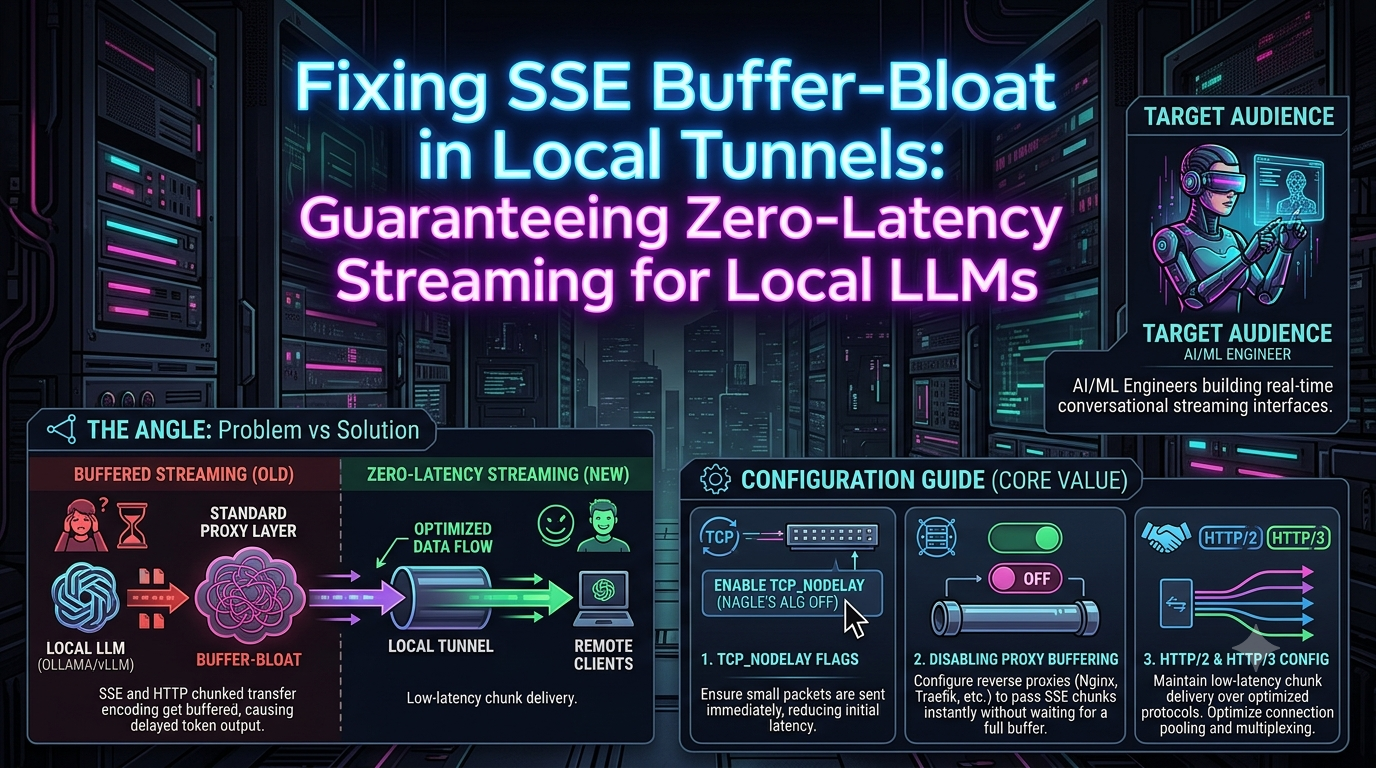
In this guide, we will dissect why standard networking layers inadvertently sabotage Server-Sent Events (SSE) and HTTP chunked transfer encoding. More importantly, we’ll provide a definitive configuration guide to completely disable proxy buffering, tune TCP flags, and guarantee zero-latency chunk delivery for your local AI stack.
The Root Cause: Why Proxies Break LLM Streaming
To understand the fix, we must understand the failure mode. LLM streaming standardly relies on Server-Sent Events (SSE). In an SSE connection, the server holds a single HTTP connection open and pushes data (tokens) down the wire as soon as they are generated, using Transfer-Encoding: chunked.
Standard web infrastructure was not designed for this. Proxies, load balancers, and tunnels are historically optimized for high-throughput, static, or fully-rendered dynamic payloads. To save bandwidth and CPU cycles, they employ buffering.
1. Reverse Proxy Buffering
When a reverse proxy (like Nginx) sits between your LLM and your client, it defaults to buffering responses. Nginx will wait to accumulate a certain amount of data from the upstream server (e.g., 4KB or 8KB) before forwarding it to the client. If your LLM generates 15 tokens per second, it might take seconds to fill that buffer. The user sees a frozen screen, then a massive paragraph appears instantly.
2. Nagle’s Algorithm (Transport Layer)
At the TCP/IP level, Nagle’s Algorithm dictates that small packets should be delayed and grouped together into a single, larger packet to reduce network congestion. Since single LLM tokens are tiny (often just a few bytes), Nagle’s algorithm eagerly caches them, injecting artificial latency into your stream.
3. Tunneling Protocol Mismatches
Tools like Cloudflare Tunnels (cloudflared) or Ngrok often multiplex traffic over HTTP/2 or HTTP/3. While HTTP/2 multiplexing is great for loading 50 small images simultaneously, aggressive stream buffering by tunnel clients can break the continuous, unbuffered flow required by SSE.
Let’s systematically strip away these buffers, layer by layer.
Layer 1: Transport & App Tuning (Disabling Nagle’s Algorithm)
Before fixing the proxy, ensure your application isn’t the bottleneck. If you are writing a custom inference server (e.g., using Python/FastAPI to wrap an ML model), you must disable Nagle’s algorithm using the TCP_NODELAY flag.
Setting TCP_NODELAY instructs the TCP stack to send data immediately, regardless of packet size.
Python / FastAPI (Uvicorn)
If you are running Uvicorn, you can enforce this at the socket level. Furthermore, ensure your application-layer generator actually yields data without internal caching.
from fastapi import FastAPI
from fastapi.responses import StreamingResponse
import asyncio

app = FastAPI()

async def token_generator():
    tokens = ["Hello", " world", ",", " this", " is", " streaming", " live!"]
    for token in tokens:
        # Crucial: Formatting as a proper SSE payload
        yield f"data: {token}\n\n"
        await asyncio.sleep(0.1) # Simulate inference time

@app.get("/stream")
async def stream_llm():
    return StreamingResponse(
        token_generator(),
        media_type="text/event-stream",
        headers={
            "Cache-Control": "no-cache",
            "Connection": "keep-alive",
            "X-Accel-Buffering": "no" # Signals Nginx to stop buffering
        }
    )
Note: The X-Accel-Buffering: no header is a massive cheat-code. Many proxies (specifically Nginx) respect this header and will automatically disable buffering for that specific response.
Layer 2: Reverse Proxy Configuration
If you are putting Ollama or vLLM behind a reverse proxy to handle TLS termination or API key authentication, you must explicitly configure the proxy for streaming.
Nginx
Nginx is the most common offender for SSE buffer-bloat. By default, proxy_buffering is set to on. You must disable it for your inference endpoints. Furthermore, you need to extend timeout limits, as LLM generation can take minutes.
server {
    listen 443 ssl;
    server_name api.yourdomain.com;

    location /v1/chat/completions {
        proxy_pass http://localhost:8000; # vLLM or Ollama backend

        # 1. Disable Buffering
        proxy_buffering off;
        proxy_cache off;

        # 2. HTTP/1.1 is strictly required for WebSockets/SSE in older Nginx setups
        proxy_http_version 1.1;
        proxy_set_header Connection '';

        # 3. Disable chunked transfer encoding interference
        chunked_transfer_encoding on;

        # 4. Prevent premature timeouts for long-running prompts
        proxy_read_timeout 600s;
        proxy_connect_timeout 600s;
        proxy_send_timeout 600s;

        # Standard headers
        proxy_set_header Host $host;
        proxy_set_header X-Real-IP $remote_addr;
    }
}
Caddy Server
Caddy is generally smarter about modern web standards, but for zero-latency AI streaming, you want to explicitly set the flush interval to ensure chunks are pushed immediately.
api.yourdomain.com {
    reverse_proxy localhost:8000 {
        header_up Host {host}
        header_up X-Real-IP {remote}

        # Flush response immediately, disabling internal buffering
        flush_interval -1
    }
}
Traefik
If you are using Traefik in a Docker/Kubernetes environment, buffering can be disabled via labels or middleware.
# docker-compose.yml example
labels:
  - "traefik.http.middlewares.unbuffer.buffering.maxRequestBodyBytes=0"
  - "traefik.http.middlewares.unbuffer.buffering.memRequestBodyBytes=0"
  - "traefik.http.middlewares.unbuffer.buffering.maxResponseBodyBytes=0"
  - "traefik.http.middlewares.unbuffer.buffering.memResponseBodyBytes=0"
Layer 3: Navigating Local Tunnels (Cloudflare & Ngrok)
Often, AI engineers don’t want to expose public ports or mess with port forwarding, opting instead for local tunnels. These introduce their own aggressive buffering mechanisms.
Cloudflare Tunnels (cloudflared)
Cloudflare sits at the edge and often buffers responses to apply WAF rules, caching, or compression. When piping SSE through a Cloudflare Tunnel, you must observe two critical rules:
- Strict Content-Type: Cloudflare will buffer your response unless the
Content-Typeheader is exactlytext/event-stream. If your application returnsapplication/jsonor a plain text type while streaming, Cloudflare will wait for the connection to close before delivering the payload. - Disable Response Buffering in Dashboard: If you are still seeing delays, you can explicitly bypass buffering for your subdomain via Page Rules or Configuration Rules in the Cloudflare Dashboard. Create a rule for
api.yourdomain.com/*and set Cache Level toBypassand disable Response Buffering.
Troubleshooting note: In highly secure enterprise environments (like using Cloudflare Zero Trust or Zscaler), HTTP/2 bidirectional streaming is sometimes intercepted and buffered by the security layer. Modern tools (like the Cursor AI editor network protocols) are designed to actively fall back to HTTP/1.1 SSE when they detect HTTP/2 stream buffering. If you are experiencing issues with cloudflared, forcing HTTP/1.1 on your origin server can sometimes bypass aggressive layer-7 firewall buffering.
Ngrok
Ngrok is generally well-behaved with SSE out of the box, provided your headers are correct. However, if you are using Ngrok edges, ensure compression is disabled. Gzip/Brotli compression requires a certain amount of data to be buffered before the compression algorithm can act on it.
When passing SSE through any tunnel, explicitly disable compression in your application headers:
Accept-Encoding: identity (client side) or Content-Encoding: identity (server side).
Layer 4: HTTP/2 and HTTP/3 Considerations
As the web moves towards HTTP/2 and HTTP/3 (QUIC), streaming gets complicated.
HTTP/2 uses a single TCP connection and multiplexes multiple streams over it. While this solves the head-of-line blocking problem for static assets, HTTP/2 flow control windows can inadvertently throttle or buffer long-running, slow-drip SSE connections if not carefully tuned.
If you are reverse-proxying a local LLM over a high-latency network (e.g., streaming from your home rig to a phone on 5G), HTTP/3 provides a distinct advantage. Because QUIC is UDP-based, if a single packet containing a token is dropped, it doesn’t block the delivery of subsequent tokens (unlike TCP, which halts the stream to re-transmit the lost packet).
However, many AI inference servers (like vLLM’s embedded FastAPI server) do not support HTTP/3 natively.
The Best Practice Stack for 2026:
1. Run vLLM/Ollama locally on bare metal (HTTP/1.1).
2. Use Nginx or Envoy on the same machine to terminate TLS, apply proxy_buffering off, and expose an HTTP/3 (QUIC) edge to the internet.
3. Ensure the client (React/Next.js frontend) uses an SSE parser that supports modern fetch streams without waiting for the connection to close.
Summary Checklist for Zero-Latency AI Streams
If your tokens are arriving in chunks, verify the following:
- [ ] App Layer: Are you yielding data immediately? (No large array appends before yielding).
- [ ] Headers: Is your server returning
Content-Type: text/event-stream? - [ ] Headers: Are you passing
X-Accel-Buffering: noto bypass Nginx defaults automatically? - [ ] Proxy: Is
proxy_buffering off;set in your Nginx location block? - [ ] Compression: Is Gzip/Brotli disabled for the SSE route?
- [ ] Tunnels: If using Cloudflare, is Response Buffering disabled in your routing rules?
By systematically removing buffers from your networking stack, you can restore the magic of local LLMs. Your users (and your frontend applications) will benefit from true real-time token delivery, achieving near zero-latency interactions matching the speed of human conversation.
Related InstaTunnel pages
Continue from this article into the most relevant product guides and workflows.
Related Topics
Keep building with InstaTunnel
Read the docs for implementation details or compare plans before you ship.