Killing the .env File: Ephemeral Secret Injection via Local Tunnels
Quick answer
Killing the .env File: Ephemeral Secret Injection via Local : localhost tunnel answer
A localhost tunnel gives your local app a public HTTPS URL without opening router ports, which is useful for demos, QA, mobile testing, and provider callbacks.
How do I expose localhost without opening ports?
Use a reverse HTTPS tunnel. Your machine connects outbound to the tunnel service, and the public URL forwards requests back to your local app.
When should I use a localhost tunnel?
Use one for webhook testing, OAuth callbacks, client demos, QA previews, mobile device checks, and short-lived development reviews.
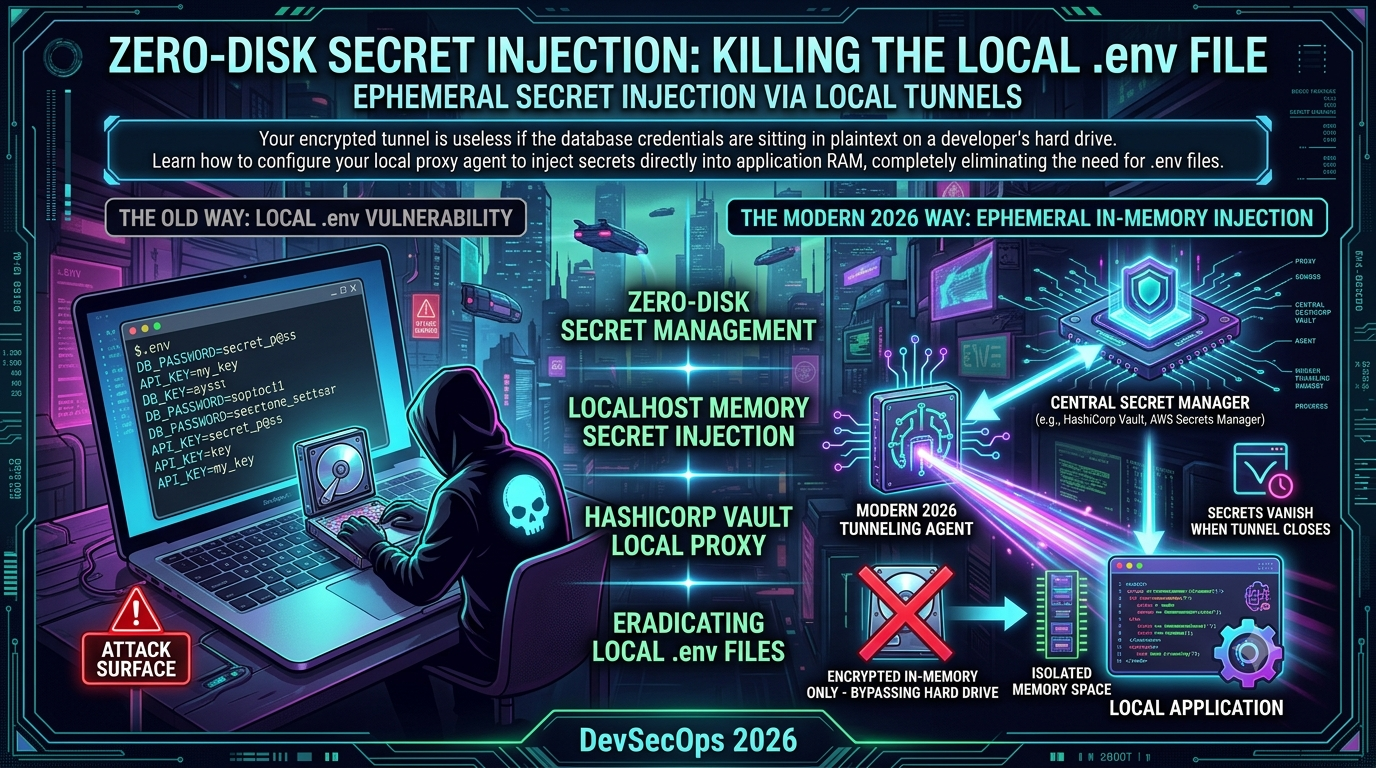
Your encrypted tunnel is useless if the database credentials are sitting in plaintext on a developer’s hard drive. This article explains how to configure your local proxy agent to inject secrets directly into application RAM at process spawn time, eliminating the .env file entirely from the developer endpoint threat surface.
Introduction: The Vulnerability Sitting at ~/projects/
For over a decade the local .env file has been the undisputed bedrock of local development configuration. Engineers across the globe follow a well-rehearsed ritual: clone a repository, copy .env.example to .env, manually request database credentials and API keys from a team password manager, paste them into a local file, drop that file into .gitignore, and cross their fingers.
That ritual is no longer just an administrative chore—it is an unacceptable security hazard.
The data backs this up with uncomfortable precision. GitGuardian’s 2026 State of Secrets Sprawl report found that 28.65 million new hardcoded secrets were added to public GitHub repositories in 2025 alone—a 34% increase year-over-year. GitHub’s own security report counted 39 million secret leaks across 2024. An academic study presented at IEEE S&P 2025 analyzing over 80 million files found that up to 30% of audited projects contained at least one exposed credential. The trend line is unambiguous and going in the wrong direction.
Meanwhile, security teams spend millions hardening cloud perimeters, deploying WAFs, and engineering complex Zero Trust Network Access (ZTNA) policies. The keys to the kingdom frequently sit in unencrypted plaintext files inside a standard corporate laptop’s home directory—a threat model most of that spending does nothing to address.
The industry response is a shift toward zero-disk secret management: leveraging local tunneling agents paired with centralized secret managers to achieve true in-process memory injection. Instead of writing credentials to a physical drive, the tunnel agent fetches required secrets at runtime and streams them directly into the local application’s isolated memory space. When the tunnel closes or the process terminates, those secrets vanish.
The Anatomy of the Threat: Why the .env File Must Die
To understand why eradicating local .env files is a high-priority mandate, consider the full spectrum of active exploitation vectors.
1. Supply Chain Attacks via Package Managers
Modern applications rely on hundreds or thousands of npm, PyPI, and Cargo dependencies. The September 2025 Shai-Hulud campaign—documented in detail by Palo Alto Networks Unit 42 and confirmed by CISA—demonstrated how catastrophically this surface can be exploited at scale.
Attackers launched a coordinated phishing campaign targeting npm package maintainers, registering the lookalike domain npmjs.help on September 5, 2025 and distributing urgency-framed 2FA reset emails. Once a maintainer account was compromised, a self-replicating worm (bundle.js delivered via postinstall script) deployed into their packages. The worm used TruffleHog—a legitimate secret scanner—to hunt developer machines and CI/CD pipelines for npm tokens, GitHub PATs, and cloud service keys (AWS, GCP, Azure), then exfiltrated the haul to attacker-controlled webhooks.
The payload spread exponentially: it authenticated to the npm registry as the compromised developer, injected malicious code into every other package that maintainer owned, and published the poisoned versions. Within 24 hours more than 500 npm packages were compromised, including widely used libraries such as ngx-bootstrap, @ctrl/tinycolor (2.2M weekly downloads), and angulartics2. By November 2025 the follow-up “Shai-Hulud 2.0” campaign had widened to 25,000+ malicious repositories across ~350 unique users and added a destructive fallback: if credential exfiltration failed, the worm attempted to destroy the victim’s entire home directory.
CISA’s advisory on the initial wave explicitly cited targeting of AWS, GCP, and Azure credentials stored in development environment files. If there is no .env file on disk, there is nothing for a rogue postinstall script to find.
The threat has not abated. Unit 42 tracked active Shai-Hulud waves in April and May 2026, and a separate attack on node-ipc (10M+ weekly downloads) in May 2026 deployed an identical credential-stealing payload across three simultaneous version releases. The npm supply chain is a live, active exploit surface.
2. Endpoint Malware and Session Exfiltration
If a developer’s laptop is compromised via phishing, a browser exploit, or a malicious dependency, the local filesystem is immediately vulnerable. Information-stealing malware explicitly targets files named .env, .json, .pem, and .yaml in common code directories. Once discovered, they are packed and exfiltrated to command-and-control infrastructure within seconds. The Shai-Hulud worm’s use of TruffleHog as its scanning engine is instructive: defenders built the map the attacker followed.
3. Malicious IDE Extensions and Build Toolchain Exploits
Third-party extensions running inside VS Code, JetBrains IDEs, or any other editor inherit the developer’s filesystem permissions. A compromised or poorly audited extension can scan the project root, locate the .env file, and transmit its contents over HTTPS under the guise of telemetry—with no indication in process logs that anything unusual occurred.
4. Autonomous AI Coding Agents and Prompt Injection
AI coding agents and code-completion tools scan entire project structures to gain context. OWASP ranks prompt injection first in its Top 10 for LLM Applications 2025. If an agent encounters a prompt injection vulnerability while reading a malicious file or testing an untrusted endpoint, it can be manipulated into reading local configuration and transmitting keys to an external attacker. GitGuardian’s 2026 research found that AI-assisted commits leak secrets at approximately 2× the baseline rate (3.2% vs. ~1.6%), and AI service credential leaks grew 81% year-over-year in 2025—113,000 DeepSeek API keys alone were detected.
5. Accidental Commits and Backup Leaks
GitGuardian’s 2025 report found that 70% of secrets leaked in 2022 remain active today. Files get renamed; flags get bypassed; .env contents occasionally get pushed to remote branches and linger in git history indefinitely after the offending commit is “removed.” Local filesystems are also regularly backed up to corporate cloud storage or personal external drives, creating unmonitored secondary caches of sensitive production keys. The report found over 7,000 valid AWS keys still exposed in Docker Hub image layers—another vector for inadvertent .env file content propagation via careless COPY . . directives.
The Core Concept: Zero-Disk Secret Injection
The alternative is treating secrets as dynamic, short-lived memory assets. Zero-disk secret injection delivers configuration tokens and credentials to an application at the exact moment of process instantiation, keeping them strictly within the bounded, volatile memory space of the running process.
| Metric / Feature | Traditional .env File |
Zero-Disk Secret Injection |
|---|---|---|
| Storage Location | Local SSD as plaintext | Volatile application RAM / process memory |
| Lifecycle | Indefinite; remains on disk until explicitly deleted | Ephemeral; tied to the application process lifecycle |
| Access Control | Any process with filesystem read access | Cryptographically validated identity via local proxy |
| Audit Trail | None | Complete trail via centralized secret manager logs |
| Rotation | Manual, error-prone, infrequent | Real-time, dynamic generation on every process execution |
Application code continues to interact with standard environment APIs—process.env in Node.js, os.environ in Python, os.Getenv in Go—without modification. Those variables are never populated by parsing a local file; they are fed into the process control block via execution wrappers managed by a secure local tunneling proxy.
Architectural Breakdown: How Tunneling Agents and Secret Managers Converge
In a zero-disk injection architecture the local tunneling agent serves a dual role: it forwards traffic to upstream services and acts as an identity-aware orchestrator that bridges local execution with centralized governance. The most production-validated implementation of this at the local-dev layer is HashiCorp Vault Agent’s Process Supervisor mode (available since Vault 1.14).
[ Developer CLI ] ---> Launches Vault Agent ---> Authenticates via OIDC / AppRole / AWS IAM
                                                         |
                                                         v
[ Central Secret Manager ] <--- JIT Fetch (mTLS) --- [ Vault Agent ]
   (Vault / AWS Secrets Manager / Infisical)               |
                                                         | env_template injection
                                                         v
                                            [ Child Process (node server.js) ]
                                             Secrets live only in process ENV block
                                             Evicted on SIGTERM / process exit
The Five-Stage Lifecycle
1. Identity Attestation and Authentication
When a developer initiates their local environment, the Vault Agent authenticates against the centralized identity provider using OIDC, AppRole, AWS IAM, or another supported auto-auth method. This establishes an audited, machine-to-machine session linked to a verified engineer identity.
2. Upstream Context Evaluation
The agent determines which environments the developer needs based on their current Git branch, workspace configuration, or explicit runtime flags. It establishes an encrypted tunneled connection to the corporate overlay network or public ingress layer.
3. Dynamic Runtime Fetching
Vault Agent contacts the centralized secret manager over an mTLS connection and requests the specific credentials required for that development session. When configured with Vault’s dynamic secrets engines—for databases, AWS, PKI, and others—the secret manager generates just-in-time credentials (e.g., a temporary PostgreSQL user valid for 1 hour) rather than returning static long-lived master passwords.
4. Memory-Bound Injection via Process Supervisor Mode
This is the technically precise part: Vault Agent’s exec block forks a child process to launch the developer’s application. Using env_template stanzas backed by Consul Template markup, the agent injects secrets directly into the environment block of the child process before that process starts. Per the official Vault Agent documentation, the agent “will wait until each environment variable template has rendered at least once before starting the process.” The child process receives the credentials as standard environment variables—indistinguishable from variables set in a shell session. No file I/O involved.
Critically, restart_on_secret_changes (default: always) means the agent automatically restarts the child process when a dynamic secret approaches its TTL expiry, rotating credentials transparently without developer intervention.
5. Ephemeral Eviction
When the developer hits Ctrl+C, the agent sends SIGTERM to the child process (configurable via restart_stop_signal), waits up to 30 seconds, then sends SIGKILL. The OS reclaims the process memory allocation. Because secrets were never committed to non-volatile storage, they are immediately eradicated from the host machine.
Step-by-Step Configuration: Replacing .env with Runtime Injection
Step 1: Purge the Filesystem of .env Artifacts
# Delete all .env files across the project workspace
find . -name "*.env*" -type f -delete

# Harden .gitignore to prevent future regressions
cat <<EOT >> .gitignore
# Prevent accidental credential caching
*.env
*.env.local
*.env.development
*.env.production
.env/
EOT
Step 2: Configure Vault Agent with Process Supervisor Mode
The cleanest local-dev pattern is to use vault agent generate-config (available since Vault 1.14) to scaffold the configuration automatically, then extend it. Manual configuration looks like this—stored at a path outside the repository:
# /etc/security/vault/agent-config.hcl

vault {
  address = "https://vault.internal.enterprise.com:8200"
  retry {
    num_retries = 5
  }
}

auto_auth {
  method "oidc" {
    config = {
      role = "developer-local-workspace"
    }
  }

  # Token sink on Linux tmpfs (in-memory filesystem, no disk persistence)
  sink "file" {
    config = {
      path = "/run/user/1000/vault-token"
    }
  }
}

# env_template blocks define each secret as an environment variable.
# The agent renders these BEFORE spawning the child process.
env_template "DB_USER" {
  contents             = "{{ with secret \"secret/data/development/database\" }}{{ .Data.data.username }}{{ end }}"
  error_on_missing_key = true
}

env_template "DB_PASS" {
  contents             = "{{ with secret \"secret/data/development/database\" }}{{ .Data.data.password }}{{ end }}"
  error_on_missing_key = true
}

env_template "STRIPE_API_KEY" {
  contents             = "{{ with secret \"secret/data/development/stripe\" }}{{ .Data.data.live_secret_token }}{{ end }}"
  error_on_missing_key = true
}

# exec block: the child process Vault Agent will supervise.
# Secrets are injected before the command is started.
exec {
  command                = ["node", "server.js"]
  restart_on_secret_changes = "always"
  restart_stop_signal    = "SIGTERM"
}
Note: Process Supervisor mode (
exec+env_template) is mutually exclusive with filetemplatestanzas in the same Vault Agent configuration—you cannot mix both modes in a single agent invocation. Run separate agent instances if you need both patterns simultaneously.
Start the agent:
vault agent -config=/etc/security/vault/agent-config.hcl
Vault Agent will log something like:
[INFO]  agent.auth.handler: authenticating
[INFO]  agent.auth.handler: authentication successful, sending token to sinks
[INFO]  agent.template.server: rendering template; secret/data/development/database
[INFO]  agent.template.server: rendering template; secret/data/development/stripe
[INFO]  agent.exec.server: starting child process: ["node", "server.js"]
The child process inherits the fully populated environment. No file write, no disk touch.
Step 3: Application Code Requires No Vault Awareness
One of the architectural benefits of Process Supervisor mode is that your application code is entirely agnostic to where its environment variables came from. It reads standard OS env vars; the source is invisible.
Python (Flask) — server.py
import os
import sys
from flask import Flask, jsonify

app = Flask(__name__)

REQUIRED_SECRETS = ["DB_USER", "DB_PASS", "STRIPE_API_KEY"]
for secret in REQUIRED_SECRETS:
    if not os.environ.get(secret):
        print(
            f"CRITICAL ERROR: Environment variable {secret} is absent from process RAM.",
            file=sys.stderr,
        )
        sys.exit(1)

@app.route("/health")
def health_check():
    # Process reads from its own env block—no file I/O at any point
    db_connection = f"postgresql://{os.environ['DB_USER']}:[PROTECTED]@localhost/dev_db"
    return jsonify({"status": "healthy", "db_connected": True})

if __name__ == "__main__":
    app.run(port=8080)
Node.js — server.js
const express = require('express');
const app = express();

const requiredSecrets = ['DB_USER', 'DB_PASS', 'STRIPE_API_KEY'];
requiredSecrets.forEach((secret) => {
  if (!process.env[secret]) {
    console.error(`FATAL: Secure variable [${secret}] not present in process environment.`);
    process.exit(1);
  }
});

app.get('/api/v1/payments', (req, res) => {
  // Stripe key consumed directly from process ENV block—zero disk reads
  const stripeKey = process.env.STRIPE_API_KEY;
  res.status(200).json({ status: "authenticated" });
});

app.listen(8080, () => {
  console.log("Initialized via zero-disk execution context on port 8080.");
});
Go — main.go
package main

import (
    "fmt"
    "log"
    "net/http"
    "os"
)

func main() {
    required := []string{"DB_USER", "DB_PASS", "STRIPE_API_KEY"}
    for _, key := range required {
        if os.Getenv(key) == "" {
            log.Fatalf("FATAL: required secret %s not present in process environment", key)
        }
    }

    http.HandleFunc("/health", func(w http.ResponseWriter, r *http.Request) {
        fmt.Fprintln(w, `{"status":"healthy"}`)
    })

    log.Println("Listening on :8080 — secrets injected via Vault Agent process supervisor")
    log.Fatal(http.ListenAndServe(":8080", nil))
}
Step 4: Validate the Zero-Disk Posture
With the agent running and the child process live, verify from a separate terminal that no credentials exist on the filesystem:
# Search the project tree for any credential patterns
grep -ri "STRIPE_API_KEY" ./

# Inspect the process listing for the running PID
ps aux | grep node

# Attempt to read the process environment via the proc filesystem
# (requires root or ptrace privileges—normal users will see a permission error)
cat /proc/$(pgrep -f "node server.js")/environ 2>/dev/null | tr '\0' '\n' | grep -i stripe

# Expected result: no plaintext values visible outside the process's private memory.
When you Ctrl+C the agent, it sends SIGTERM to node server.js, waits the configured grace period, and forces SIGKILL. The OS reclaims memory. The secrets are gone.
Security Hardening: Memory Safety, Swap Files, and Process Isolation
Moving secrets from SSD to RAM significantly reduces the attack surface, but advanced threat models require additional controls.
Preventing Swap File Leaks
Linux and macOS use swap space to page inactive memory regions to disk when physical RAM pressure climbs. If a process containing injected secrets is paged out, those secrets could be written to the host SSD as plaintext—defeating the zero-disk guarantee entirely. The Linux man page for mlock(2) notes this risk explicitly: “As a result of paging, these secrets could be transferred onto a persistent swap store medium, where they might be accessible to the enemy long after the security software has erased the secrets in RAM and terminated.”
The mitigation is mlockall(2), which pins all current and future memory pages of the calling process into physical RAM, preventing them from ever being swapped:
#include <sys/mman.h>
#include <stdio.h>

int main() {
    // MCL_CURRENT: lock pages already mapped into the address space
    // MCL_FUTURE:  lock pages that will be mapped in the future (heap growth, shared libs)
    if (mlockall(MCL_CURRENT | MCL_FUTURE) != 0) {
        perror("mlockall failed — secrets could leak to swap");
        return 1;
    }
    // Proceed with secure process initialization
}
This requires the CAP_IPC_LOCK Linux capability (or root). Confirm the process’s locked memory via /proc/PID/status:
grep VmLck /proc/$(pgrep -f "vault agent")/status
# VmLck: 32768 kB   <-- pages pinned in physical RAM
One practical caveat:
mlockall(MCL_FUTURE)can cause subsequentmmap(2),sbrk(2), ormalloc(3)calls to fail if they would exceedRLIMIT_MEMLOCK. Tune this limit appropriately (ulimit -l unlimitedin a secure development context, or set via/etc/security/limits.conf).
Modern orchestration runtimes—Vault Agent included—manage mlock-equivalent protections natively. Confirm with:
# Vault Agent respects mlock by default; disable_mlock = true would be a security regression
grep -i mlock /etc/security/vault/agent-config.hcl
# Should produce no output, meaning the default (mlock enabled) is in effect.
Restricting Process Memory Introspection
On a standard Linux system, a process running under the same UID can attach a debugger or inspect another process’s memory via ptrace(2). Set ptrace_scope to restrict this to parent-child relationships only:
# Temporary (until next reboot)
sudo sysctl -w kernel.yama.ptrace_scope=1

# Persistent
echo "kernel.yama.ptrace_scope = 1" | sudo tee -a /etc/sysctl.d/99-ptrace.conf
sudo sysctl -p /etc/sysctl.d/99-ptrace.conf
ptrace_scope=1 allows a process to attach only to its own children (the default parent-supervisor relationship that Vault Agent relies on), blocking lateral memory inspection by unrelated processes running as the same user.
On macOS, enable System Integrity Protection (SIP) and Hardened Runtime code signing to block unsigned processes from attaching debuggers to running proxy wrappers or terminal nodes.
Containerized Isolation
Running the application inside a Docker or Podman container with environment variables injected at docker run time gives an additional namespace boundary:
# Vault Agent fetches secrets and writes them to a named pipe or directly to docker run --env
docker run --rm \
  --env DB_USER="$(vault kv get -field=username secret/development/database)" \
  --env DB_PASS="$(vault kv get -field=password secret/development/database)" \
  --read-only \
  my-app:latest
The --read-only flag enforces a non-persistent root filesystem: the container cannot write anything to disk, preventing any inadvertent file-based credential caching by the application.
The DevSecOps Perspective: Centralized Auditability and JIT Credentials
Real-Time Compliance Visibility
When secrets live in local .env files, a CISO has no reliable way to verify whether a developer has rotated their local credentials or whether a departed contractor still holds valid infrastructure tokens on a personal machine. Routing all credential retrieval through a HashiCorp Vault instance or cloud secrets portal—tethered to identity-attested local tunnels—produces a centralized, real-time audit trail:
[AUDIT LOG] 2026-06-23 09:15:22 UTC
User:     pat.engineer@enterprise.com
Host:     MacBook-Pro-ID-88291.local
Action:   Fetched Ephemeral Token Set [Development-DB-Replica]
Reason:   Local Tunnel Initialization (App: logistics-service)
TTL:      240 minutes
Every credential fetch, renewal, and revocation is timestamped, attributed to a human identity, and queryable. Off-boarding a contractor becomes a single policy change in Vault rather than a frantic inventory of .env files across unknown machines.
Just-In-Time Dynamic Credentials
Rather than fetching static database passwords that remain unchanged for months, Vault’s dynamic secrets engines generate temporary, purpose-built credentials on demand. When the agent requests a database key, the upstream Vault cluster creates a unique temporary database user scoped to that developer’s session, grants it constrained permissions, and passes the credential to the RAM injection layer.
When the local tunnel closes or the TTL expires, Vault drops that temporary database user entirely. Even if an attacker retrieves the memory block via an advanced hardware exploit, the stolen credentials are already dead at the database layer.
Offline Fallback: Encrypted OS Credential Stores
The most common objection to network-dependent secret fetching is developer velocity during offline work—flights, VPN outages, network brownouts.
Modern local proxy architectures solve this with encrypted OS keychain enclaves rather than plaintext fallback files. When online, the proxy synchronizes secrets and stores an encrypted snapshot in the system’s protected key managers: macOS Keychain, Windows Credential Manager, or the Linux Secret Service API (via D-Bus / libsecret). If the developer disconnects, the tunnel agent queries the OS keychain rather than failing.
On macOS:
# Store a development secret in the native keychain (protected by Touch ID / Secure Enclave)
security add-generic-password -a "$USER" -s "DEV_DB_PASS" -w "super_secure_token_123"

# Inject directly into the process environment at launch time (no plaintext file written)
DATABASE_PASS=$(security find-generic-password -a "$USER" -s "DEV_DB_PASS" -w) node server.js
The keychain entry is protected by system-level biometric access controls and is only readable by authenticated processes under the owning user account. It is never a plaintext file accessible by filesystem scanning tools or postinstall scripts.
Alternatives and Ecosystem Context
Vault Agent is not the only implementation of this pattern. The ecosystem of tools worth evaluating alongside it:
Infisical offers an open-source (MIT-licensed) alternative to Vault with comparable RBAC, audit logging, environment separation, and a Kubernetes operator. It is frequently cited in community discussions following HashiCorp’s BSL license change for Vault.
Doppler and 1Password Secrets Automation provide SaaS-hosted secret management with CLI wrappers (doppler run -- and op run --) that implement the same process-wrapping injection pattern described above—injecting secrets into child processes without writing files.
Pulumi ESC takes an orchestration approach, pulling from AWS Secrets Manager, Azure Key Vault, GCP Secret Manager, Vault, and 1Password via OIDC through a unified environment-as-code interface. Automated rotation for AWS IAM keys and database credentials launched in 2025.
SOPS (21,000+ GitHub stars, MPL 2.0) takes a fundamentally different approach: it encrypts secret values in-place within YAML, JSON, or .env files and commits the encrypted files to Git, using AWS KMS, GCP KMS, Azure Key Vault, or age for key management. Values are encrypted at rest in the repository; the file itself can be diffed and linted. Paired with direnv for local development, this is a practical middle path for teams that want secrets safely in version control without a network-dependent injection layer.
The right choice depends on your existing IaC investment, cloud provider alignment, and compliance posture. What all of these alternatives share with the Vault Agent approach is the core invariant: secrets are never written to the developer endpoint as a long-lived plaintext file.
Conclusion: Embracing the Zero-Disk Future
The era of treating .env files as a security boundary is over. The evidence from three consecutive years of GitGuardian State of Secrets Sprawl reports, the Shai-Hulud worm campaigns of 2025–2026, the December 2024 U.S. Treasury breach traced to a single leaked BeyondTrust API key, and 113,000 exposed AI service credentials in 2025 alone establishes the threat with sufficient clarity.
By embracing zero-disk secret management—local proxy agents authenticating to centralized secret stores, injecting credentials into child process memory via env_template + exec blocks, with mlockall protecting against swap exfiltration and ptrace_scope=1 restricting memory introspection—engineering teams align local development workflows with the same Zero Trust principles they apply to production infrastructure.
The migration path is mechanical:
- Audit and purge
.envfiles from developer endpoints. - Deploy a Vault Agent (or equivalent) configured in Process Supervisor mode.
- Define
env_templatestanzas for each required secret. - Point the
execblock at your existing application start command. - Set
kernel.yama.ptrace_scope=1and confirmmlockis active. - Rotate all previously-static credentials to dynamic, TTL-bounded secrets.
Application code changes exactly zero lines. What changes is the threat surface: from indefinitely-persistent plaintext files discoverable by any process, to ephemeral in-process memory that evaporates the moment work is done.
Changelog
| Version | Date | Changes |
|---|---|---|
| 1.1 | 2026-06-23 | Added Shai-Hulud 2025–2026 supply chain incident data (CISA, Unit 42, Trellix); added GitGuardian 2025⁄2026 State of Secrets Sprawl statistics; corrected Vault Agent configuration to use documented env_template + exec syntax (Process Supervisor mode, Vault ≥ 1.14); added ptrace_scope persistence pattern; added mlockall caveats (RLIMIT_MEMLOCK, CAP_IPC_LOCK, fork behavior); added ecosystem alternatives section (Infisical, Doppler, Pulumi ESC, SOPS); added Go code example; removed speculative tunnel.yaml wrapper in favour of documented Vault Agent primitives. |
| 1.0 | 2026-06-23 | Initial draft. |
Related InstaTunnel pages
Continue from this article into the most relevant product guides and workflows.
Related Topics
Keep building with InstaTunnel
Read the docs for implementation details or compare plans before you ship.