Managing IoT Fleets at Scale: SocketXP, Reverse Tunnels, and Secure OTA Updates
Quick answer
SocketXP vs ngrok: IoT Fleet Remote Access & Tunnels: quick answer
If free tunnel limits interrupt your workflow, compare session length, stable URLs, concurrent tunnels, and paid-plan pricing before choosing a localhost tunnel tool.
What free tunnel limits should developers check first?
Check session duration, URL stability, concurrent tunnels, custom subdomains, bandwidth or request limits, and whether webhook callbacks survive restarts.
How does InstaTunnel handle longer development sessions?
InstaTunnel Free is designed around 24-hour sessions, with Pro available for higher limits and MCP endpoint tunnel workflows.
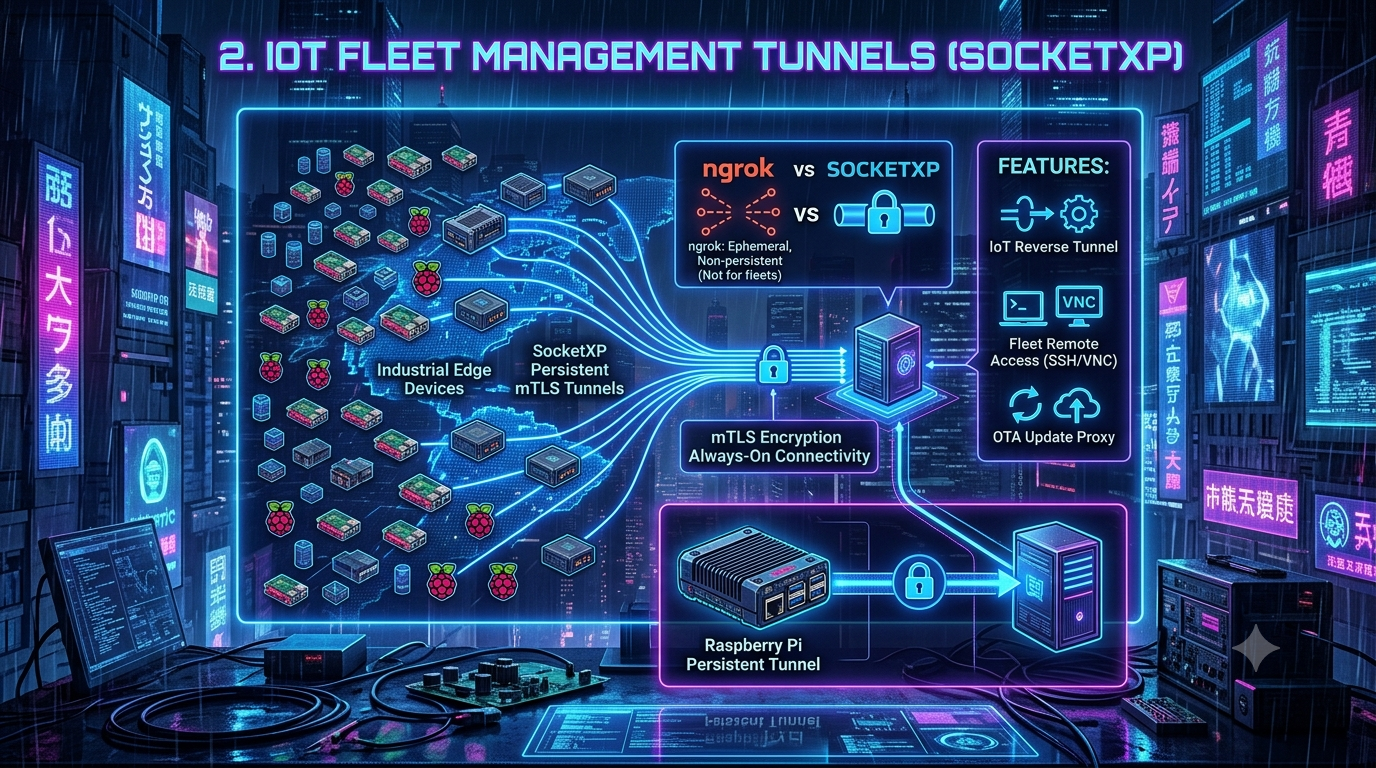
Transitioning from a single local development server to a distributed fleet of 100 field-deployed Raspberry Pis or industrial edge controllers introduces a completely different class of networking problem. The ephemeral, single-session tunneling tools developers reach for during prototyping fall apart once hardware is scattered across warehouses, vehicles, and customer sites. Purpose-built IoT device management platforms exist specifically to fill that gap — providing always-on, outbound-only tunnels for remote SSH, VNC/RDP, and over-the-air (OTA) updates without opening a single inbound port. SocketXP is one of the more established players in this space, so it’s a useful lens for looking at what a real IoT fleet-management stack actually needs to do.
Edge devices don’t sit in climate-controlled racks with static IPs. They’re deployed in warehouses, agricultural fields, retail stores, and moving vehicles — environments that introduce network layers traditional port-forwarding was never built to penetrate.
The Connectivity Problem: NAT, CGNAT, and Firewalls
A fleet of Linux-based edge devices typically connects to the internet through one of three restrictive environments:
- Corporate firewalls. Devices placed inside a client’s network are often blocked from making non-standard outbound connections, and inbound connections are denied outright by IT policy.
- Consumer NAT routers. The device only has a local
192.168.x.xor10.x.x.xaddress, with no direct path in from the internet. - Cellular CGNAT. Devices on 4G/5G modems sit behind Carrier-Grade NAT, where the carrier shares one public IP across hundreds of subscribers — making inbound port-forwarding a non-starter.
Configuring OpenVPN or IPSec across all three environments means negotiating with client IT departments, managing key exchanges, and touching routers you don’t control. A reverse tunnel sidesteps this: instead of listening for inbound traffic, a lightweight agent on the device dials out to a cloud gateway over a standard, always-allowed port (typically 443). Once that outbound connection is up, the gateway can route authenticated traffic back down it. The device stays invisible to internet-wide port scans — there’s nothing listening for a botnet to find.
SocketXP vs. ngrok — and How That Comparison Has Actually Changed
The “SocketXP vs. ngrok” framing shows up a lot in this space, but it’s worth being precise about what each product covers today, because ngrok’s positioning here has shifted meaningfully.
Ngrok’s roots are as a developer productivity tool for exposing a localhost server so someone can test a webhook or share a build. For a long time, “device fleets” were out of scope. That’s no longer accurate: ngrok now ships a dedicated Device Gateway product. Per ngrok’s own device-gateway page, it gives each device a secure, addressable endpoint over an outbound connection, supports HTTP, TCP, TLS, and SSH natively (with other protocols like Modbus or RDP tunneled over TCP/TLS), ships agent SDKs for Go, Python, Rust, and Java for embedding into your own device software, and includes fleet-level features — per-device auth tokens, IP restrictions, JWT validation via Traffic Policy, and real-time fleet observability. Billing for fleets is pay-as-you-go at $0.02 per active-endpoint-hour (an idle device with an online endpoint doesn’t accrue charges), with custom per-device or per-customer pricing available for larger rollouts. Notably, ngrok’s own device gateway FAQ is explicit that this is still a connectivity and access-control layer, not a device management platform — ngrok doesn’t have OTA/firmware update delivery, resource monitoring, or asset tracking built in.
That last point is the real dividing line. SocketXP bundles the same kind of outbound-tunnel connectivity with a device-management layer purpose-built for fleets: an Artifact Registry and deployment system for OTA updates, device status and resource-usage monitoring with webhook alerts, GPS-based asset tracking, and an on-premises self-hosting option for regulated or air-gapped environments. If what you need is connectivity plus access control, ngrok’s Device Gateway is now a legitimate option that didn’t really exist before. If you need to actually push firmware, track device health, and manage a fleet lifecycle, that’s still functionality you’d have to build yourself on top of ngrok.
| Capability | ngrok (Device Gateway) | SocketXP |
|---|---|---|
| Core model | Outbound agent/SDK per device; addressable endpoint | Outbound agent per device; SSL/TLS reverse tunnel |
| Native protocols | HTTP, TCP, TLS, SSH (others tunnel over TCP/TLS) | SSH, VNC, RDP (via xrdp), HTTP/HTTPS, SFTP/SCP, direct TCP |
| Fleet device management | Per-device URLs, per-device auth tokens, fleet-wide Traffic Policy, real-time observability | Device groups/tags, status + resource monitoring with webhook alerts, GPS asset tracking |
| OTA/firmware update delivery | Not offered — build your own on top of the connectivity layer | Built-in Artifact Registry + deployment system (10 MB artifact cap) |
| Billing model | $0.02/active-endpoint-hour, PAYG; custom per-device/per-customer pricing for fleets | Contact-sales pricing; not published self-serve |
| Self-hosting | Not available | Community Free edition (limited features, non-commercial) or licensed Enterprise edition |
| Security model | mTLS, IP restrictions, JWT validation at the edge | Mutual TLS (mTLS) end to end |
If your deployment is a handful of developers sharing local web apps, a general-purpose tunneling tool is still the right call. If you’re managing edge controllers, robotics compute nodes, or kiosks where an offline device means a truck roll, the device-management layer — whichever vendor provides it — is what actually matters.
Setting Up a Persistent Tunnel on a Raspberry Pi
SocketXP’s agent is a single Go binary with no runtime dependencies, published for Linux, macOS, and Windows across x86, ARM, MIPS, and RISC-V architectures. The current documented install path is architecture-specific rather than a single generic URL:
# amd64 (most cloud VMs, x86_64 desktops)
curl -LO https://portal.socketxp.com/download/linux/amd64/socketxp && chmod +wx socketxp && sudo mv socketxp /usr/local/bin

# ARM (Raspberry Pi 3/4/5, most embedded Linux boards)
curl -LO https://portal.socketxp.com/download/linux/arm/socketxp && chmod +wx socketxp && sudo mv socketxp /usr/local/bin
Authenticate the device against your account. For fleet deployments, it’s worth naming the device and assigning it to a group at login time rather than doing it later in the portal:
sudo socketxp login <your-auth-token> --iot-device-name "temp-monitor-12345" --iot-device-group "temp-monitor"
This generates a per-device private key at /var/lib/socketxp/device.key; the auth token itself is never written to disk on the device, so a compromised unit doesn’t leak account-wide credentials.
To survive reboots and network blips, the agent installs as a native systemd service:
sudo socketxp service install
sudo systemctl enable socketxp
sudo systemctl start socketxp
From that point on the agent maintains a persistent connection to the gateway, sending a keepalive ping every 90 seconds by default (configurable via ping_interval in config.json) to stop NAT table entries from timing out on flaky cellular links — the agent tears down and re-establishes the tunnel if three consecutive pings go unanswered.
Remote Access: SSH, VNC, and RDP
SocketXP routes SSH, VNC, and RDP (via xrdp) traffic through the same SSL/TLS reverse tunnel, and there’s no public TCP endpoint an attacker could scan for — connections are only accepted through the authenticated agent or the portal’s browser terminal.
There are two supported ways to actually get a session going:
Browser terminal. Log into the SocketXP portal, select a device, and click the terminal icon to get a full shell session with no local client needed — useful for triage when you’re away from your usual machine.
Slave Mode, for your own SSH client. For key-based auth or a client like PuTTY or FileZilla, run the agent in “IoT Slave Mode” on your own laptop. It behaves like a local proxy: it opens a local port and forwards anything sent to it, over the tunnel, to a specific device.
socketxp connect tcp://localhost:3000 --iot-slave --peer-device-id "abc123456789" --peer-device-port 22 --authtoken <device-access-token>
Then point a normal SSH client at the local port:
ssh -i ~/.ssh/john-private.key john@localhost -p 3000
Slave Mode isn’t SSH-specific — the same mechanism works for SCP, rsync, VNC/RDP, a local database client, or any other TCP-based service running on the device. Note that this requires a DEVICE_ACCESS-scoped auth token rather than the general-purpose account token, which keeps a stolen laptop from becoming a skeleton key to the whole fleet.
OTA Updates: What the Workflow Actually Looks Like
This is the piece that most differentiates a device-management platform from a plain tunnel, so it’s worth describing precisely rather than in the abstract.
Step 1 — Package and upload an artifact. The SocketXP Artifact Registry accepts exactly two artifact types: a tar.gz bundle, or a standalone script. If you’re shipping an application binary, firmware image, Debian/RPM package, or Docker-related config, you bundle it into a tar.gz alongside a workflow script named update.sh that contains the install/rollback logic. If your image already lives in a third-party registry (Docker Hub, GHCR, ECR), you can skip the bundle and upload just the update.sh script, which pulls the image at deploy time. One real constraint worth planning around: artifact files are capped at 10 MB — fine for application binaries, config, and most Debian packages, tight for a full firmware image or container layer, which is why the docs push you toward pulling large payloads from an external registry inside the script rather than bundling them directly.
Step 2 — Create a deployment. A deployment targets a specific device, a device group, or a tag, and reuses an already-uploaded artifact — so the same build can be rolled out to a test group, then production, then a canary subset of production, without re-uploading anything. SocketXP’s own documentation explicitly recommends exactly this staged rollout: test group first, verify logs, only then promote to production.
A few operational details that are easy to get wrong if you’re assuming this works like a managed OS updater:
- The safety net is the script you write, not a platform guarantee. SocketXP doesn’t independently checksum or verify artifact integrity on the device beyond the transfer itself — the “verify, back up, install, health-check, roll back on failure” logic lives entirely inside
update.sh, which you author. Treat the workflow script as the actual safety mechanism, not an add-on. - Failed deployments don’t auto-retry. If a deployment fails on a device, SocketXP does not retry it automatically — you create a fresh deployment targeting the devices that failed.
- Offline devices queue updates. A device that’s down when a deployment goes out will pick it up on its next check-in, with roughly a five-minute gap enforced between queued updates if more than one is pending.
Fleet Health: Monitoring and Asset Tracking
Two features round out the device-management side and are worth knowing about even if you don’t reach for them immediately:
Device status and resource monitoring. The agent can push device up/down events to a webhook URL you register (Slack’s incoming-webhook format works directly, as does any custom endpoint). Separately, resource monitoring — added in agent v2.0.1 — watches CPU, memory, and disk usage and fires a webhook alert when any of them cross a configurable threshold (80% by default). Alerts are throttled to at most one per device per five-minute window, so a device stuck in a bad state doesn’t flood your channel.
GPS-based asset tracking. For mobile or field-deployed hardware, the agent can periodically report device location to the gateway, either by reading a geolocation.json file written by your own GPS-reading code, or via the Google Geolocation API if the device has no GPS unit of its own. Locations are viewable on a map in the portal, and retrievable through the API. The default polling interval is 24 hours, configurable down to whatever cadence your bandwidth budget allows.
Zero Trust: Mutual TLS and Outbound-Only Connections
SocketXP’s security model rests on Mutual TLS (mTLS): unlike a typical HTTPS connection, where only the server proves its identity, both the device and the cloud gateway authenticate each other cryptographically before any data moves. Every SSH keystroke, VNC frame, and OTA payload travels over that same encrypted channel, and because only devices registered to a specific account can complete the handshake, a device outside that account has no path to intercept or request an update meant for someone else’s fleet.
The outbound-only design compounds this: the device’s local firewall drops all unsolicited inbound traffic by default, so a port scan across a block of cellular IPs simply finds nothing to talk to.
Self-Hosting, If You Need It
For zero-trust, air-gapped, or regulated deployments where routing device traffic through a third-party cloud isn’t an option, SocketXP’s gateway server (socketxp-gtwy) can be self-hosted as a VM or Docker container in your own data center or private cloud, with RPM, Debian, and Docker Compose install paths, PostgreSQL for production data, and optional MongoDB for security/audit event logging. Worth knowing before you plan around it: without a license file, the self-hosted gateway runs in a Community Free mode with a reduced feature set and no vendor support, positioned for hobbyist and non-commercial use. Full functionality requires an Enterprise license (a 30-day free trial is available), so budget for that step if self-hosting is a production requirement rather than a lab experiment.
The Bottom Line
Managing a fleet of remote hardware needs infrastructure built for the physical world’s unpredictability, not just a tunnel to a laptop’s localhost. The gap between “expose a port” and “operate a fleet” is real, and it’s worth being clear-eyed about which side of that line a given tool sits on: ngrok’s Device Gateway now closes part of that gap on the pure-connectivity side, but OTA delivery, resource monitoring, and asset tracking are still the differentiators for purpose-built platforms like SocketXP. Whichever you pick, the pattern that actually keeps a distributed fleet secure and online is the same — persistent, outbound-only, mutually authenticated tunnels, with device management layered on top rather than bolted on after the fact.
Changelog
Fact-checked against SocketXP’s official documentation (docs.socketxp.com), ngrok’s device-gateway page, and current pricing pages. Corrections and additions from the original draft:
- ngrok comparison rewritten entirely. The original draft’s “ngrok has introduced device gateway features” was vague to the point of being misleading. ngrok now ships a named, documented Device Gateway product (ngrok.com/use-cases/device-gateway) with fleet-wide Traffic Policy, per-device auth tokens, SDKs in four languages, and $0.02/active-endpoint-hour PAYG pricing. The comparison table was rebuilt from ngrok’s own FAQ and feature copy rather than treating ngrok as a bare dev-tunnel tool.
- Removed the unverified SHA-256 checksum claim. The original stated SocketXP generates and verifies a cryptographic checksum for every artifact. SocketXP’s OTA documentation describes no such automatic integrity check — verification, backup, and rollback-on-failure logic all live inside the user-authored
update.shworkflow script. Rewrote the OTA section to reflect that the safety mechanism is the script, not a platform guarantee. - Added the 10 MB artifact size cap, an operationally significant constraint absent from the original draft, sourced from SocketXP’s OTA Update documentation.
- Added that failed OTA deployments do not auto-retry and that offline devices queue updates with a ~5-minute gap between them — both explicitly stated in SocketXP’s docs, both missing from the original.
- Corrected the install command. The original used a single generic
curl -O .../download/linux/socketxpURL. Current documentation serves architecture-specific binaries (/download/linux/amd64/socketxp,/download/linux/arm/socketxp, etc.). - Corrected the systemd/local-SSH-client section. The original’s
ssh -p 2222 pi@localhostwasn’t paired with any actual SocketXP command. Replaced with the real “IoT Slave Mode” flow and its documentedsocketxp connect tcp://localhost:3000 --iot-slave --peer-device-id ... --peer-device-port 22 --authtoken <device-access-token>syntax, plus the correct auth-token scope (DEVICE_ACCESS, not the general account token). - Added RDP support (via xrdp) alongside SSH and VNC — documented but omitted from the original’s remote-access section.
- Added a new Fleet Health section covering device status/resource monitoring (webhook alerts, 80% default threshold, 5-minute alert throttling, agent version gating) and GPS/Google-Geolocation-API asset tracking — real, documented features not mentioned in the original draft at all.
- Refined the self-hosting claim. The original stated self-hosting is available without qualification. Corrected to note the distinction between the unsupported, feature-limited Community Free edition and the licensed Enterprise edition (30-day trial, then paid), per SocketXP’s self-hosting documentation.
- Softened the pricing claims. Neither vendor publishes fleet/device pricing as simple self-serve numbers beyond ngrok’s per-endpoint-hour rate; removed any implied pricing comparison that wasn’t sourced.
- Left the NAT/CGNAT/firewall explanation largely intact — this is foundational networking material that checked out against general technical consensus and didn’t need vendor-specific sourcing.
Related InstaTunnel pages
Continue from this article into the most relevant product guides and workflows.
Related Topics
Keep building with InstaTunnel
Read the docs for implementation details or compare plans before you ship.