Testing Passkeys Through a Tunnel: RP ID, Origins, and Why Credentials Don’t Follow You From localhost
Passkeys made on localhost vanish behind a tunnel. Learn how WebAuthn RP ID and origins work, and why a stable subdomain stops orphaned credentials.
Quick answer
Testing Passkeys Through a Tunnel: RP ID & Origin Guide: localhost tunnel answer
A localhost tunnel gives your local app a public HTTPS URL without opening router ports, which is useful for demos, QA, mobile testing, and provider callbacks.
How do I expose localhost without opening ports?
Use a reverse HTTPS tunnel. Your machine connects outbound to the tunnel service, and the public URL forwards requests back to your local app.
When should I use a localhost tunnel?
Use one for webhook testing, OAuth callbacks, client demos, QA previews, mobile device checks, and short-lived development reviews.
You build a passkey flow on http://localhost:3000. Registration works, login works, and you feel done. Then you open a tunnel so a real phone can try it, and the login screen offers no passkeys at all. Nothing is broken in the usual sense. The tunnel is up, the certificate is valid, the browser is happy. Your credentials simply live somewhere else.
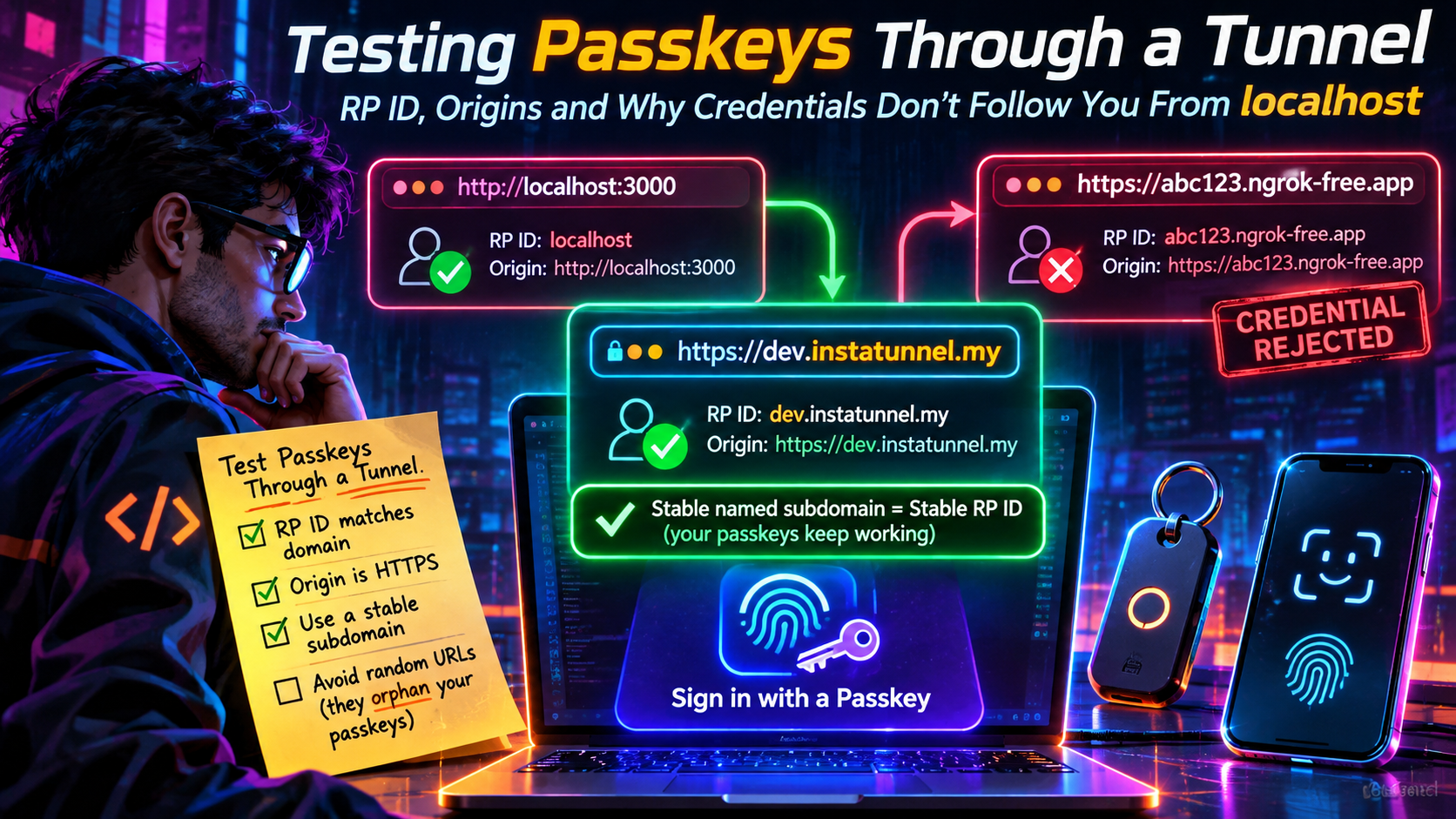
Passkeys are bound to a domain, not to your app or your laptop. Test through a tunnel and the tunnel’s hostname becomes part of your credential. This guide covers the rules, the backend configuration, and why a stable named tunnel subdomain keeps today’s passkey alive tomorrow.
The Short Version
- A passkey belongs to one Relying Party ID (RP ID), which is a domain name.
localhostand a tunnel hostname are different RP IDs, so their credentials never cross over. - The RP ID must equal the page’s hostname or be a registrable parent domain of it. It can’t be a public suffix such as
com. - Your server checks the RP ID and the full origin (scheme, host and port) separately.
- A random tunnel URL changes both on every run, silently orphaning every passkey you registered.
- A stable, named tunnel subdomain gives you a stable RP ID.
What an RP ID Actually Is
Every WebAuthn credential is created for a single RP ID, and every request is processed in the context of one. The W3C’s related-origin-requests explainer describes it as essentially a domain name. An origin may use any RP ID formed by discarding zero or more labels from the left of its effective domain, stopping before an effective top-level domain. So a page on www.example.com can use www.example.com or example.com, but not com.
Three practical rules follow:
- Suffix rule. The RP ID must be the page’s effective domain or a registrable domain suffix of it. An RP ID that isn’t a suffix of the current origin makes the browser throw a
SecurityError. - No public suffixes. Browsers validate the RP ID against the Public Suffix List, so a bare suffix like
comorco.ukis rejected, while a real domain such asexample.comis fine.localhostis accepted for development. - Secure context. WebAuthn needs HTTPS. The development exception covers
localhostand loopback addresses, not a plain-HTTP page on a LAN IP address like192.168.1.42.
An RP ID is a bare host string. Including a scheme, port or path makes it invalid: https://example.com, example.com:8443 and example.com/auth all fail, while example.com is correct.
If you leave rp.id out of your options, the browser defaults it to the effective domain of the calling page, which is the full hostname. That default is convenient on localhost and quietly dangerous on a tunnel, because the credential is then scoped to exactly that host.
The standard itself is settled. The W3C published WebAuthn Level 3 as a full Recommendation on 25 August 2026, succeeding Level 2 (April 2021), with future work moving to Level 4. The RP ID rules above are not new in Level 3, so nothing in the promotion changes how you test.
Why localhost Credentials Don’t Follow You to a Tunnel
A credential created while the page was http://localhost:3000 is stored under the RP ID localhost. When you open https://my-app.tunnel.example and call navigator.credentials.get(), the browser looks for credentials whose RP ID matches my-app.tunnel.example (or a valid parent). It finds none, so the passkey chooser comes up empty or the call fails.
Localtonet’s passkey guide takes the same position: treat localhost credentials and tunnel-hostname credentials as separate test environments, and don’t expect a credential registered for localhost to authenticate under a tunnel hostname. That’s the right mental model. A tunnel doesn’t “forward” your localhost identity. It gives your app a new public identity, and WebAuthn keys everything to identity.
Two other things hold old state. The authenticator (iCloud Keychain, Google Password Manager, Windows Hello, a hardware key) only offers credentials for the matching RP ID, and your database may still hold public keys attached to an RP ID you no longer serve.
Two Checks, Two Places: RP ID and Origin
Passkey failures through a tunnel often get blamed on “origin mismatch” when the actual problem is the RP ID, or the reverse. They’re verified in different places.
| Check | Where it happens | What must match |
|---|---|---|
| RP ID vs. page hostname | Browser, before the ceremony starts | rp.id equals the hostname or a registrable parent |
| RP ID hash | Your server, reading authenticator data | SHA-256 of your configured RP ID |
| Origin | Your server, reading clientDataJSON |
Exact scheme + host + port in your allowed-origins list |
Server libraries expose these as two settings. SimpleWebAuthn calls them rpID and expectedOrigin, py_webauthn uses rp.id and origin, and Java libraries commonly use relyingParty.id and origins. Corbado’s tunnel guide notes that the origin comparison is case-sensitive and includes the scheme, so https://abc123.ngrok-free.app has to be added verbatim.
For a tunnel at https://pk-test.my-tunnel.dev, the RP ID is pk-test.my-tunnel.dev (no scheme, port or path) and the origin is https://pk-test.my-tunnel.dev. Putting https:// in the RP ID, or the bare hostname in the origin list, fails, and the error rarely says which.
The origin is also not the address your tunnel client forwards to. http://127.0.0.1:3000 is where traffic ends up, but the browser-facing public origin is what the server must expect. If you’re unsure, run window.location.origin and window.location.hostname in the console on the tunneled page and copy those values into your config.
The Random-URL Trap
Here’s the failure mode in full. You start a tunnel that assigns a random hostname such as crispy-fox-1234.example-tunnel.com. You register a passkey. Tomorrow you restart, and the hostname is quiet-owl-5678. Your app is identical, but the RP ID has changed, so none of yesterday’s credentials apply.
What makes this nasty is the lack of a signal. Registration succeeded, and the credential exists in your password manager and your database. Login just shows nothing, or a generic NotAllowedError, which browsers keep deliberately vague. Orphans also pile up: synced passkey managers keep one entry per dead hostname until you delete them, and your credentials table fills with rows tied to RP IDs you’ll never see again.
How common this is depends on your tunnel:
- Cloudflare quick tunnels (
cloudflaredwith no account) give you a random*.trycloudflare.comhostname that lasts until you stop the process, and Cloudflare itself frames them as a way to experiment, with no uptime guarantee. A Cloudflare named tunnel needs a free account and a domain on Cloudflare DNS, and gives you a hostname you choose that doesn’t change. - ngrok changed this in its favor. Every account, free ones included, gets an assigned dev domain (for example
your-assigned-name.ngrok-free.dev) that’s static across agent restarts and stays with the account. You can’t rename it, though. Choosing your own subdomain requires the paid Hobbyist plan, and random domain generation isn’t available on the free plan. Free endpoints have no timeout, and free HTTPS endpoints show visitors an interstitial page on first load, which is worth knowing before you hand a phone to a teammate. - Named-subdomain tunnels, InstaTunnel among them, let you pick the hostname on the command line. InstaTunnel’s package documentation shows
instatunnel 3000 --subdomain myappproducinghttps://myapp.instatunnel.my, and its own materials advertise custom subdomains on the free tier.
The point isn’t which vendor wins. It’s that passkey testing needs a hostname you choose and keep.
Pick One Name and Pin It Everywhere
The fix is boring in the best way: choose a hostname once, then derive your RP ID and origin from it.
Step 1: Claim a stable subdomain
instatunnel 3000 --subdomain pk-test
# https://pk-test.instatunnel.my
With ngrok, use your assigned dev domain instead (shown under Domains in the dashboard):
ngrok http 3000 --url https://<your-dev-domain>.ngrok-free.dev
Pick a name that reads as test infrastructure (pk-test, acme-passkeys-dev) so nobody mistakes it for something real.
Step 2: Keep identity in environment variables
# .env.tunnel
RP_ID=pk-test.instatunnel.my
RP_ORIGIN=https://pk-test.instatunnel.my

# .env.local
RP_ID=localhost
RP_ORIGIN=http://localhost:3000
Don’t build these from request headers. Your app sits behind a proxy, so the Host and forwarded headers it sees may not match what the browser used, and trusting client-supplied X-Forwarded-* headers from every source just to silence an origin error is its own security problem. Configuration is the source of truth, and the headers are not.
Step 3: Wire the config into your WebAuthn library
import { generateRegistrationOptions, verifyRegistrationResponse }
  from '@simplewebauthn/server';

const rpID = process.env.RP_ID;
const origin = process.env.RP_ORIGIN;

const options = await generateRegistrationOptions({
  rpName: 'Passkey Test App',
  rpID,
  userName: user.email,
});

// later, on the response:
const verification = await verifyRegistrationResponse({
  response,
  expectedChallenge,
  expectedOrigin: origin,
  expectedRPID: rpID,
});
Parameter names differ slightly between library versions, so check your version’s docs. The principle doesn’t change: one RP ID, one origin, both from config, and the same RP ID in registration options, registration verification, authentication options and assertion verification.
Step 4: Use the full hostname as the RP ID
For tunnel testing the full hostname is the safest RP ID. ngrok’s documentation says its managed base domains (ngrok-free.app, ngrok-free.dev and others) are on the Public Suffix List, so the base domain itself can never be your RP ID. The full hostname is always valid and can’t widen the credential’s scope. A broader parent RP ID only makes sense on a custom domain you control, when sharing credentials across subdomains is a deliberate design choice.
Step 5: Check the plumbing around the ceremony
A tunnel changes more than the hostname. Before blaming WebAuthn, confirm:
- No hardcoded localhost URLs. If the page loads through the tunnel but API calls still target
localhost, the ceremony fails for reasons that look like passkey errors. - Cookies survive the new origin. Challenges are tied to a session. If the session cookie isn’t sent on the finish request (wrong domain,
SecureorSameSitesettings), you’ll see a challenge mismatch even though the authenticator did its job. - Dev-server host checks. Some dev servers reject unfamiliar hostnames. Allow the one tunnel hostname rather than disabling the check globally.
Keep localhost and Tunnel Environments Separate
Since the two identities can’t share credentials, stop pretending they might.
- Store the RP ID with every credential. An
rp_idcolumn lets you purge by environment instead of guessing which rows are dead. - Use separate test accounts for localhost and tunnel runs, so “why can’t this user sign in?” stays answerable.
- Delete old test passkeys from your password manager when you retire a hostname. WebAuthn Level 3 defines a Signal API that lets a site tell the passkey provider which credentials are still valid, and Chrome and Edge have shipped it since version 132 (January 2025). But the call only works for the RP ID the page is actually served from, so it can clean up stale credentials on your current tunnel hostname, not on hostnames that no longer exist.
- Use throwaway users only. If a tunnel subdomain can be reclaimed by someone else after you drop it, don’t put real accounts behind it.
On the current hostname, a failed login for a credential your server no longer knows is the natural place to signal:
// credentialId: the base64url ID the browser just presented
if (PublicKeyCredential.signalUnknownCredential) {
  await PublicKeyCredential.signalUnknownCredential({
    rpId: process.env.RP_ID,
    credentialId,
  });
}
Always feature-detect first, because support varies by browser and platform.
When Something Fails: A Debugging Table
| Symptom | Likely cause | Fix |
|---|---|---|
SecurityError on create() or get() |
rp.id isn’t the page hostname or a registrable parent of it, or the page isn’t a secure context |
Set rp.id to the tunnel hostname, or omit it deliberately; use the HTTPS URL |
| Passkey chooser empty on the tunnel | Credential was registered under localhost or an older tunnel URL |
Register again under the current hostname |
NotAllowedError |
Cancelled prompt, timeout, or no usable authenticator or credential | Check the console and device screen lock, then confirm the RP ID matches the registration |
| Server says unexpected origin | Origin list lacks the exact https://host string |
Add the full origin, scheme included |
| Server says RP ID hash mismatch | Server rpID differs from the one the browser used |
Make both read from the same env var |
| Works on desktop, not on phone | Phone reached the app over HTTP on a LAN IP | Use the HTTPS tunnel URL on the phone |
| Challenge missing or mismatched | Session cookie not sent, or challenge stored in one process and verified in another | Fix cookie settings for the public host; use a shared session or cache |
| Prompt appears, registration still fails | Server-side verification (origin, RP ID hash, challenge) rejected it | Read your library’s structured error, not just the browser result |
What a Tunnel Is For, and What It Isn’t
A tunnel earns its place for real-device testing. Corbado’s ngrok guide explains why Wi-Fi-only testing fails: an HTTP origin on a LAN IP isn’t a secure context, so the browser won’t run the WebAuthn ceremony. A public HTTPS URL fixes that and lets you check platform authenticators on iOS, Android, Windows and macOS, from a phone on mobile data or a laptop on any network.
It’s the wrong tool for repeatable automation. Chrome’s DevTools WebAuthn tab and the Chrome DevTools Protocol’s WebAuthn domain provide virtual authenticators, and Selenium exposes the same idea through its Virtual Authenticator API, which follows the W3C’s WebAuthn automation model. Playwright and Puppeteer can drive the same CDP domain. They let CI register and assert passkeys headlessly against localhost, but they can’t reproduce platform authenticator UI, passkey-provider sync behavior or real-device quirks. A reasonable split: virtual authenticators on localhost for CI, and a stable tunnel hostname with real authenticators for the device matrix.
Related Origin Requests Won’t Rescue Random URLs
Related Origin Requests (ROR) let other origins use your RP ID. The RP ID’s host publishes a JSON file at https://{RP ID}/.well-known/webauthn with an origins array, and the browser checks that list before allowing a request whose origin doesn’t match the RP ID. Without ROR support, the browser throws a SecurityError.
Support has widened. Chrome (128) and Safari support it, and Firefox added it in version 152, released on 16 June 2026. Chrome caps the list at five distinct labels, where a label is the eTLD+1 name: example.co.uk and example.de both count as example, so they take one slot. All the sites also need to share an account database, since ROR only lets a credential authenticate across origins that already share a user directory.
It’s tempting to see this as a way around changing tunnel URLs. It isn’t: the file has to be served by the RP ID host and list each origin, so you’d be editing it every time a random hostname changes. ROR is worth testing only if your production design uses it, and then two stable tunnel names (one as the RP ID host, one as the related origin) let you rehearse it.
FAQ
Can I use a passkey registered on localhost on my tunnel URL?
No. The RP ID is localhost for the first and the tunnel hostname for the second. Register again under the tunnel hostname.
Can I set the RP ID to the tunnel provider’s base domain?
Usually not. If the base domain is on the Public Suffix List, as ngrok’s managed domains are, browsers reject it. Use the full hostname.
Why did my passkeys vanish after restarting the tunnel?
If the tunnel assigned a new random hostname, your RP ID changed. The old credentials still exist, but only for the old hostname.
Can I test passkeys on my phone without a tunnel?
Only if the page is served from a secure context, which means HTTPS or a loopback address. A plain-HTTP LAN IP address doesn’t qualify, which is why a public HTTPS tunnel (or a trusted local certificate setup) is needed for device testing.
Do I need a new credential if I rename my tunnel subdomain?
Yes. A new hostname is a new RP ID, so register a fresh test credential. An RP ID can’t be edited on an existing credential.
Conclusion
Passkeys test the thing most tunnels weren’t built to preserve, which is a stable public identity. Treat localhost and your tunnel as two separate environments, keep the RP ID and origin in config, and give the tunnel a hostname that doesn’t change. Then the passkey you register on Monday still works on Friday, and your failures point at real bugs rather than a hostname that moved overnight.
Sources
- FIDO Alliance: WebAuthn Level 3 is now a W3C Recommendation
- W3C Web Authentication Level 3
- W3C WebAuthn explainer: Related Origin Requests
- web.dev: Allow passkey reuse across your sites with Related Origin Requests
- Firefox 152 release notes
- MojoAuth: Related Origin Requests across ccTLDs
- MojoAuth: Choosing Your RP ID
- Chrome for Developers: WebAuthn Signal API
- Corbado: Test Passkeys from Localhost with ngrok
- Localtonet: Test WebAuthn Passkeys Through a Localhost HTTPS Tunnel
- ngrok docs: Domains
- ngrok docs: Free plan limits
- ngrok blog: Static dev domains for all ngrok users
- Cloudflare Sandbox docs: Quick vs. named tunnels
- Flavio Copes: The complete guide to Cloudflare Quick Tunnels
- Selenium docs: Virtual Authenticator
- InstaTunnel package README
Related InstaTunnel pages
Continue from this article into the most relevant product guides and workflows.
Related Topics
Keep building with InstaTunnel
Read the docs for implementation details or compare plans before you ship.