Orchestration d'événements complexes : configuration de tunnels webhook multi-port
Quick answer
Orchestration d'événements complexes : configuration de tunnels webhook multi-port: webhook testing answer
For local webhook testing, run your app locally, expose it with a public HTTPS tunnel, and paste the stable callback URL into the provider dashboard.
How do I test webhooks on localhost?
Start your local server, open a public HTTPS tunnel to that port, configure the provider webhook URL, and inspect events in your local logs.
Why does a stable webhook URL matter?
Stable URLs prevent provider dashboards from needing manual callback updates every time you restart a tunnel.
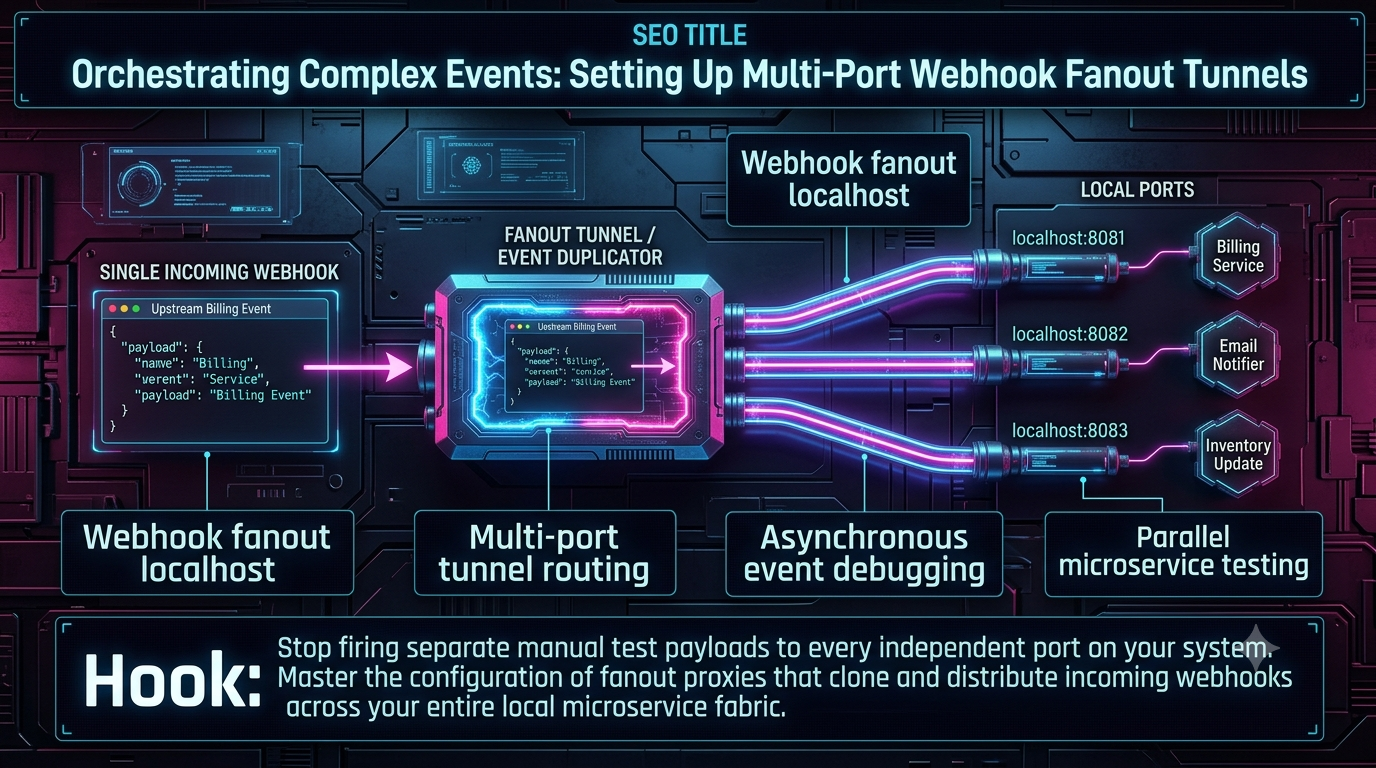
Arrêtez d’envoyer manuellement des payloads de test séparés à chaque port indépendant de votre système. Maîtrisez la configuration de proxies de fanout qui clonent et distribuent les webhooks entrants sur l’ensemble de votre microservice local.
Introduction : Le goulot d’étranglement du développement local dans les systèmes événementiels
La transition des architectures monolithiques vers des microservices découplés et orientés événements a résolu d’importants problèmes de scalabilité en production, mais a aussi introduit une friction considérable en développement local. Dans un environnement cloud-native moderne, un événement asynchrone — un paiement Stripe réussi, un commit GitHub, une création de commande Shopify — est généralement ingéré par une passerelle API, puis poussé dans un bus d’événements ou un broker de messages (Apache Kafka, AWS EventBridge, Google Pub/Sub), et immédiatement diffusé à tous les microservices abonnés à ce sujet.
Cette architecture pub-sub est élégante et très résiliente. La reproduire sur une machine de développement locale, cependant, est notoirement frustrant. Les fournisseurs de webhooks externes nécessitent une URL HTTP publique unique pour livrer leurs payloads. Historiquement, les développeurs ont utilisé des outils de tunneling comme ngrok ou localtunnel pour mapper une URL publique à un seul port local (par exemple, localhost:3000).
Mais que faire lorsque votre environnement local comprend cinq microservices distincts tournant sur les ports 3001 à 3005, et que trois d’entre eux doivent réagir simultanément au même webhook entrant ?
La solution traditionnelle consiste à recevoir le webhook sur un service, copier manuellement le payload JSON, puis déclencher des requêtes curl séparées vers chaque autre port. Cela rompt le flux de tests continus, et crée des différences artificielles entre local et production. C’est ici qu’une architecture de fanout webhook localhost devient essentielle.
Comprendre les tunnels de fanout webhook multi-port
Un tunnel de fanout webhook se situe à la frontière de votre environnement de développement local et agit comme un duplicateur d’événements intelligent et un routeur de trafic. Au lieu d’un tuyau direct 1:1 entre Internet public et un seul serveur d’application, le tunnel de fanout intercepte la requête HTTP POST entrante, clone le payload (y compris les headers et métadonnées), et l’envoie simultanément à une liste prédéfinie de ports locaux.
L’architecture de base
L’anatomie d’une configuration de routage de tunnel multi-port standard comporte trois couches :
Le nœud d’entrée (Ingress Node) — Une URL publique unique et stable fournie par un service de tunneling ou une passerelle webhook (par ex., https://events.hookdeck.com/e/src_...). C’est l’URL que vous enregistrez auprès des fournisseurs tiers une seule fois, et que vous ne modifiez jamais.
Le routeur de fanout (Fanout Router) — Un proxy local ou une table de routage gérée dans le cloud qui mappe le chemin d’entrée à plusieurs destinations locales. C’est ici que réside la logique de clonage.
Le tissu local (Local Fabric) — Vos microservices découplés tournant en parallèle sur localhost:8081, localhost:8082, etc.
Lorsqu’un service tiers envoie un événement, il atteint le nœud d’entrée. Le routeur de fanout reconnaît le type d’événement (via l’inspection des headers ou le routage par chemin) et multiplie la requête, envoyant des POST HTTP standards à tous les ports locaux abonnés en parallèle.
Pourquoi le fanout est crucial pour tester des microservices en parallèle
Les tests parallèles de microservices valident comment plusieurs services indépendants réagissent à un seul changement d’état, sans nécessiter un environnement d’intégration partagé.
Prenons une plateforme e-commerce. Lorsqu’un événement checkout.session.completed arrive d’un processeur de paiement :
- Le Service Commande (Port 4000) doit créer un enregistrement en base et lancer la préparation.
- Le Service Inventaire (Port 4001) doit décrémenter le stock disponible.
- Le Service Email (Port 4002) doit envoyer un reçu au client.
Si ces services sont vraiment découplés, ils ne communiquent pas directement — ils dépendent tous de l’événement initial. Sans tunnel de fanout, tester ce flux en local nécessite un générateur d’événements mock complexe. Avec une configuration de fanout multi-port, vous effectuez un vrai paiement test, le webhook atteint votre URL de tunnel unique, et votre routeur local déclenche instantanément les trois services en parallèle. Vous visualisez leurs logs en temps réel, réduisant drastiquement la friction en QA locale et assurant que vos services gèrent la concurrence correctement.
Le paysage d’outillage 2026 pour le routage de tunnels multi-port
À mesure que les architectures webhook ont mûri, l’outillage a évolué des tunnels TCP basiques vers des passerelles intelligentes, conscientes des webhooks. La mise en place d’une architecture de fanout local peut être réalisée via plusieurs approches, allant d’outils CLI cloud gérés à des reverse proxies locaux personnalisés.
1. Passerelles webhook modernes (Hookdeck CLI)
Des plateformes spécialisées de gestion de webhooks ont émergé comme choix pratique pour un routage complexe. Hookdeck fournit une CLI dédiée qui comprend nativement le fanout webhook.
Le modèle est simple : vous créez une Source (votre URL webhook permanente), puis définissez des Connections qui relient cette Source à plusieurs Destinations. Chaque Connection peut comporter ses propres règles de filtrage, politique de retry, et logique de transformation. Cela signifie qu’un webhook entrant peut fanout différemment selon son contenu — un paiement peut aller à trois destinations, alors qu’un remboursement à cinq.
Avec la CLI, un développeur peut écouter plusieurs sources en une seule commande :
$ hookdeck listen 3000 '*'
●── HOOKDECK CLI ──●
Listening on 3 sources • 3 connections

stripe   │ Requests to → https://events.hookdeck.com/e/src_...
         └─ Forwards to → http://localhost:3000/webhooks/stripe

shopify  │ Requests to → https://events.hookdeck.com/e/src_...
         └─ Forwards to → http://localhost:3000/webhooks/shopify

twilio   │ Requests to → https://events.hookdeck.com/e/src_...
         └─ Forwards to → http://localhost:3000/webhooks/twilio

💡 Ouvrez le tableau de bord pour inspecter, réessayer & mettre en favori les événements :
   https://dashboard.hookdeck.com/events/cli
Hookdeck expose aussi une commande metrics requests qui montre la moyenne d’événements par requête — mesurant directement l’efficacité du fanout entre vos connexions. La CLI est gratuite pour le développement et fournit des URLs de sources permanentes et stables, un avantage pratique majeur par rapport à ngrok, qui ne propose pas d’URLs stables en version gratuite.
Hookdeck a aussi récemment open-source Outpost, une bibliothèque d’infrastructure pour webhooks sortants et destinations d’événements supportant le fanout nativement — un message envoyé à un topic est répliqué et livré à plusieurs endpoints pour traitement parallèle. Outpost supporte nativement Webhooks, Amazon EventBridge, AWS SQS, GCP Pub/Sub, RabbitMQ, et Kafka, ce qui le rend adapté aux équipes nécessitant un fanout vers des destinations hétérogènes.
2. Pattern du dispatcher local (Proxies personnalisés Express/FastAPI)
Pour les équipes préférant zéro dépendance externe autre qu’un tunnel comme ngrok ou Cloudflare Tunnel, le Pattern du Dispatcher Local est très efficace.
Dans cette configuration, vous créez un script léger (Node.js/Express ou Python/FastAPI) tournant sur un port dédié (par ex., localhost:9999). Vous pointez votre tunnel standard vers ce port. Le script agit comme une API Gateway interne : lorsqu’il reçoit une requête, il utilise des clients HTTP asynchrones (axios ou httpx) pour déclencher des requêtes non bloquantes vers vos microservices.
// local-fanout-dispatcher.js
const express = require('express');
const axios = require('axios');
const app = express();

app.use(express.json());

const SERVICES_LOCAUX = [
  'http://localhost:4000/webhooks/orders',
  'http://localhost:4001/webhooks/inventory',
  'http://localhost:4002/webhooks/notifications'
];

app.post('/fanout', (req, res) => {
  // Accuser réception immédiatement
  // Stripe, Shopify, GitHub attendent un 2xx dans ~30s
  res.status(202).send('Accepté pour fanout');

  const promesses = SERVICES_LOCAUX.map(serviceUrl =>
    axios.post(serviceUrl, req.body, { headers: req.headers })
      .catch(err => console.error(`Échec livraison à ${serviceUrl} :`, err.message))
  );

  Promise.allSettled(promesses).then(() => console.log('Fanout terminé'));
});

app.listen(9999, () => console.log('Routeur de fanout en écoute sur le port 9999'));
Ce pattern offre une flexibilité ultime : injecter de la latence artificielle, modifier les payloads par destination, ou simuler des partitions réseau lors de tests parallèles. L’inconvénient est que vous gérez la logique de retry, la ré-émission, et le suivi de livraison — des fonctionnalités que les passerelles webhook gèrent automatiquement.
Côté tunnel : ngrok fonctionne désormais comme un outil d’accès pour le développement et DevOps, offrant inspection du trafic, replay, contrôles d’accès, et domaines statiques. Il a reçu un tour de financement de 50 millions de dollars mené par Lightspeed Venture Partners et a été nommé gagnant des Microsoft Store Awards en 2025. Cependant, il ne supporte plusieurs endpoints qu’avec des plans payants, et ne propose pas de fanout ou filtrage d’événements en version gratuite.
Cloudflare Tunnel (ex-Argo Tunnel) reste une alternative gratuite solide pour l’entrée, connectant un serveur local au réseau global de Cloudflare via une seule commande cloudflared tunnel. Comme ngrok, il expose un seul endpoint par tunnel, la logique de fanout devant donc résider dans votre dispatcher local.
3. Passerelles API open source (KrakenD, Kong, Traefik)
Pour les environnements d’entreprise où la configuration locale doit refléter exactement la production, les API gateways Dockerisées sont une solution naturelle.
KrakenD est une passerelle stateless, haute performance, écrite en Go. En début 2025, environ 2000 entreprises l’utilisent, notamment en Europe. Elle fonctionne à partir d’un fichier de configuration unique (JSON, YAML, ou TOML) sans dépendances de base de données — lancer une instance locale via Docker Compose ne nécessite qu’un volume pour le fichier de config. KrakenD supporte nativement l’agrégation de requêtes et le fanout multi-backend via sa configuration d’endpoint.
Kong Gateway est la passerelle API open source la plus déployée, avec environ 345 000 déploiements exposés sur Internet et 37 000 entreprises utilisant la plateforme début 2025. Son écosystème de plugins supporte la duplication de requêtes et le forwarding multi-destinations, mais sa configuration est plus lourde que KrakenD pour un usage local.
Traefik (v3.6.5, sortie décembre 2025) est un reverse proxy cloud-native et un load balancer écrit en Go, conçu pour Kubernetes. Avec une note d’environ 4.6 étoiles sur G2, il est particulièrement adapté aux équipes utilisant Docker Compose ou Minikube, où Traefik peut auto-découvrir les services et router le trafic entrant via des règles déclaratives.
En lançant un conteneur gateway avec vos microservices via docker-compose, vous établissez une topologie réseau locale où votre tunnel d’entrée alimente directement la gateway, qui gère le fanout selon une configuration déclarative stricte. Cette approche est plus lourde qu’un dispatcher personnalisé, mais crée un environnement local identique à la production — c’est tout l’intérêt.
Maîtriser le débogage asynchrone d’événements
Déployer un tunnel de fanout multi-port résout le problème de livraison mais introduit un nouveau défi : le débogage d’événements asynchrones. Lorsqu’un payload unique déclenche des actions simultanées sur trois services, suivre une erreur demande une approche structurée.
Le chaos de la concurrence
Parce que le routeur de fanout livre le webhook à plusieurs ports locaux en parallèle, les logs de terminal s’entrelacent. Si le Service Inventaire plante à cause d’un champ JSON malformé mais que le Service Commande réussit, il est difficile d’identifier la cause racine dans la sortie de logs concurrente. La seule mitigation fiable consiste à intégrer un event_id cohérent dans vos logs structurés, pour pouvoir tracer le parcours d’un payload via grep ou un agrégateur de logs local comme Grafana Loki.
Inspection : visibilité à la frontière
Avant qu’un événement n’atteigne votre tissu local, vous devez pouvoir l’inspecter. Les proxies de fanout modernes offrent un tableau de bord web local ou une interface terminal qui intercepte le payload à l’entrée. Cela vous permet de vérifier les headers — y compris les signatures cryptographiques comme Stripe-Signature ou X-Hub-Signature-256 — et le corps JSON brut avant le fanout.
Si une vérification de signature échoue sur tous vos services locaux simultanément, l’inspection à la frontière vous permet de rapidement déterminer si le tunnel a supprimé un header ou si vos variables d’environnement contenant les secrets webhook sont mal configurées. Ngrok (via l’inspecteur http://localhost:4040) et Hookdeck (via le tableau de bord CLI) offrent cette capacité.
Relecture déterministe : le super-pouvoir du débogage
L’un des plus grands avantages d’une configuration de fanout sophistiquée est la relecture sélective.
Considérez le scénario où un webhook est fanouté à trois services. Le Service A et le Service B le traitent avec succès, mais le Service C rencontre une exception de pointeur nul et retourne un 500. Sans relecture, vous devez revenir chez le fournisseur externe (ex., Stripe), générer un nouvel événement de test avec un nouvel event_id, et nettoyer manuellement les états en base de données de A et B pour éviter les doublons.
Avec un routeur de fanout robuste, vous corrigez le bug dans le Service C, redémarrez ce microservice, et cliquez sur « Relecture » spécifiquement pour la livraison échouée vers Port C. Le routeur renvoie exactement le même payload HTTP — mêmes event_id, mêmes timestamps — uniquement au service qui a échoué. Cela transforme un processus de débogage multi-étapes en un cycle de débogage en une seule itération.
Le CLI de Hookdeck conserve l’historique des événements entre sessions, permettant des relectures même après un redémarrage du tunnel. Ngrok supporte aussi la relecture de requêtes via son inspecteur web à localhost:4040, mais l’historique est perdu lors du redémarrage du processus.
Imposer l’idempotence en développement local
Le routage multi-port expose rapidement les défauts de la logique d’idempotence — et le faire en local est bien moins pénible qu’en production.
Les webhooks fonctionnent selon une sémantique de livraison au moins une fois. Ce n’est pas une limitation du fournisseur ; c’est une contrainte mathématique issue du problème des deux généraux et du résultat FLP (Fischer, Lynch, Patterson, 1985). Aucun fournisseur ne peut garantir une livraison exactement une fois au niveau du réseau. La documentation Stripe avertit explicitement qu’un endpoint « pourrait recevoir le même événement plusieurs fois ». La bonne formulation est que l’idempotence exacte est une garantie de traitement, jamais une garantie de livraison — et sa mise en œuvre incombe au consommateur.
Les proxies de fanout amplifient ce risque. Parce que les retries sont suivis indépendamment par destination, chacun de vos services locaux peut recevoir des duplicatas. Si le Service Email met 15 secondes à traiter une requête, bloqué sur un point d’arrêt de débogage, le proxy de fanout peut supposer un timeout et relancer. Lorsqu’on reprend le débogueur, la requête initiale et la relance sont toutes deux traitées, envoyant deux emails.
La mitigation standard consiste en une table de déduplication basée sur event_id :
CREATE TABLE processed_events (
  event_id      VARCHAR(255) PRIMARY KEY,
  processed_at  TIMESTAMPTZ NOT NULL DEFAULT NOW()
);
Chaque microservice vérifie cette table à la réception. Si l’event_id existe déjà, il retourne 200 OK sans réexécuter la logique métier. Une commande Redis SET NX avec TTL est une alternative légère pour les services sans état.
Principaux modes de défaillance à tester en local avec fanout :
- Timeout + relance produisant un duplicata — incident le plus courant en prod
- Livraison hors ordre — un événement
order.updatedarrivant avantorder.created - Échec partiel du fanout — un endpoint retourne 500 alors que d’autres retournent 200 ; la relance doit cibler uniquement la destination échouée
Les politiques de retry diffèrent selon le fournisseur. Stripe relance jusqu’à 3 jours en mode live avec backoff exponentiel. Shopify relance 8 fois sur 4 heures, et peut supprimer automatiquement des abonnements API après 8 échecs consécutifs. Svix tente environ 8 fois réparties sur une journée. Comprendre la politique de retry de vos fournisseurs en amont détermine la durée pendant laquelle votre stockage de déduplication doit conserver les event_id.
Étapes : implémenter une stratégie de fanout local
1. Standardiser l’entrée. Choisissez une solution de tunneling unique pour l’équipe. Qu’il s’agisse d’une passerelle webhook gérée ou d’une configuration Docker Compose avec un dispatcher Node.js personnalisé, chaque développeur doit utiliser le même mécanisme d’entrée. La divergence d’URL — où chaque développeur a une URL différente enregistrée auprès de Stripe — est la cause la plus fréquente de bugs webhook du type « ça marche chez moi ».
2. Découpler la vérification de signature webhook. Dans une configuration multi-port, faire vérifier la signature cryptographique par chaque microservice indépendamment gaspille du CPU et complique la gestion des secrets locaux. Envisagez de déporter cette vérification vers le routeur de fanout. Le routeur vérifie la signature externe une seule fois, la supprime, et signe le payload cloné avec un JWT interne ou un secret partagé avant de fanout. Cela correspond au pattern utilisé par les bus d’événements en production, où l’autorité de signature appartient à la couche d’entrée.
3. Implémenter des retries indépendants par destination. Si votre logique de routage envoie un événement à Port A et Port B, et que Port A retourne 500 alors que Port B retourne 200, le routeur doit mettre en queue une relance uniquement pour Port A. Failer tous les destinations en cas d’échec partiel entraîne que Port B recevra des doublons lors de la prochaine tentative. Hookdeck suit les codes de réponse indépendamment par Connection et gère cela correctement dès la sortie.
4. Filtrer au niveau du routeur, pas du service. Ne pas envoyer chaque événement à chaque port. Utilisez le routage par chemin ou le filtrage par headers au niveau du fanout. Si un développeur travaille exclusivement sur le service Inventaire, configurez le routeur local pour ignorer tous les webhooks qui ne concernent pas l’inventaire. Cela garde les logs locaux ciblés et évite de lancer une logique de service non pertinente en développement.
5. Tester délibérément l’idempotence. Utilisez la fonction de relecture de votre outil de fanout pour envoyer intentionnellement le même événement deux fois rapidement. Si votre service le traite deux fois, votre implémentation d’idempotence a une faille. La détection en local ne prend que quelques minutes, en production cela coûte des clients.
Conclusion
L’époque où l’on copiant manuellement des payloads JSON et déclenchait des commandes curl pour tester des microservices est révolue. À mesure que les architectures modernes s’appuient fortement sur des déclencheurs d’événements tiers, les environnements de développement locaux doivent évoluer pour refléter la nature hautement parallèle et asynchrone des systèmes en production.
En adoptant des tunnels de fanout webhook multi-port, les développeurs peuvent transformer leurs machines locales en répliques précises des bus d’événements cloud-native. Que vous utilisiez une passerelle dédiée comme Hookdeck CLI avec ses URLs de source permanentes et son suivi de retry par connexion, un dispatcher Node.js léger derrière Cloudflare Tunnel, ou une instance KrakenD ou Kong dockerisée qui reflète exactement votre configuration de passerelle en production — centraliser l’entrée webhook et router intelligemment les payloads clonés vers des services découplés est la bonne architecture.
Cela élimine la friction dans les tests d’intégration, accélère le débogage asynchrone grâce à la relecture déterministe, et vous oblige à construire et valider une logique d’idempotence correcte avant que cela ne devienne critique en production. Ne traitez plus vos microservices locaux comme des îles isolées. Orchestré-les comme le tissu unifié et orienté événements qu’ils sont destinés à être.
Related InstaTunnel pages
Continue from this article into the most relevant product guides and workflows.
Related Topics
Keep building with InstaTunnel
Read the docs for implementation details or compare plans before you ship.