Beyond HTTP: Why Game Devs & VoIP Engineers Can't Use ngrok
Current comparison
Looking for the main ngrok alternative guide?
We keep the latest ngrok alternative comparison, CLI commands, pricing notes, and webhook examples on one canonical page.
Open the InstaTunnel ngrok alternative guideQuick answer
Beyond HTTP: Why Game Devs & VoIP Engineers Can't Use ngrok: quick comparison answer
Choose the tunnel tool based on the network model: public HTTPS URLs for webhooks and demos, private mesh access for internal apps, and managed infrastructure when policy controls matter most.
Which tunnel tool is best for public webhook testing?
Use a public HTTPS localhost tunnel with stable URLs. InstaTunnel focuses on webhook testing, demos, OAuth callbacks, and MCP endpoint workflows.
When should I choose a private network tool instead?
Choose a private mesh or Zero Trust tool when every user and service should stay inside a controlled private network.
If you’ve built a web app, wired up a webhook, or tested an API locally in the past decade, chances are you’ve run ngrok http 3000. It’s the default tool for local development productivity — one command exposes a local HTTP or HTTPS port to the public internet, bypassing router configuration and Carrier-Grade NAT (CGNAT) without any fuss.
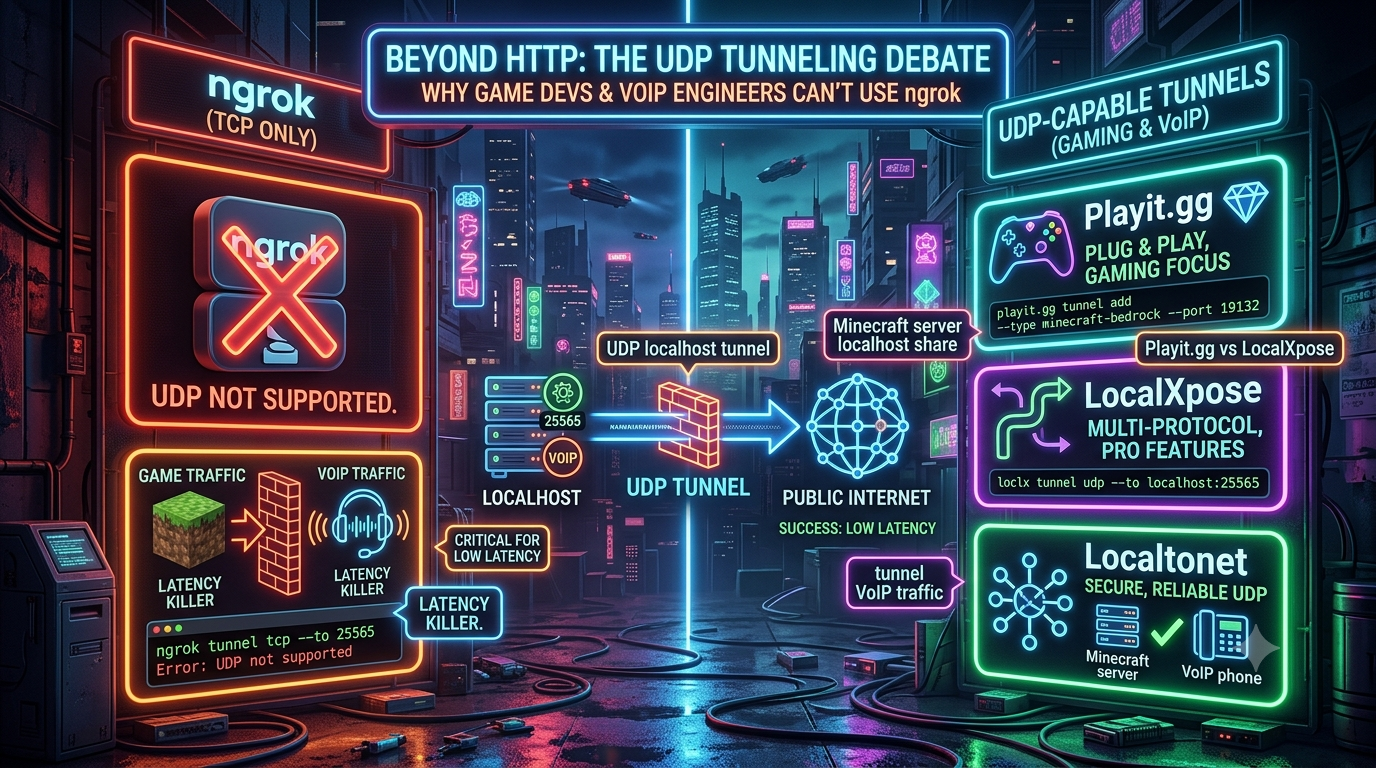
Step outside the web stack, though, and the story changes. Try to share a local Minecraft server, test a multiplayer build with remote playtesters, or debug a SIP/RTP VoIP server, and ngrok simply doesn’t help. Its architecture is built around TCP and HTTP streams, and as of 2026 it still has no native UDP tunneling support — a limitation confirmed directly in ngrok’s own documentation, which lists TCP endpoints but nothing for UDP.
This piece looks at why UDP is non-negotiable for real-time applications, why tunneling UDP over a TCP reverse proxy wrecks performance, and which tools actually solve the problem today.
1. TCP vs. UDP: The Core Dilemma
| TCP (HTTP, Webhooks, REST APIs) | UDP (Voice, Video, Game State) | |
|---|---|---|
| Connection model | Connection-oriented | Connectionless |
| Delivery | Guaranteed, in-order | Best-effort, “fire-and-forget” |
| Error handling | Retransmits lost packets | No retransmission |
| Overhead | Higher (handshakes, acks) | Minimal |
| Priority | Correctness | Latency |
TCP guarantees that every byte sent arrives, in order. If a packet is lost, TCP halts downstream processing, requests retransmission, and waits — a behavior known as head-of-line (HoL) blocking. That’s exactly right for a database query or a file download, where a corrupted byte breaks the payload.
UDP trades reliability for speed. There’s no handshake, no ordering guarantee, no retransmission. That’s exactly right for:
- Game servers. A fast-paced title might broadcast player positions 60–128 times a second. If one position packet is lost, the client doesn’t want it retransmitted 150ms late — it wants the next packet, now. Retransmitting stale state causes the rubber-banding and jitter every multiplayer game dev has fought at some point.
- VoIP and WebRTC. In a SIP/RTP voice call, a dropped audio frame is better replaced with a few milliseconds of silence than delivered late. Retransmitted audio over TCP produces cumulative delay and robotic stuttering rather than a clean drop.
2. Why You Can’t Just Wrap UDP Inside a TCP Tunnel
A reasonable question: can’t you just encapsulate UDP traffic inside a TCP tunnel with something like socat? Technically yes — practically, this triggers a well-documented failure mode known as TCP meltdown (or TCP-over-TCP).
When you tunnel traffic over a connection-oriented TCP link, any packet loss on the underlying connection triggers the tunnel’s own congestion control: it pauses to retransmit. Meanwhile the application on top, which is expecting UDP-style immediate delivery, has no idea the tunnel is stalled. You end up with two independent TCP control loops — inner and outer — fighting each other. The result, as networking references describe it, is an outer TCP connection left with a collapsed congestion window, an inflated retransmission timeout, and a full send buffer that can’t drain in either direction. This is a long-established phenomenon in networking (it’s why most VPN protocols avoid running their tunnel over TCP), not a quirk specific to any one tunneling vendor.
Since ngrok’s TCP-based relay architecture doesn’t do end-to-end UDP datagram forwarding, forcing real-time UDP traffic through it turns a 30ms game or voice stream into a stuttering mess.
3. Real-World Use Cases That Actually Need UDP
Game server hosting. Home routers increasingly sit behind CGNAT, meaning there’s no public IPv4 address to forward a port to. A Minecraft, Valheim, or custom Unity/Unreal server needs a proxy that accepts public UDP traffic and forwards it to 127.0.0.1:<port> with minimal overhead, while shielding the host’s residential IP from DDoS traffic.
VoIP, telephony, and WebRTC. Telephony splits into two protocols: SIP (signaling — can run over TCP or UDP, typically port 5060) and RTP (the actual audio/video payload, almost always high-numbered UDP ports, commonly in the 10000–20000 range). If a tunnel proxies SIP signaling but drops RTP media, the call connects and then goes completely silent.
4. Does ngrok Support UDP in 2026? Still No.
This remains ngrok’s most consistent gap relative to the rest of the tunneling market. Multiple independent 2026 comparisons of ngrok alternatives confirm the same thing: ngrok still has zero native UDP support and only handles HTTP, HTTPS, and TCP as of 2026. Anyone building a Minecraft server, a Valheim world, or a UDP-speaking IoT device will find that most popular tunneling options — ngrok included — simply won’t work for that traffic.
That gap is exactly why a small cluster of UDP-capable alternatives has grown a dedicated following: Playit.gg, LocalXpose, Localtonet, and — increasingly relevant if you already use it for other tunnels — Pinggy.
5. Four UDP-Capable Tunneling Tools, Reviewed
Playit.gg — Purpose-Built for Game Servers
Playit.gg was designed specifically to solve CGNAT and port-forwarding pain for gamers and self-hosters, with over a million registered users and 19 datacenters across five continents.
[ External Player ]
       │ (UDP packets)
       ▼
[ Playit.gg Anycast Edge ]
       │ (encapsulated tunnel)
       ▼
[ Playit.gg Local Agent ] ──▶ [ Local Game Server (127.0.0.1:25565) ]
Free tier: Built-in one-click support for popular titles (Minecraft Java/Bedrock, Palworld, Terraria, Factorio, Valheim, 7 Days to Die, Project Zomboid, and more), including UDP where the game needs it, plus static-IP DDoS protection on the free anycast network.
Playit Premium ($3/month): Unlocks custom TCP+UDP tunnels for games without built-in support (Starbound, Unturned, Vintage Story, BeamMP, and others), regional tunnel selection (the free tier’s “global anycast” routing can occasionally send a nearby player through a distant datacenter), more allocatable ports (4 → 16), extra firewall rules, and custom .playit.plus domains or your own external domain.
Worth noting since the free tier gets described loosely elsewhere: custom domains and regional routing are Premium features, not part of the free plan.
LocalXpose — The Closest ngrok-Style CLI With Native UDP
If you like ngrok’s CLI ergonomics and want the closest drop-in replacement that actually does UDP, LocalXpose is it.
# Native UDP tunnel via the official LocalXpose CLI
loclx tunnel udp --port 4545 --to 127.0.0.1:5060
Free “Starter” tier ($0): 2 active HTTP/HTTPS tunnels only — no UDP, no TCP. It’s meant for evaluating the product, not for real-time workloads.
Pro ($8/month, $96/year billed annually): This is the tier that actually unlocks UDP — 10 tunnels across HTTP, HTTPS, TCP, TLS, and UDP, TCP/UDP port forwarding, custom subdomains and domains, wildcard tunnels, automatic Let’s Encrypt certificates, and unlimited bandwidth (subject to an acceptable-use policy).
This is a meaningful correction to keep in mind if you’re evaluating LocalXpose based on marketing copy alone: UDP tunneling is a paid-plan feature, not something available on the free tier.
Localtonet — Multi-Protocol, Pay-As-You-Go
Localtonet has repositioned around pay-as-you-go pricing: rather than a flat monthly subscription, you fund a balance that drains at roughly $2 per tunnel per month of actual uptime — you’re not charged while a tunnel is stopped. It supports HTTP/HTTPS, TCP, and UDP, end-to-end encryption, and runs across 16+ global server locations.
Free plan: 1 tunnel, 1GB of bandwidth, and a 30-minute session limit — enough to test, not enough for a persistent server.
Beyond core tunneling, Localtonet bundles a few things you’d otherwise need separate tools for: a webhook inspector, a file server, IP whitelisting for tunnel access, and an Android “mobile proxy” feature that turns a phone into an HTTP/SOCKS5 proxy over mobile data — a fairly unusual feature among tunneling tools, useful for geo-testing scenarios.
Pinggy — Zero-Install UDP via SSH
Pinggy doesn’t appear in most older UDP-tunneling roundups, but it’s worth including for anyone already using it for HTTP/TCP tunnels or MCP server exposure: it added UDP tunnel support without requiring any client install at all.
# UDP tunnel with the Pinggy CLI — no binary download needed on most systems
pinggy tunnel udp --to localhost:8080
# Or via raw SSH, which works from any machine with an SSH client
ssh -p 443 -R0:localhost:8080 udp@a.pinggy.io
Free plan: Full protocol support (HTTP/HTTPS, TCP, UDP, TLS) with unlimited data transfer, but tunnel URLs are random and time out after 60 minutes.
Pro (~$3/month, or roughly $2.37–$2.50/month billed annually): Adds persistent tunnels, custom subdomains and domains, persistent TCP/UDP port reservations, wildcard domain support, and team/remote-device management.
Because Pinggy’s tunnel client ships as a small SSH-compatible binary (and works through plain ssh on systems that already have an SSH client), it has the lowest setup friction of the four — genuinely useful if you’re spinning up a one-off UDP test and don’t want to install another CLI.
6. Feature Comparison
| Tool | UDP Support | Free Tier | UDP on Free Tier? | Paid From | Custom Domains |
|---|---|---|---|---|---|
| ngrok | ✕ No (any tier) | Limited, ephemeral | ✕ | $10/mo | Paid tiers, TCP only |
| Playit.gg | ✓ Yes | 4 TCP + 4 UDP (built-in games) | ✓ (built-in games) | $3/mo (Premium) | Premium only |
| LocalXpose | ✓ Yes | 2 HTTP/HTTPS tunnels | ✕ (Pro plan only) | $8/mo ($96/yr) | Pro only |
| Localtonet | ✓ Yes | 1 tunnel, 1GB, 30-min sessions | ✓ | ~$2/tunnel/mo (pay-as-you-go) | Paid |
| Pinggy | ✓ Yes | Unlimited data, 60-min sessions | ✓ | ~$3/mo | Pro only |
7. Step-by-Step Guides
Guide A: Share a Minecraft Server Without Port Forwarding (Playit.gg)
- Start your local server. Confirm it’s reachable at
127.0.0.1:25565. - Download and run the Playit agent from the official download page for your OS, or run it via Docker.
- Claim your agent. On first run, the CLI prints a claim URL like
https://playit.gg/claim/xxxx-xxxx-xxxx. Open it, sign in, and accept the claim. - Add a tunnel. In the dashboard, go to Tunnels → Add Tunnel, pick your game (or Custom UDP/TCP), set the local port to
25565, and create it. - Share the address. Playit assigns a public address in the form
something.gl.at.ply.gg:PORT— hand that to your players; no router changes needed.
Guide B: Tunnel Local SIP/RTP Traffic for Testing (LocalXpose)
- Install and authenticate:
bash
loclx account login <your-access-token>
2. Open a UDP tunnel to your local SIP port (this requires a Pro plan):bash loclx tunnel udp --port 4545 --to 127.0.0.1:5060 - Note the assigned public endpoint from the CLI output (something like
us.loclx.io:4545). - Point your remote SIP client or softphone at that host and port. Signaling and any UDP media in the associated range will route through to your local
5060.
Guide C: Fastest Possible UDP Tunnel, No Install (Pinggy)
For a quick one-off test where you don’t want to install anything:
ssh -p 443 -R0:localhost:5060 udp@a.pinggy.io
This works from any machine with an SSH client — which is most machines. It’s a genuinely fast way to sanity-check that a local UDP service is reachable before committing to a persistent tunnel elsewhere. Just remember free-tier tunnels here are ephemeral: the URL is random and the session ends after 60 minutes.
8. Performance Tuning & Latency Considerations
Tunneling always adds a network hop, so a few habits keep latency down for real-time traffic:
- Pick the nearest edge region. A host in Frankfurt tunneling through a US edge to reach players in Berlin adds 100ms+ for no reason. LocalXpose and Localtonet both let you select a specific region; Playit’s free tier uses global anycast, which is usually good but not guaranteed optimal — regional pinning is a Premium feature there.
- Watch your MTU. UDP tunnels wrap your datagrams in tunnel-specific framing, which adds a few bytes of overhead. Keeping application packets around 1200–1300 bytes leaves headroom before you risk IP fragmentation against the standard 1500-byte Ethernet MTU.
- Consider a mesh VPN for closed groups. If you’re not exposing a service publicly — just connecting a small trusted team — WireGuard, Tailscale, or ZeroTier can beat a reverse-proxy tunnel on latency, since there’s no third-party relay in the data path for private peer-to-peer connections. The trade-off is that everyone needs the client installed, unlike a public tunnel where players connect with nothing extra.
9. Which One Should You Use?
- Hosting a game server for friends, free? Playit.gg. Built-in support for most popular titles, UDP included, DDoS-protected static IP, zero cost for the common case.
- Want an ngrok-style CLI that actually does UDP, and don’t mind paying? LocalXpose Pro. Closest to a drop-in ngrok replacement, at $8/month once you need UDP.
- Need UDP plus a broader toolkit (webhook inspection, mobile proxy, IP whitelisting) and prefer paying only while running? Localtonet’s pay-as-you-go model is worth a look.
- Just need to sanity-check a UDP service right now, no install? Pinggy over plain SSH — the lowest-friction option of the four, with the caveat that free-tier sessions are time-limited and the URL isn’t persistent.
ngrok remains excellent for HTTP APIs, webhooks, and request inspection — that hasn’t changed. But for anything speaking UDP — game servers, VoIP, real-time telemetry — it’s still the wrong tool in 2026, and the four alternatives above are the ones actually built for the job.
Changelog
- Removed embedded SEO metadata and jammed title/body text from the source draft; restructured into clean Markdown headers.
- Verified ngrok’s lack of native UDP support is still accurate as of 2026, cross-checked against multiple independent sources including ngrok’s own documentation behavior described by third parties.
- Verified TCP-over-TCP meltdown mechanics against networking references; kept explanation but tightened wording for accuracy.
- Corrected Playit.gg claims: custom domain support and regional tunnel selection are Playit Premium ($3/month) features, not part of the free tier as the original draft implied. Verified free-tier scope (built-in game support, 4 TCP + 4 UDP tunnels, DDoS-protected static IP) against playit.gg’s own site and support docs.
- Corrected LocalXpose claims: UDP tunneling is only available on the Pro plan ($8/month, $96/year) — the free “Starter” tier is HTTP/HTTPS-only with 2 tunnels. Updated the
loclx tunnel udpcommand syntax to match LocalXpose’s current official documentation. - Updated Localtonet pricing: replaced outdated flat-subscription framing with Localtonet’s current pay-as-you-go model (~$2/tunnel/month of actual uptime), and added accurate free-tier limits (1 tunnel, 1GB, 30-minute sessions).
- Added Pinggy as a fourth alternative, including its SSH-based zero-install UDP tunnel option and current free/paid tier details — a notable omission from the original draft given its growing UDP support.
- Removed the unverifiable Localtonet TCP+UDP claim table cell that overstated free-tier custom port reservation; replaced feature comparison table with verified current data.
- Rewrote all vendor “Key Features” bullet lists to distinguish free-tier vs. paid-tier claims explicitly, since several were previously stated without a tier qualifier.
Related InstaTunnel pages
Continue from this article into the most relevant product guides and workflows.
Related Topics
Keep building with InstaTunnel
Read the docs for implementation details or compare plans before you ship.