Localhost 上の Voice AI エージェント: Twilio Media Streams と OpenAI Realtime をトンネル経由で
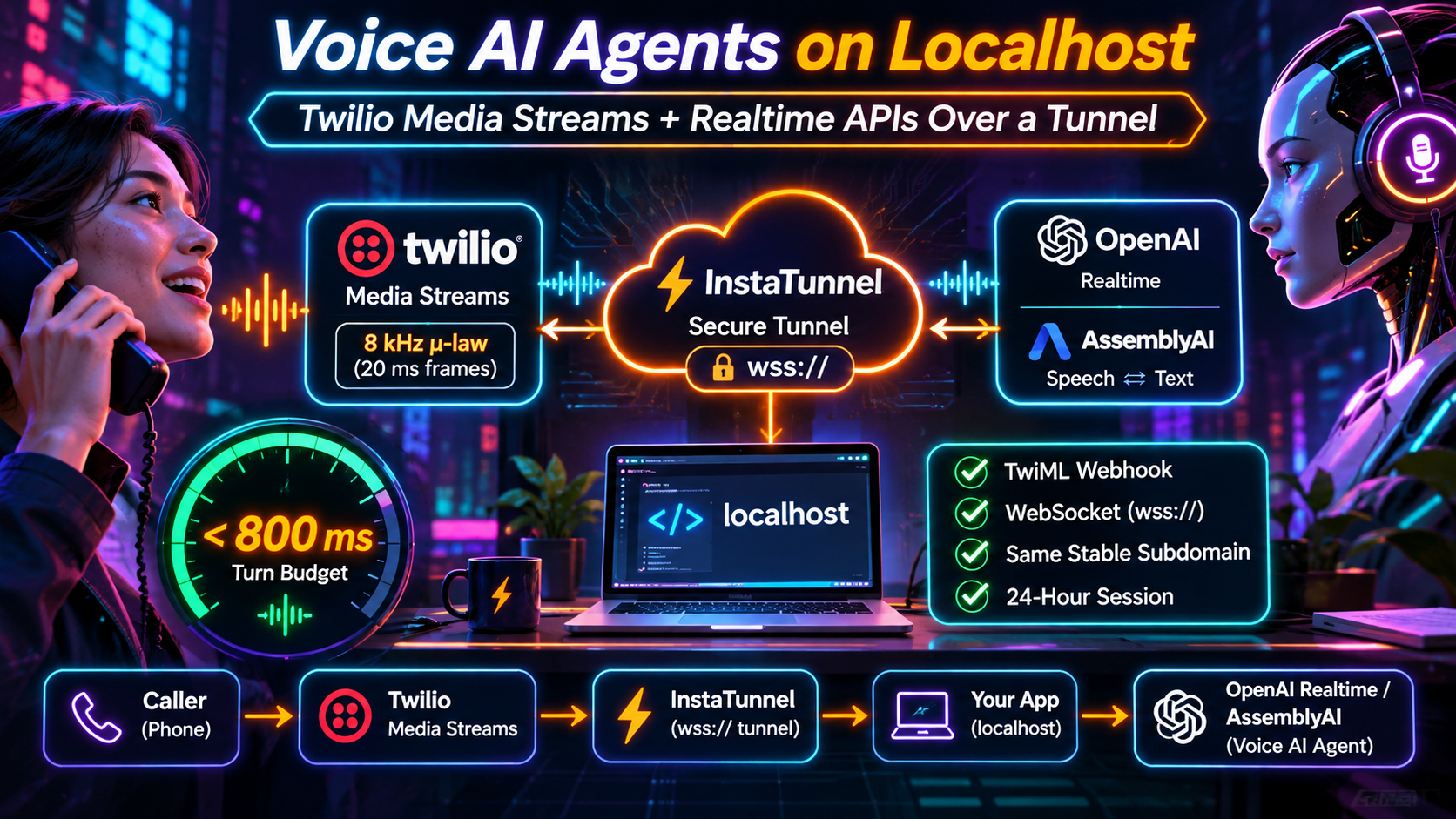
Twilio の Voice AI エージェントを localhost で実行します。wss:// オーディオをトンネル経由で中継し、レイテンシを 800 ms 未満に保ち、TwiML と WebSocket のために 1 つの安定したサブドメインを使用します。
Quick answer
Localhost 上の Voice AI エージェント: Twilio Streams Over a Tunnel: quick answer
If free tunnel limits interrupt your workflow, compare session length, stable URLs, concurrent tunnels, and paid-plan pricing before choosing a localhost tunnel tool.
What free tunnel limits should developers check first?
Check session duration, URL stability, concurrent tunnels, custom subdomains, bandwidth or request limits, and whether webhook callbacks survive restarts.
How does InstaTunnel handle longer development sessions?
InstaTunnel Free is designed around 24-hour sessions, with Pro available for higher limits and MCP endpoint tunnel workflows.
A phone-based voice agent is the least forgiving thing you can run on a laptop. A webhook can retry. A page can reload. A phone call cannot: if audio stalls for half a second, the caller hears it.
Twilio Media Streams plus OpenAI’s Realtime API is a common way to build these agents. A classic speech-to-text → LLM → text-to-speech pipeline is the other. Twilio’s own docs list AI agents as a Media Streams use case, and its examples use ngrok-style hostnames because the stream URL has to be publicly reachable over TLS. This guide covers what crosses the tunnel, how the WebSocket upgrade works through an edge proxy, how to stay near an 800 ms turn budget, and why a stable subdomain makes a day of test calls easier.
Why voice agents are a different tunnel workload
Most tunnel traffic is request/response: a webhook arrives, your server answers. Voice is a continuous, bidirectional stream of small audio messages. Twilio sends the caller’s audio to your server, and your server sends the agent’s audio back over the same WebSocket for the entire call.
Unlike one-way streaming such as Server-Sent Events, round-trip timing and jitter matter in both directions at once.
The audio format is narrow and fixed. Per Twilio’s documentation, the start message always reports audio/x-mulaw, 8,000 Hz, one channel, and payloads are base64-encoded inside JSON. μ-law at 8 kHz is 8,000 bytes per second, so a 20 ms frame is 160 bytes. Twilio documents that audio you send back can be of any size. Bandwidth is trivial; delay is not.
The architecture: two URLs, one host
A Twilio voice agent needs two public endpoints:
- An HTTPS webhook that Twilio calls when a call arrives. It returns TwiML.
- A
wss://endpoint that Twilio connects to after reading that TwiML.
Both can live on the same tunnel hostname:
Caller ──PSTN──> Twilio ──POST /voice──> tunnel edge ──> localhost:5050/voice   (returns TwiML)
                   │
                   └────wss://your-subdomain.example/media ──> tunnel edge ──> localhost:5050/media
                                                                                   │
                                                              outbound wss to OpenAI Realtime
The TwiML for a bidirectional stream uses <Connect><Stream>:
<Response>
  <Connect>
    <Stream url="wss://your-subdomain.example/media">
      <Parameter name="caller" value="+15551230000" />
    </Stream>
  </Connect>
</Response>
These rules from Twilio’s documentation matter for tunnel setups:
wssis the only supported protocol. A plainws://URL will not work.- The
urldoes not support query string parameters. Pass per-call data with<Parameter>elements instead. They arrive in the WebSocketstartmessage undercustomParameters. The combined length of each parameter’s name and value must be under 500 characters. <Connect><Stream>creates a bidirectional stream, and Twilio does not execute later TwiML until your server closes the WebSocket.- A call can have only one bidirectional stream active at a time, and bidirectional streams can only receive the
inbound_track. - Your server must accept secure WebSocket connections from Twilio on TCP port 443, from any public IP address, and must validate the
X-Twilio-Signatureheader. - You cannot start a bidirectional stream through the Stream REST resource. It has to come from
<Connect><Stream>.
What Twilio sends and what it expects back
Twilio sends connected, start, media, dtmf, mark and stop messages. dtmf and mark appear only on bidirectional streams. DTMF is supported only in the inbound direction, so you can read keypad presses but cannot send tones back. Your server can send three message types back: media, mark and clear.
An outbound audio message is minimal:
{
  "event": "media",
  "streamSid": "MZXXXXXXXXXXXXXXXXXXXXXXXXXXXXXX",
  "media": { "payload": "<base64 mulaw/8000>" }
}
Three details cause most “it connects but sounds broken” bugs:
- No file headers. The payload must be raw μ-law. Twilio warns that header bytes make the media stream incorrectly, which usually sounds like static or clicks.
- Audio is buffered. Twilio plays
mediamessages in the order received. If you send audio faster than real time, which model APIs usually do, it queues on Twilio’s side. clearempties the buffer. When a caller interrupts, you sendclear. Twilio then returnsmarkmessages for any marks you sent that had not yet played, so you can tell which audio was discarded.
Because the stream is bidirectional, it stops when the call ends or when your server closes the WebSocket. You cannot stop it with <Stop>. If your server closes the connection, Twilio requests the <Connect> action URL if you set one. Otherwise it continues with whatever TwiML follows <Connect>.
Wiring OpenAI Realtime without transcoding
The fastest way to protect your turn budget is to avoid resampling. OpenAI’s PCM format supports only a 24 kHz sample rate. Bridging Twilio to PCM therefore means converting 8 kHz μ-law up and 24 kHz audio back down on every frame. One published tutorial measured about 80 ms added per turn from a naive resampler in the hot path.
Instead, ask Realtime for G.711 μ-law directly and pass Twilio’s payloads through unchanged. The GA API accepts audio/pcmu (μ-law) and audio/pcma (A-law) as session audio formats. Twilio uses μ-law, so you want audio/pcmu.
The beta-era flat fields (input_audio_format: "g711_ulaw") are replaced in the GA schema by nested audio.input.format and audio.output.format objects. If you are porting an older Twilio example and see schema errors, start there.
{
  "type": "session.update",
  "session": {
    "type": "realtime",
    "model": "gpt-realtime-2.1",
    "output_modalities": ["audio"],
    "instructions": "You are a concise phone agent.",
    "audio": {
      "input":  { "format": { "type": "audio/pcmu" }, "turn_detection": { "type": "semantic_vad" } },
      "output": { "format": { "type": "audio/pcmu" }, "voice": "marin" }
    }
  }
}
On July 6, 2026, OpenAI released gpt-realtime-2.1 and gpt-realtime-2.1-mini. The full model updates GPT-Realtime-2 with better alphanumeric recognition, silence and noise handling, and interruption behavior. The mini is a lower-cost reasoning model for voice. OpenAI also said it cut p95 latency by at least 25% across its Realtime voice models through improved caching. Model names change quickly, so confirm the current ID and pricing in OpenAI’s docs before copying any code.
Both 2.1 models take a reasoning-effort setting. Summaries of OpenAI’s guidance, and one published test, point the same way: start low, because higher effort adds latency. In that test (on gpt-realtime-2), raising effort from low to medium moved median response time from about 1.1 s to about 1.8 s.
A minimal bridge has two loops sharing the stream ID:
# Twilio <- OpenAI Realtime bridge (FastAPI + websockets); error handling omitted
state = {"stream_sid": None}

async def twilio_to_openai(twilio_ws, openai_ws):
    async for raw in twilio_ws.iter_text():
        msg = json.loads(raw)
        if msg["event"] == "start":
            state["stream_sid"] = msg["start"]["streamSid"]
        elif msg["event"] == "media":
            await openai_ws.send(json.dumps({
                "type": "input_audio_buffer.append",
                "audio": msg["media"]["payload"],   # already base64 mulaw
            }))
        elif msg["event"] == "stop":
            break

async def openai_to_twilio(twilio_ws, openai_ws):
    async for raw in openai_ws:
        ev = json.loads(raw)
        if ev["type"] == "response.output_audio.delta":
            await twilio_ws.send_text(json.dumps({
                "event": "media",
                "streamSid": state["stream_sid"],
                "media": {"payload": ev["delta"]},  # forward untouched
            }))
        elif ev["type"] == "input_audio_buffer.speech_started":
            # caller is talking over the agent: flush what Twilio has queued
            await twilio_ws.send_text(json.dumps({
                "event": "clear",
                "streamSid": state["stream_sid"],
            }))

# run both with asyncio.gather(...)
The OpenAI connection is outbound from your machine, so only the Twilio leg crosses the tunnel. That matters for the latency math below.
WebSocket upgrade through the tunnel edge
A WebSocket starts life as an HTTP request. The client sends a GET with Upgrade: websocket, Connection: Upgrade, a Sec-WebSocket-Key and Sec-WebSocket-Version: 13. The server answers 101 Switching Protocols, and from then on both sides exchange frames over the same TCP connection.
For a tunnel edge, that means it must:
- Terminate TLS so Twilio can connect to a
wss://URL with a valid certificate, on port 443. - Forward the upgrade headers to your local origin instead of stripping
UpgradeandConnection. - Pass frames in both directions without buffering them into larger chunks, since buffering turns steady frames into bursts.
- Keep the connection open for the whole call. Voice traffic is never idle while a call is up, so idle timeouts rarely matter, but a hard per-connection lifetime would.
Test this before debugging agent logic: point a WebSocket client at your public wss:// URL and confirm a 101 response and echoed messages. It rules out the whole edge layer in a minute.
Signature validation needs one extra check. Twilio computes X-Twilio-Signature over the public URL it called, so the scheme and host your validation code reconstructs must match the public tunnel URL, not localhost. If validation passes on a direct connection but fails through the tunnel, compare those values first.
The sub-second turn budget
The number to design around is the gap between the caller finishing a sentence and the agent starting its reply. AssemblyAI’s phone-agent guide puts the achievable target at around 800 ms, which it says callers experience as attentive. It says the agent feels broken past 1,500 ms. Its sample budget allots 50–150 ms to network and telephony, 150–300 ms to endpointing, and several hundred milliseconds each to LLM first token and TTS first byte.
A speech-to-speech model skips the relay between those stages, but not the target. A Techsy tutorial measured a median of 1.1 s and a p95 of 1.9 s over 40 Twilio calls on gpt-realtime-2 with semantic_vad and low reasoning effort. Its server was colocated near the OpenAI region, and the test predates the 2.1 models. That is one vendor’s measurement, so treat it as a reference point, not a benchmark. The takeaway is that 800 ms is a target for a well-tuned stack, not a default you get for free.
What the tunnel adds
Only the Twilio leg crosses the tunnel. Caller audio travels Twilio → edge → your laptop, and the reply travels laptop → edge → Twilio. Compared with a relay deployed near Twilio, the added cost is the extra hop through the edge and your last mile, in both directions. It depends on three things you control:
- Distance. Twilio’s default region is US1. Media Streams are also available in Ireland (IE1) and Australia (AU1). Pick the tunnel region closest to the Twilio region your calls use.
- Your last mile. Wi-Fi jitter or a VPN will hurt more than the edge hop. Use wired Ethernet for test sessions.
- Jitter, not averages. A path that occasionally stalls for 200 ms produces audible gaps even if the mean looks fine.
I could not verify a published, vendor-neutral figure for tunnel overhead on voice traffic, so measure it. Log when input_audio_buffer.speech_stopped arrives, when the first response.output_audio.delta arrives, and when you send the first media message back to Twilio. Compare with a deployed baseline.
Barge-in without talking over the caller
Because Twilio buffers outbound audio, interruption takes three steps:
- When Realtime signals that the caller started speaking (
input_audio_buffer.speech_started), send Twilio aclearmessage so queued audio stops. OpenAI’s session config also controls whether a detected speech start automatically interrupts the in-flight response. - Send a
markmessage after eachmediamessage, and use the marks Twilio returns to track what actually played. - Tell the model what was heard by sending a
conversation.item.truncateevent for the interrupted item, so its record of the conversation matches what the caller experienced.
Skip step one and the agent finishes its sentence over the caller. Skip step three and the model believes it said things the caller never heard.
Why a stable subdomain and a 24-hour session help
Voice debugging means many short calls across a day: tweak the prompt, call, listen, repeat. Two things in the Twilio setup are painful with a random, changing URL:
- The phone number’s voice webhook is configured in the Twilio console. Change the host and you edit it again.
- The
<Stream>URL inside your TwiML must be a fullwss://host, and since query strings are not supported, you cannot smuggle routing data in the URL.
A tunnel that gives you one stable subdomain solves both. The same host serves POST /voice and wss://…/media, so you register the webhook once and the TwiML reads its own host from the request. Per-call data goes in <Parameter> values, and you key state by the streamSid and call SID from the start message.
According to InstaTunnel’s published material, free sessions last up to 24 hours and include a custom persistent subdomain, with longer limits on Pro. Check the current pricing page before relying on exact numbers. For voice work the benefit is simple: a tunnel that survives a working day means no reconnecting or re-pasting URLs mid-test.
One limit sits on the OpenAI side. A single Realtime session has a maximum duration of 60 minutes, so a long-lived tunnel does not make for a long-lived call. Plan for reconnects on very long calls.
Security for a tunnel that accepts phone traffic
An open WebSocket that bridges to a paid model API is a cost risk if anyone finds it.
- Validate
X-Twilio-Signatureon the webhook and the WebSocket handshake, and reject failures before opening the upstream OpenAI socket. - Keep API keys in your server process, never in TwiML or a browser.
- Close the tunnel when you are done, and set spend limits on your model account.
- Do not put a browser-login gate in front of Twilio. It cannot complete an interactive login, so signature validation is your authentication.
Troubleshooting checklist
Set a statusCallback URL on <Stream> while debugging. Twilio sends stream-started, stream-stopped and stream-error events there, with an error message on failure. The URL must be absolute and publicly reachable, so it can go through the same tunnel.
| Symptom | Likely cause |
|---|---|
| Call connects, then hangs up | url is not wss://, handshake fails, or signature validation rejects the request |
| Static or clicks on the line | Header bytes in the payload, or wrong encoding (not μ-law 8 kHz) |
| Chipmunk or garbled audio | OpenAI session still on 24 kHz PCM while you forward raw μ-law |
| Agent talks over the caller | No clear sent on interruption |
| Long, uneven pauses | Resampling in the hot path, distant tunnel region, or laptop jitter |
| Works locally, fails through tunnel | Edge not forwarding Upgrade headers, or signature host mismatch |
| Webhook works, stream never connects | TLS or port 443 reachability to the WebSocket path |
Schema errors on session.update |
Beta-style flat audio fields sent to the GA API |
When to leave the tunnel behind
A tunnel is for development. For production, deploy the relay to a cloud region near Twilio’s media servers to remove your laptop and one hop from the call path.
You have two other ways to cut the relay or the audio plumbing:
- Skip the WebSocket relay with SIP. OpenAI’s Realtime API accepts SIP calls. In Twilio’s walkthrough, an Elastic SIP Trunk uses an origination URI of the form
sip:proj_<your_project_id>@sip.api.openai.com;transport=tls. OpenAI then fires arealtime.call.incomingwebhook to your server, and your server accepts the call through the Realtime Calls API. You trade control of the audio path for fewer moving parts. A tunnel still helps, because that webhook needs a public URL during development. - Let Twilio handle speech. If you do not need raw audio at all, Twilio points to ConversationRelay, where Twilio handles speech recognition and text-to-speech for you.
FAQ
Does Twilio Media Streams need wss://?
Yes. wss is the only supported protocol for <Stream>, and Twilio expects your server to accept secure WebSocket connections on TCP port 443.
What audio format does Twilio use?
μ-law (audio/x-mulaw), 8,000 Hz, mono, base64-encoded in JSON. Outbound audio must be raw, with no file headers.
Can OpenAI Realtime take Twilio audio directly?
Yes. Set the GA audio format to audio/pcmu for input and output, and you can forward payloads without transcoding.
Can I put query parameters on the stream URL?
No. Use <Parameter> elements, which arrive in the start message.
How fast should a voice agent respond?
Around 800 ms is the commonly cited target, and past 1,500 ms feels broken. Published tutorial measurements land closer to one second, so measure your own stack.
Sources
- Twilio: TwiML
<Stream> - Twilio: Media Streams WebSocket messages
- Twilio: Media Streams overview
- Twilio: Connect the OpenAI Realtime SIP Connector with Elastic SIP Trunking
- OpenAI Developer Community: gpt-realtime-2.1 release
- OpenAI: Realtime conversations guide
- OpenAI API reference: Realtime calls
- AssemblyAI: How to create a phone-based voice agent
- Techsy: OpenAI Realtime API voice agent tutorial
- InstaTunnel on DEV: ngrok alternatives in 2026
Related InstaTunnel pages
Continue from this article into the most relevant product guides and workflows.
Related Topics
Keep building with InstaTunnel
Read the docs for implementation details or compare plans before you ship.