Webhook v1 のシャットダウン? v1 → v2 移行を localhost で並行テスト
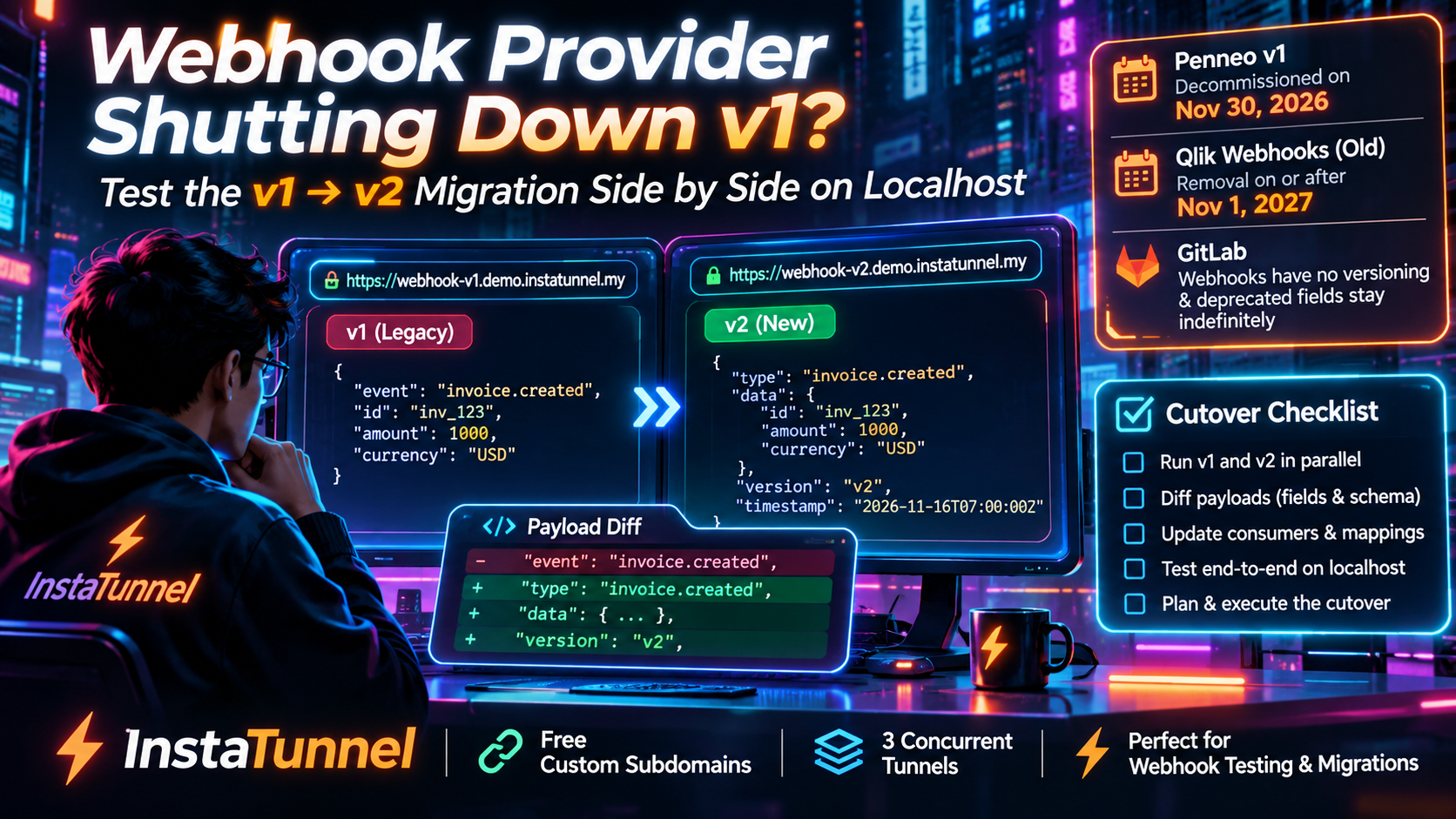
Webhook v1 が非推奨になっていますか? localhost 上で安定したサブドメインを使い、v1 と v2 を並行して実行し、差分のペイロードを比較し、安全なカットオーバー チェックリストに従います。
Quick answer
Webhook v1 の停止? localhost で v1 → v2 の移行をテスト: quick answer
If free tunnel limits interrupt your workflow, compare session length, stable URLs, concurrent tunnels, and paid-plan pricing before choosing a localhost tunnel tool.
What free tunnel limits should developers check first?
Check session duration, URL stability, concurrent tunnels, custom subdomains, bandwidth or request limits, and whether webhook callbacks survive restarts.
How does InstaTunnel handle longer development sessions?
InstaTunnel Free is designed around 24-hour sessions, with Pro available for higher limits and MCP endpoint tunnel workflows.
Penneo のレガシー webhook サービスは 2026年11月30日 に完全に廃止され、これは 2026年11月16日から14日後です。その日付以降、v1 で購読を続けているインテグレーションはイベントを受信しなくなります。Qlik はレガシー webhook ペイロードフィールドを別のスケジュールで廃止し、webhook 管理 API を新しいパスに移動します。GitLab の 2026年1月の計画課題は webhook バージョニング戦略を持たないと述べており、非推奨フィールドには除去のタイムラインがありません。
これらは3つのベンダー、それぞれ3つの異なる障害モードを持ち、1つの安全な対応策があります。旧パスと新パスの webhook を安定した URL に対して自分のマシン上で並行実行し、それぞれが実際に送信する内容をキャプチャし、結果を差分比較してから初めて切替を行います。本ガイドでは、2つのトンネル用サブドメイン、2つの小さな受信機、ペイロード差分スクリプト、署名検証ツール、カットオーバーチェックリストを使用します。
3つの webhook 非推奨、3つの異なる時刻
| 提供元 | 変更内容 | 日付 |
|---|---|---|
| Penneo | レガシー (v1) webhook サービスを廃止; イベントの配信を停止 | 2026年11月30日 |
| Qlik Cloud | ウェブフックペイロードからのレガシーフィールドを削除(ハイブリッド → CloudEventsのみ) | 2026年12月10日(10月6日から移動) |
| Qlik Cloud | レガシーアイデンティティ・アクセス管理システムのイベントを com.qlik.core.* イベントに置換 |
2026年11月30日以降 |
| Qlik Cloud | /api/v1/webhooks マネジメント API を削除 |
2027年11月1日以降 |
| GitLab | webhook バージョニングや削除のタイムラインなし(GitLab issue #588235 に基づく) | 未定 |
Penneo は 2026年5月21日に廃止を発表しました。廃止の概要にはレガシーサービスを「Deprecated(非推奨)」と記載しています。Penneo の定義では、まだ機能しているが、重大なセキュリティ修正のみが適用される状態を指します。移行ガイドは、移行していない場合、11月30日以降はイベント更新を受信できなくなると述べています。猶予期間には触れられていません。
Qlik は最も複雑な展開を持ち、3つの変更は混乱しやすいです:
- 管理 API パス。
/api/v1/webhooksAPI は非推奨となり、2027年11月1日以降に削除されます。置換は/api/core/webhooks配下にあります。Qlik は両方のパスが同じ webhook リソースを使用すると述べており、既存の webhook、ID、および配信履歴は保持され、パスの変更が配信ペイロードには影響しません。 - ペイロード形式。 Qlik は CloudEvents への移行を 2025年9月2日に発表し、それ以降ハイブリッドペイロード(従来のフィールドと CloudEvents のフィールドの両方)を送信しています。2026年10月2日に CloudEvents のみへの切替に移行し、2026年12月10日までの期間は 2026年10月6日から切替えを行います。
eventId、eventTime、eventType、cloudEventsVersion、contentType、extensionsを読む統合は、それ以前に CloudEvents 相当のフィールドへ移行する必要があります。 - イベントタイプ。 レガシーのアイデンティティとアクセス管理のイベントは、
com.qlik.core.*イベントへ置換され、2026年11月30日以降に削除されます。これは特定のファミリーのイベントを対象としており、すべてのcom.qlik.*タイプを対象としていません。
ツールに関する注意点: 2026年11月3日の Qlik の通知によれば、qlik-cli 3.4.0 および @qlik/api 2.20.0 は依然として非推奨の /api/v1/webhooks エンドポイントを呼び出します。更新済みリリースが出るまで、これらをベースに作成したスクリプトは /api/core/webhooks に直接 REST 呼び出しを行う必要があります。
GitLab は教訓の例です。GitLab の課題 #588235(私が読んだ版の 2026年1月30日 最終編集)には、以下の4つのギャップが挙げられています:
- Webhook にはバージョン識別子がない。
- 非推奨フィールドには削除タイムラインがない。
- ユーザーは変更が適用される前に新しいフォーマットをテストすることを選べない。
- ドキュメントはフィールドを非推奨とするが、送信は続けられている。
GitLab の 8.5 以降にわたる一部のマージリクエストフィールドは非推奨とされ、現在の追加のみのアプローチを「ほぼ現在の状況」としているとのことです。Qlik の REST API は反対のアプローチを取ります。qlik-api-version ヘッダを送信すると、非推奨・日没・リンクといった応答ヘッダで通知されます。Qlik は日没日が最も早い削除日であり、必ずしも保証日ではないと警告しています。
なぜ side by side が big-bang な切替より優れているか
変更履歴はベンダーが意図していることを教えてくれます。実際に到着するトラフィックは、ヘッダ、フィールド名、型、ネスト、リトライ挙動を教えてくれます。Penneo のガイドはエンドポイント、イベントタイプ、シグネチャヘッダを文書化しますが、v1 と v2 のペイロードをフィールドごとに比較した差分は公開されていません。両方を受信することで初めて知ることができます。
Penneo はエンドポイントが公開アクセス可能で、localhost やプライベートネットワークの URL は機能しないと述べています。トンネルはそのギャップを埋めます。安定したサブドメインは、URL が変わるたびに購読を編集するのではなく、一度 Callback URL を登録するだけで済む点で重要です。
Penneo 自体は、Incoming JSON とヘッダの最初の確認のため Webhook.site のようなツールを提案しています。これは迅速なチェックに有効です。安定したサブドメインの背後にあるローカルレシーバーは、raw body をディスクに保存し、実際のハンドラに対して再生することを可能にします。
Penneo v1 と v2 の実際の差異は何か
| 機能 | Legacy (v1) | New (v2) |
|---|---|---|
| エンドポイント | {base}/api/v1/webhook |
{base}/webhook/api/v1 |
| Subscribe by | トピック (signer と casefile) | イベントタイプ (sign.casefile.completed, sign.signer.signed, …) |
| 確認ステップ | 必須 | 不要 |
| 整合性チェック | 未記述 | X-Event-Signature (HMAC-SHA256)、任意だが推奨 |
| テストイベント | 未記述 | webhook.subscription.test |
| 状態 | Deprecated | Active |
v2 サービスは 17 種類のイベントタイプを文書化しています:4 つの sign.casefile.*、12 の sign.signer.*、およびテストイベント。v1 で「casefile」トピックを購読していた場合、Penneo は すべての casefile イベントタイプを購読することで同等のものを得られると述べています。いくつかの署名イベントは、署名を複数回実行する場合があり、1 回限りのイベントとして扱わないでください。
文書化されたペイロードは最小限です。v1 風の Sign ペイロードは、topic、eventType、eventTime オブジェクト、payload に数値の ID とステータスを含みます。Penneo は通知はアカウント内のすべてのケースファイルに送信されるとしています(他のチームメンバーが作成したものも含む)。あなたの API ユーザーはそれらの詳細を取得する権限を持っていない可能性があるため、スーパ API ユーザーが必要になる場合があります。
v2 の設計上の運用上の制限:
- あなたのエンドポイントは 500 ms 内に接続を受け付け、1.5 秒内に応答する必要があります。
- 成功とカウントされるのは
2xxのみ。ほかのコードはすべてリトライを引き起こします。 - 配送は少なくとも一度は発生します。
- 各顧客は5件のアクティブサブスクリプションに制限されます。
Step 1: 2つの受信機を2つの安定したサブドメインの背後に配置
受信機はすべてを記録して高速に応答する必要があります。このサンプルは Node の標準ライブラリのみを使用し、各リクエスト、ヘッダ、および生データをディスクに書き込みます。これを receiver.mjs として保存してください。
// receiver.mjs — usage: node receiver.mjs <port> <label>
import http from "node:http";
import { mkdirSync, writeFileSync } from "node:fs";

const [port, label] = [Number(process.argv[2]), process.argv[3]];
mkdirSync(`captures/${label}`, { recursive: true });

http.createServer((req, res) => {
  const chunks = [];
  req.on("data", (c) => chunks.push(c));
  req.on("end", () => {
    const raw = Buffer.concat(chunks).toString("utf8");
    const file = `captures/${label}/${Date.now()}.json`;
    writeFileSync(file, JSON.stringify(
      { method: req.method, url: req.url, headers: req.headers, raw }, null, 2));
    res.writeHead(200, { "content-type": "application/json" });
    res.end('{"ok":true}');
  });
}).listen(port, () => console.log(`${label} listening on ${port}`));
Start one receiver per version, then expose each with its own subdomain. Install the CLI with npm install -g instatunnel. Pick names of your own, since subdomains are unique.
node receiver.mjs 4001 v1 &&
node receiver.mjs 4002 v2 &&

# in two separate terminals
instatunnel 4001 --subdomain acme-hooks-v1
instatunnel 4002 --subdomain acme-hooks-v2
You now have https://acme-hooks-v1.instatunnel.my and https://acme-hooks-v2.instatunnel.my. The package README describes the free tier as including custom subdomains and three simultaneous tunnels, so two cover the old and new paths and the third stays free for your real application. Other published descriptions of the free tier mention limits on session length, bandwidth and daily requests. Check the current pricing page before you plan a long test around any of these numbers.
Two practical notes:
- The CLI supports a
--passwordflag, but skip tunnel-level password protection on these URLs. Webhook senders generally cannot answer a login prompt. Verify signatures instead. - Your receiver writes its own captures, so you don’t depend on any tunnel-side request log.
Step 2: Point a sandbox subscription at each URL
Use a sandbox or test account, never production. Penneo’s webhook guide links a separate sandbox API reference at sandbox.penneo.com/api/docs. Set PENNEO_BASE_URL to your sandbox base URL.
Start by listing your existing v1 subscriptions with GET {base}/api/v1/webhook/subscriptions. Then point a test v1 subscription at the v1 URL using the deprecated endpoints in the API reference. v1 has a required confirmation step that the migration guide doesn’t spell out. Your first captured v1 request may therefore not be an event at all, which is exactly why you record everything.
Create the v2 subscription next:
curl -X POST "$PENNEO_BASE_URL/webhook/api/v1/subscriptions" \\
  -H "Authorization: Bearer $PENNEO_ACCESS_TOKEN" \\
  -H "Content-Type: application/json" \\
  -d '{
    "eventTypes": ["sign.casefile.completed", "sign.signer.signed", "webhook.subscription.test"],
    "endpoint": "https://acme-hooks-v2.instatunnel.my"
  }'
Penneo’s migration guide lists Bearer authorization for both versions. The webhook guide’s example uses a JWT scheme with an X-Auth-Token header and says any supported authorization method works. Use whichever your integration already uses. The response includes the subscription secret, which you need for signature checks. Administrators can also manage subscriptions and review delivery logs in the Penneo UI under Configure → Webhooks.
Trigger the built-in test with POST {base}/webhook/api/v1/subscriptions/test. Then perform the same real action once per version, for example signing a test case file, so both tunnels see equivalent events.
Step 3: Diff the payloads
Comparing a v1 signer event with an unrelated v2 event tells you nothing, so always trigger the same business event on both sides. The script below flattens every captured JSON body into dot-notation paths and reports fields, types and headers that exist on only one side. Save it as diff.mjs.
// diff.mjs — usage: node diff.mjs
import { readdirSync, readFileSync } from "node:fs";

const load = (label) => readdirSync(`captures/${label}`).map((f) =>
  JSON.parse(readFileSync(`captures/${label}/${f}`, "utf8")));

function paths(value, prefix = "", out = new Map()) {
  if (value !== null && typeof value === "object") {
    for (const [k, v] of Object.entries(value)) {
      const key = Array.isArray(value) ? "[]" : k;
      paths(v, prefix ? `${prefix}.${key}` : key, out);
    }
  } else out.set(prefix, typeof value);
  return out;
}

function shape(label) {
  const fields = new Map(), headers = new Set();
  for (const c of load(label)) {
    Object.keys(c.headers).forEach((h) => headers.add(h));
    try { paths(JSON.parse(c.raw), "", fields); } catch { /* non-JSON request */ }
  }
  return { fields, headers };
}

const report = (title, xs) =>
  console.log(`\n${title}\n` + (xs.length ? xs.map((x) => "  " + x).join("\n") : "  (none)"));

const a = shape("v1"), b = shape("v2");
report("Fields only in v1", [...a.fields.keys()].filter((k) => !b.fields.has(k)));
report("Fields only in v2", [...b.fields.keys()].filter((k) => !a.fields.has(k)));
report("Type changes", [...a.fields].filter(([k, t]) => b.fields.has(k) && b.fields.get(k) !== t)
  .map(([k, t]) => `${k}: ${t} -> ${b.fields.get(k)}`));
report("Headers only in v1", [...a.headers].filter((h) => !b.headers.has(h)));
report("Headers only in v2", [...b.headers].filter((h) => !a.headers.has(h)));
Read the output as a migration to-do list:
- Fields only in v1 are things your code may still depend on.
- Headers only in v2 are new capabilities to adopt. The documented signature example lists
x-event-idandx-event-typeamong the signed headers, andx-event-signaturecarries the signature itself. - Type changes are the silent killers. A field that was a number and is now a string passes a schema-less handler and breaks three layers downstream.
Penneo の文書化された v2 のテストイベントは、v1 の例と同じ topic / eventType / eventTime / payload のエンベロープを保持しますが、その payload はプレーンテキストのメッセージです。接続性を検証するには有用ですが、実運用イベントを代表するものではありません。 envelope よりもヘッダと配送挙動の差分が最も顕著になると想定されるため、実イベントで確認してください。
同様の手法は Qlik にも適用できます。ハイブリッドペイロードをキャプチャし、eventId、eventTime、eventType、cloudEventsVersion、contentType、extensions を削除してコピーをハンドラに対してリプレイします。Qlik 自身の移行投稿は、ハイブリッドイベントが CloudEvents フィールド(id、time、type)を従来のものと並べて運ぶことを示しており、コードがどのセットを読み取っているかを確認してください。切り替えが完了しているかどうかを判断するには、これらの差を見てください。12月10日までに準備が整えば大丈夫です。もしそうでなければ、数週間の余裕がある時点で不具合を特定できます。
Step 4: 生データの署名を v2 で検証する
Penneo の X-Event-Signature ヘッダは、key=value のカンマ区切りリストです:
tは Unix タイムスタンプです。hは署名対象ヘッダ名のスペース区切りリストです。v1は署名です。
公式例は t=1763132484,h=x-event-id x-event-type,v1=abc123... のように見えます。
署名対象の文字列は、タイムスタンプ、ヘッダ名リスト、これらのヘッダの値、および生のリクエスト本文をすべてドットで結んだものです。署名はサブスクリプションシークレットを鍵として HMAC-SHA256 の16進ダイジェストを計算し、等時間性比較で検証します。Penneo はタイムスタンプが±5分の範囲を超える場合は拒否し、すでに処理済みのイベントID には再処理しないことを推奨します。
// verify.mjs
import { createHmac, timingSafeEqual } from "node:crypto";

export function verifyPenneo(headers, rawBody, secret, toleranceSec = 300) {
  const parts = Object.fromEntries(
    String(headers["x-event-signature"] ?? "").split(",").map((p) => {
      const i = p.indexOf("=");
      return [p.slice(0, i).trim(), p.slice(i + 1)];
    }));
  if (!parts.t || !parts.h || !parts.v1) return false;
  if (Math.abs(Date.now() / 1000 - Number(parts.t)) > toleranceSec) return false;

  const values = parts.h.split(" ").map((n) => headers[n.toLowerCase()] ?? "");
  const signed = [parts.t, parts.h, ...values].join(".") + "." + rawBody;
  const expected = createHmac("sha256", secret).update(signed).digest("hex");

  const a = Buffer.from(expected), b = Buffer.from(parts.v1);
  return a.length === b.length && timingSafeEqual(a, b);
}
Always pass the raw bytes you received, never re-serialized JSON, because whitespace changes break the digest. Also dedupe on X-Event-Id, since delivery is at-least-once. Penneo suggests caching event IDs for a short period, such as the same duration as your timestamp window.
Tunnel gotchas specific to v2
- Answer fast. With a 500 ms connect limit and a 1.5 second response limit, do the minimum in the handler: verify, enqueue, return
2xx. - Never redirect. A
3xxcounts as a failure and is retried, so an HTTP-to-HTTPS or trailing-slash redirect on your endpoint causes retries. - A dead tunnel is not harmless. When a delivery fails, Penneo retries up to 5 times at intervals that start at 5 seconds and grow by 5 seconds each time. It then retries hourly, up to 30 times. After all 35 retries it stops and automatically disables the subscription, then emails the user who created it and the customer’s administrators. By my arithmetic from that schedule, that is roughly 30 hours after the first failure. A sandbox subscription left pointing at a stopped tunnel over a long weekend will be switched off, and someone must manually update and re-enable it.
- Watch your tunnel’s session limits. If your tunnel plan caps session length, a tunnel that drops and returns on a new connection can leave you debugging missed deliveries. Check your plan’s limits and use the delivery logs under Configure → Webhooks.
- Mind the five-subscription cap. The cap is documented as 5 active subscriptions per customer on the new service. The docs don’t say whether old v1 subscriptions count, so don’t assume headroom while both versions run.
The cutover checklist
- Inventory every v1 subscription (
GET {base}/api/v1/webhook/subscriptions) and every code path that calls/api/v1/webhook. - Map each v1 topic to v2 event types. For example, “casefile” maps to the four
sign.casefile.*types, and signer notifications map to the relevantsign.signer.*types. - Create the v2 test subscription, fire
webhook.subscription.test, and confirm receipt on the v2 tunnel. - Capture the same real events on both tunnels and run
diff.mjs. Fix every field, type and header difference. - Add signature verification and
X-Event-Ididempotency to the v2 handler. - Acknowledge first. Move slow work behind a queue so responses stay inside 1.5 seconds.
- Create the production v2 subscription at
{base}/webhook/api/v1. Keep the overlap short, since both versions firing means duplicate notifications. - Delete the old subscriptions with
DELETE {base}/api/v1/webhook/subscriptions/{subscriptionId}once v2 traffic is confirmed. - Watch delivery logs (Configure → Webhooks in Penneo) for a few days, then release the tunnel subdomains you no longer use.
- Repeat for Qlik and GitLab, as described below.
Qlik: three changes, three tests
1. Management API path (by November 2027). The migration is mechanical. Replace /api/v1/webhooks with /api/core/webhooks and keep the rest of the path, query parameters and request bodies unchanged. Qlik’s notice lists ten direct endpoint replacements, covering list, create, get, patch, put, delete, deliveries, delivery details, resend and event types. Test in a non-production tenant first.
2. Payload format (December 10, 2026). Use the stripped-payload replay from Step 3. Qlik documents CloudEvents-only payloads from that date.
3. System event types (on or after November 30, 2026). If your subscription uses a legacy identity and access management event, swap in the mapped com.qlik.core.* type. Some mappings rename more than the prefix:
| Legacy event type | Replacement |
|---|---|
com.qlik.v1.user.created |
com.qlik.core.user.created |
com.qlik.user-session_begin |
com.qlik.core.user-session.begun |
com.qlik.group.config.updated |
com.qlik.core.group-setting.updated |
Qlik says that only com.qlik.v1.user.created, com.qlik.v1.user.deleted and com.qlik.v1.api-key.validation.failed from that notice are available through Qlik Cloud Webhooks. During any overlap period, deduplicate events using the CloudEvent id to avoid processing the same change twice.
Qlik’s versioning policy (a qlik-api-version header with quarterly YYYY-MM releases, each supported for 12 months) governs REST APIs. System events do not use the header. Their deprecations are documented in the AsyncAPI specs, so read those specs, not just response headers.
GitLab: build your own versioning
Since GitLab offers no opt-in preview, make your own. Save real payloads as fixtures and diff them whenever you upgrade GitLab. For merge request webhooks, issue #588235 lists these deprecated fields and their replacements:
| Deprecated | Use instead |
|---|---|
repository (top-level) |
project |
labels (top-level) |
object_attributes.labels |
project.http_url |
project.git_http_url |
project.homepage |
project.web_url |
project.ssh_url |
project.git_ssh_url |
project.url |
project.git_ssh_url または project.git_http_url |
object_attributes.assignee_id |
object_attributes.assignee_ids |
object_attributes.work_in_progress |
object_attributes.draft |
None of these has a removal date. Moving off them now means you won’t be surprised if GitLab adopts a removal policy later. The same issue floats options such as versioned webhooks and deprecation-with-timeline, but none is committed.
Frequently asked questions
What happens to Penneo webhooks after November 30, 2026? Subscriptions on the legacy service stop delivering events. Migrate to the v2 service at {base}/webhook/api/v1 first.
Do I need a public URL to test webhooks locally? Yes. Penneo says localhost and private network URLs will not work, so use an HTTPS tunnel with a stable subdomain.
Is Qlik’s November 2027 date the only deadline? No. That date covers the /api/v1/webhooks management API. Legacy payload fields go on December 10, 2026, and the legacy identity and access management system events are removed on or after November 30, 2026.
Will Qlik’s webhook path change break my existing webhooks? According to Qlik, no. Existing webhooks, IDs and delivery history are preserved, and the path change does not affect delivery payloads.
How many tunnels do I need? Two for a side-by-side test, one per payload version. A third lets you keep your own app reachable at the same time, if your plan allows three simultaneous tunnels.
Sources
- Migration guide: Webhook deprecation (Penneo)
- Webhooks guide (Penneo)
- Deprecation overview (Penneo)
- Webhooks API deprecated in favor of Core webhooks API (Qlik)
- Webhooks legacy event fields removal (Qlik)
- Legacy identity and access management system events deprecation (Qlik)
- Qlik Cloud Webhooks: Migration to new event formats (Qlik Community)
- Qlik API versioning and deprecation headers
- Investigate and plan webhook versioning and deprecation strategy (GitLab #588235)
- instatunnel CLI README (Pkg Stats)
Related InstaTunnel pages
Continue from this article into the most relevant product guides and workflows.
Related Topics
Keep building with InstaTunnel
Read the docs for implementation details or compare plans before you ship.