WhatsApp Cloud API Webhooks on localhost: 検証トークン ハンドシェイク、リトライ、アプリシークレットの設定
localhost で WhatsApp Cloud API の webhook を設定します。hub.challenge の検証トークン・ハンドシェイク、X-Hub-Signature-256 の検証、リトライ、アプリシークレットの扱い。
Quick answer
WhatsApp Cloud API Webhooks on localhost: Verify Token Setup: webhook testing answer
For local webhook testing, run your app locally, expose it with a public HTTPS tunnel, and paste the stable callback URL into the provider dashboard.
How do I test webhooks on localhost?
Start your local server, open a public HTTPS tunnel to that port, configure the provider webhook URL, and inspect events in your local logs.
Why does a stable webhook URL matter?
Stable URLs prevent provider dashboards from needing manual callback updates every time you restart a tunnel.
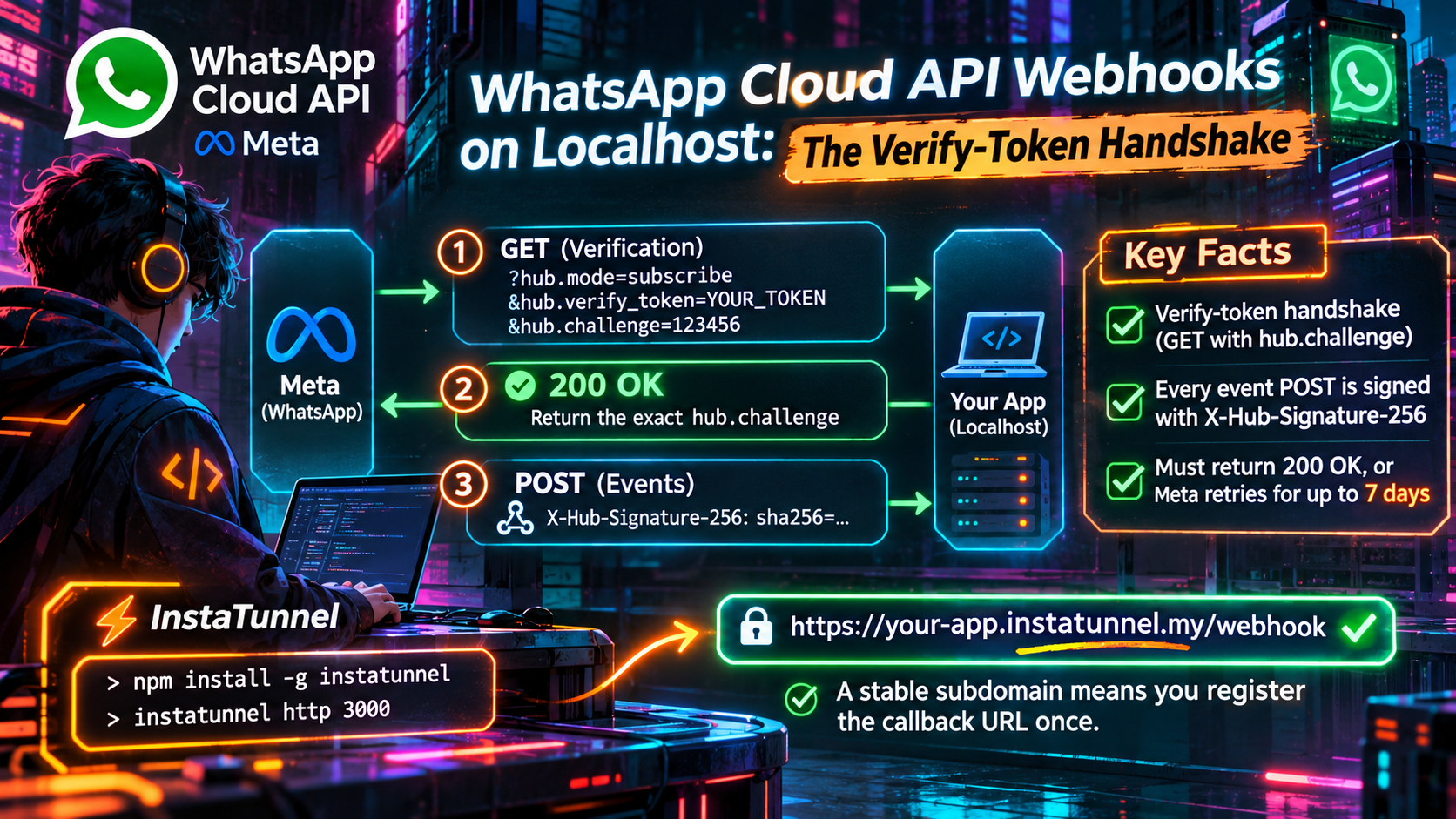
You start your WhatsApp bot on localhost:3000, open a tunnel, paste the public URL into the Meta App Dashboard, click Verify and save, and get a red error. Or it works once, you restart the tunnel the next morning, and the dashboard wants verifying all over again.\n\nBoth problems share a cause: Meta’s webhook onboarding is a handshake, not a simple “send me events” switch. Meta first sends a GET carrying a hub.challenge value. Only after you answer it correctly does it start delivering signed POST requests. If you fail to acknowledge those with a 200, Meta keeps retrying for up to 7 days on the WhatsApp Business Platform.\n\nThis guide covers the handshake, the retry behavior and the app-secret setup, then shows why a stable subdomain turns a recurring chore into a one-time registration.\n\n## TL;DR\n\n- Meta verifies your callback URL with a GET containing hub.mode, hub.verify_token and hub.challenge. Return HTTP 200 with the challenge value, but only if the token matches.\n- The verify token is a string you invent. The app secret is issued by Meta. They are different credentials.\n- Verification alone delivers nothing. You must also subscribe to the messages field.\n- WhatsApp retries failed deliveries for up to 7 days, so expect duplicates and stale events.\n- Meta sends a new verification GET whenever you set or edit the callback URL or verify token. A changing tunnel URL therefore means repeating the handshake. A stable subdomain means you register once.\n\n## Why Meta can’t call localhost\n\nMeta’s servers sit on the public internet; your laptop sits behind NAT with no inbound ports open. Meta also requires a valid TLS certificate on your endpoint, and its documentation states that self-signed certificates are not supported.\n\nSo a local integration needs three things:\n\n- A server that answers both GET (verification) and POST (events) on one path.\n- A public HTTPS URL forwarding to it.\n- Because the dashboard stores one callback URL per app, a URL that stays the same between sessions.\n\n## Step 1: The verify-token handshake\n\nIn the Meta App Dashboard, open WhatsApp → Configuration. If you created your app with the “Connect with customers through WhatsApp” use case, the panel is under Use cases → Customize → Configuration instead. You enter a Callback URL and a Verify token. The token is any string you choose; Meta does not issue it. Meta sends a verification request whenever you set or edit either field:\n\n\nGET /webhook?hub.mode=subscribe\u0026hub.verify_token=YOUR_TOKEN\u0026hub.challenge=1158201444\n\n\n\n| Parameter | Meaning |\n| — | — |\n| hub.mode | Always subscribe during verification |\n| hub.verify_token | The string you typed into the dashboard |\n| hub.challenge | A random value generated by Meta |\n\nMeta’s documentation sets the pass condition: respond with status 200 and the hub.challenge value. If you answer anything else, Meta treats the endpoint as unverified and sends no webhooks.\n\n\napp.get('/webhook', (req, res) =\u003e {\n const mode = req.query['hub.mode'];\n const token = req.query['hub.verify_token'];\n const challenge = req.query['hub.challenge'];\n\n if (mode === 'subscribe' \u0026\u0026 token === process.env.VERIFY_TOKEN) {\n // Raw challenge, plain text, no JSON wrapper\n return res.status(200).type('text/plain').send(challenge);\n }\n return res.sendStatus(403);\n});\n\n\nIn FastAPI you cannot name a Python parameter hub.mode, so use Query(alias="hub.mode"). PHP has a related quirk: it converts periods in query parameter names to underscores, so read hub_mode, hub_verify_token and hub_challenge there.\n\n### Common handshake failures\n\n| Symptom | Likely cause | Fix |\n| — | — | — |\n| “Callback URL or verify token couldn’t be validated” | JSON response, non-200 status, or a one-character token mismatch | Return the raw challenge as plain text with 200 |\n| Browser shows a missing-parameter error | You opened the URL without Meta’s query string | Expected; only Meta’s GET carries hub.challenge |\n| Timeout during verification | Server or tunnel not running yet | Start the server, then the tunnel, then click verify |\n| Handshake passes, nothing arrives | No webhook field subscribed | Subscribe to messages |\n\nThe timeout row is the localhost-specific one. Meta calls your URL live when you save, so your server and tunnel must already be up.\n\n## Verify token vs. app secret\n\nPeople mix these up constantly, and Meta uses them for different jobs.\n\n- The verify token is chosen by you and used in the GET handshake. Hookdeck’s WhatsApp guide notes it is only used once, during setup.\n- The app secret is issued by Meta, found under App settings → Basic, and is the key used to sign every event delivery.\n\nKeep them in separate environment variables, for example VERIFY_TOKEN and META_APP_SECRET. If you use the verify token where the app secret belongs, every real message will fail validation.\n\nEach POST carries an X-Hub-Signature-256 header in the form sha256=<hex>, an HMAC-SHA256 of the payload keyed with your app secret. Meta says validating it is optional but recommended. Compute the HMAC over the raw request bytes, before any JSON middleware touches the body. Hookdeck notes that Meta signs an escaped-Unicode form of the payload, so a body you parsed and re-serialized will not match.\n\n\nconst crypto = require('crypto');\n\n// express.raw() keeps the exact bytes Meta signed\napp.post('/webhook', express.raw({ type: 'application/json' }), (req, res) =\u003e {\n const expected = 'sha256=' + crypto\n .createHmac('sha256', process.env.META_APP_SECRET)\n .update(req.body)\n .digest('hex');\n const received = req.get('x-hub-signature-256') || '';\n\n const valid = received.length === expected.length \u0026\u0026\n crypto.timingSafeEqual(Buffer.from(expected), Buffer.from(received));\n if (!valid) return res.sendStatus(401);\n\n res.sendStatus(200); // acknowledge first\n queue.push(JSON.parse(req.body)); // then process asynchronously\n});\n\n\nThe signature carries no timestamp. Hookdeck’s Facebook webhooks guide points out that a captured, validly signed payload would still verify if replayed, so deduplicate on message IDs instead of treating the signature as proof of freshness.\n\n## Step 2: Subscribe to the messages field\n\nVerification proves the URL is yours; it does not pick your events. After it succeeds, the dashboard shows a list of webhook fields. For a chatbot or inbox, subscribe to messages, which carries inbound customer messages and the status of messages you send (sent, delivered, read, failed).\n\nMeta’s documentation lists the permissions: whatsapp_business_messaging for messages webhooks and whatsapp_business_management for all other webhooks.\n\nIf dashboard test events arrive but real messages do not, check that your app is subscribed to the WhatsApp Business Account itself. Both Hookdeck and Webhook Relay report this failure mode: the URL is verified, but the app was never subscribed to the WABA. The fix is POST /{WABA_ID}/subscribed_apps, and GET on the same endpoint confirms it. Also confirm your app is in Live mode, because Meta notes that some webhooks are not sent to apps in Dev mode.\n\n## Step 3: Retries, duplicates and the 7-day window\n\nMeta treats anything other than HTTP 200 as a failed delivery. The retry window depends on the product:\n\n- WhatsApp Business Platform: Meta’s documentation says delivery is retried immediately and then with decreasing frequency for up to 7 days, after which unacknowledged webhooks are dropped.\n- Generic Graph API webhooks: Meta’s “Get started with webhooks” page describes retries over 36 hours, after which unacknowledged updates are dropped.\n\nThese describe different products, so they do not contradict each other. For WhatsApp, plan around 7 days. One exception: for numbers using Meta’s “No Storage” configuration, webhook retries are limited to 1 hour, and an undeliverable incoming-message webhook is dropped with error code 131035.\n\nMeta also warns that retries go to all apps subscribed to the WABA’s webhooks, which can produce duplicate notifications. That has four consequences.\n\nAcknowledge first, work second. Return 200, then do slow work (database writes, LLM calls, replies) from a queue. Meta does not publish one universal timeout, and BSP docs vary. 360dialog, for example, documents a hard five-second limit for a 200, so keep your handler fast.\n\nDeduplicate. Key inbound messages on the message ID (wamid...) and status events on status ID plus status value, since one outbound message legitimately produces sent, delivered and read.\n\nDon’t trust arrival order. Hookdeck notes that WhatsApp makes no ordering guarantee, so a read status can arrive before delivered. Use the timestamp field inside each event rather than your receive time.\n\nExpect stale events after a local outage. If your laptop is closed overnight and the tunnel is down, Meta keeps retrying the registered URL, and a burst of old events can arrive when you reconnect. Raise your body limit too. Meta says webhook payloads can be up to 3 MB, and a 413 from your server counts as a failed delivery that Meta retries.\n\nMeta offers no API for fetching historical webhook data, so log raw payloads on receipt if you need them later.\n\n## Why a stable subdomain changes the workflow\n\nMeta stores one callback URL per app, and editing it repeats the handshake. If your tunnel hands out a random hostname on every start, each morning becomes: start the server, start the tunnel, copy the URL, paste it into the dashboard, click verify while your server is awake, and hope the token has no typo. Hookdeck makes the same point about tunnels in its WhatsApp guide: the URL changes on every restart unless you pay for a fixed subdomain.\n\nA stable subdomain collapses that into a single registration. Verify https://yourname.example-tunnel.dev/webhook once, and you can restart the tunnel, reboot, or switch laptops without touching Meta’s configuration, as long as the same name points at your machine. Tunnel services with reserved subdomains, InstaTunnel among them, exist for this reason. Check that the name persists across restarts, not just reconnects within one session.\n\nIt also helps with the retry scenario above: retried events go to the registered address, so a stable hostname lets a reconnect pick up where Meta left off.\n\n### Keep dev and prod apart with overrides\n\nIf one Meta app serves both environments, don’t swap the app-level URL when you switch. Meta supports alternate callback URLs per WABA or per business phone number. When a supported field fires, Meta checks the phone number first, then the WABA, then falls back to the app’s callback URL.\n\n\ncurl -X POST "https://graph.facebook.com/$GRAPH_API_VERSION/$TEST_WABA_ID/subscribed_apps" \
-H "Authorization: Bearer $ACCESS_TOKEN" \
-H "Content-Type: application/json" \
-d '{\n "override_callback_uri": "https://dev.example-tunnel.dev/webhook",\n "verify_token": "'"$DEV_VERIFY_TOKEN"'"\n }'\n\n\nFor a single number, send a webhook_configuration object with the same two fields to POST /{PHONE_NUMBER_ID}. Per Meta’s override docs:\n\n- The URL is capped at 200 characters, and both the URL and a verify token are required.\n- Overrides apply only to certain fields, including messages. Template webhooks (such as message_template_status_update) and account-level webhooks (such as account_update) always go to the app URL.\n- You can inspect the active setup with GET /{PHONE_NUMBER_ID}?fields=webhook_configuration, which shows the phone-number, WABA and application URLs.\n- Subscribing the app to the WABA again without body parameters removes a WABA-level override.\n\nUse the Graph API version your app targets in place of $GRAPH_API_VERSION. A permanent dev. hostname makes an ideal override target for your test number while production keeps its own URL.\n\n## A note on the 2026 mTLS change\n\nIf you enabled mutual TLS on your webhook subscription, Meta announced that from March 31, 2026 its client certificate would be signed by a new Meta-owned CA. The common name stays client.webhooks.fbclientcerts.com. Meta’s Graph API v25 announcement explained that the previous DigiCert-signed certificate could not be renewed because DigiCert is deprecating the Client Authentication EKU. That certificate’s root expired on April 15, 2026. Developers were told to add meta-outbound-api-ca-2025-12.pem to their trust store before the deadline. A server that enforced mTLS and skipped that update would have stopped receiving webhooks entirely, and the fix is a trust-store change.\n\nMeta also states that mTLS is enabled per application, not per Messaging account or phone number. Most localhost setups don’t use mTLS at all. If you want to restrict inbound traffic, Meta suggests mTLS over allow-listing its IP ranges, since those addresses change periodically.\n\n## Troubleshooting: webhook not receiving messages\n\n1. Test the handshake by hand. Request your URL with ?hub.mode=subscribe\u0026hub.verify_token=YOUR_TOKEN\u0026hub.challenge=123 and confirm 123 comes back as plain text with status 200.\n2. Compare tokens character by character, including trailing spaces.\n3. Confirm the messages subscription, then check GET /{WABA_ID}/subscribed_apps.\n4. Check app mode. Some webhooks are not sent while the app is in Dev mode.\n5. Look for an override that shadows your app-level URL.\n6. Check the tunnel. Retries make a downed tunnel look like a Meta problem.\n7. Check signature validation isn’t rejecting valid POSTs because of a wrong secret or a re-serialized body.\n\n## FAQ\n\n### What is the WhatsApp webhook verify token?\n\nA string you choose and enter in the Meta App Dashboard. Meta sends it back as hub.verify_token, and your server compares it to the stored value before echoing hub.challenge.\n\n### What should the verification endpoint return?\n\nHTTP 200 with the hub.challenge value as the response body. Returning it as plain text, with no JSON wrapper, is the safe approach. Any other response leaves the endpoint unverified.\n\n### How long does Meta retry failed WhatsApp webhooks?\n\nMeta’s WhatsApp documentation says up to 7 days, with decreasing frequency (1 hour for No Storage numbers). Generic Graph API webhooks use a shorter 36-hour window.\n\n### Do I need to re-verify if I change my local port?\n\nNo, provided the public URL and path stay the same, because Meta only knows the public address. Meta re-verifies whenever you set or edit the callback URL or verify token, so a new hostname or path means a new handshake.\n\n## Conclusion\n\nMeta’s model has three parts: a GET handshake secured by a verify token you invented, POST deliveries signed with an app secret Meta issued, and a 7-day retry net that rewards fast acknowledgements and idempotent handlers. Localhost development is painful only when the public URL keeps changing. Fix that with a stable subdomain, register once, subscribe to messages, and keep the verify token and app secret apart.\n\n## Sources\n\n- Create a webhook endpoint, WhatsApp Business Platform (Meta)\n- Webhooks overview, WhatsApp Business Platform (Meta)\n- Webhook overrides (Meta)\n- Get started with webhooks, Graph API (Meta)\n- WhatsApp Business Platform, No Storage (Meta)\n- Introducing Graph API v25 (Meta, Feb 2026)\n- WhatsApp Cloud API Webhooks: Setup, Verify Token and Payloads (Webhook Relay)\n- Guide to WhatsApp Webhooks (Hookdeck)\n- Guide to Facebook Webhooks (Hookdeck)\n- Receiving messages via Webhook (360dialog)
Related InstaTunnel pages
Continue from this article into the most relevant product guides and workflows.
Related Topics
Keep building with InstaTunnel
Read the docs for implementation details or compare plans before you ship.